A distributor has agreed to place regular orders through your store, but the first purchasing manager who signs in immediately finds problems. The prices are retail prices, the catalog includes products outside the contract, a 200-line order must be added item by item, and nobody at the buyer's company can approve the basket before checkout.
This is the point where a normal online shop stops behaving like a B2B ecommerce platform. The storefront may still take an order, but it does not yet reflect how companies register, negotiate, authorize purchases, manage tax status, or buy repeatedly.
The good news is that nopCommerce already supplies several useful building blocks. The important work is separating those native capabilities from the company-level workflows that require a B2B extension. This guide makes that boundary clear, then turns it into a practical implementation sequence.
What Is a B2B Ecommerce Platform?
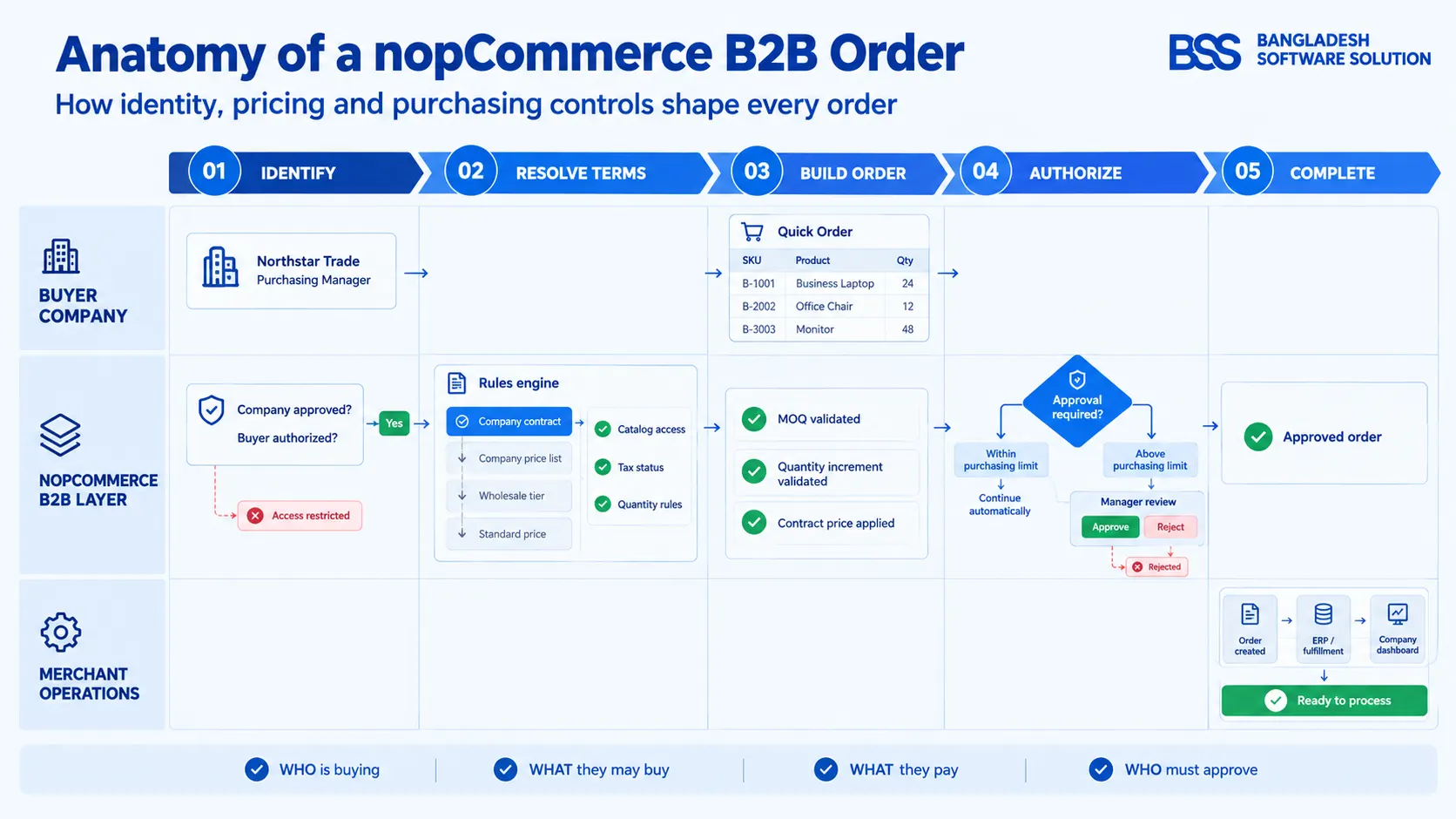
A B2B ecommerce platform is an online purchasing system designed for transactions between businesses. It does more than display products and accept card payments. It must recognize the buying company, determine what that company may see, apply the correct commercial agreement, and respect the way its employees are allowed to purchase.
The practical definition: a B2B store connects a company identity to catalog access, pricing, purchasing authority, tax treatment, and repeat-order workflows.
If those rules live only in spreadsheets, emails, and staff memory, the website is still acting as a retail storefront with wholesale customers attached—not as a complete B2B purchasing channel.
How B2B ecommerce differs from B2C
A B2C journey normally optimizes for one person making a relatively independent buying decision. A B2B journey often represents an organization, a negotiated relationship, and several people with different responsibilities. That changes the account model and the order flow.
| Area | Typical B2C store | B2B requirement |
|---|---|---|
| Identity | One customer account | Company account with one or more authorized buyers |
| Registration | Immediate or email-validated access | Business information, review, approval, and role assignment |
| Pricing | Public price and promotions | Wholesale tiers, company price lists, and negotiated contract prices |
| Catalog | Mostly the same assortment for everyone | Products, categories, or vendors restricted by buyer relationship |
| Ordering | Browse, add to cart, checkout | SKU-led bulk entry, quantity rules, approvals, and saved repeat orders |
| Tax | Consumer tax treatment | Verified exemptions and business-specific display or calculation rules |
If you are still deciding whether the platform is a good strategic fit, start with our separate evaluation of whether nopCommerce is right for B2B stores. The rest of this guide assumes you have chosen nopCommerce and now need an implementation plan.
What Does a nopCommerce B2B Store Need?
Start with the operating rules, not a plugin checklist. A merchant selling office supplies to many small companies may need role pricing and Quick Order. A manufacturer with negotiated agreements may also need company-specific catalogs, effective-dated contract prices, and purchasing approval thresholds.
Document those rules company by company. Ask who may register, who approves the account, how a price is selected when several rules match, who approves a large order, and what happens when a contract expires. These decisions become the acceptance criteria for configuration and testing.
Build the Native nopCommerce Foundation First
Do not replace useful platform features with duplicate custom logic. According to the official nopCommerce documentation, the platform already supports customer roles, administrator-approved registration, role-based tier prices, role-limited catalog items, cart quantity restrictions, reordering, and tax-exempt customers or roles. Configure these foundations before deciding what the extension layer must add.
Business registration and approval
Under Configuration → Settings → Customer settings, nopCommerce offers a registration method in which a customer must be approved by an administrator. It can also expose company and address fields on registration. This is useful when every new account should wait for review.
However, global account approval is not the same as a dedicated B2B application. If you need company status, distributor level, multiple contacts, commercial notes, or a separate business approval queue, model those requirements explicitly in the B2B layer.
Wholesale pricing with customer roles and tier prices
Customer roles provide a practical way to group buyers as Wholesale, Distributor, Trade Partner, or another commercial level. nopCommerce tier prices can then be defined by quantity and customer role on a product. That works well when many companies share the same price schedule.
Role pricing becomes insufficient when two companies in the same tier have different negotiated prices, when prices need agreement dates, or when a contract price must override a general wholesale list. Those are company-level pricing requirements, not simply more tiers.
Catalog visibility
nopCommerce can limit products and categories to selected customer roles when ACL rules are enabled. This supports broad catalogs such as Retail, Wholesale, and Distributor. It does not by itself describe a company-specific allow/deny policy across products, categories, and vendors. Use the simplest level that matches the contract.
Minimum quantities and quantity increments
At product level, nopCommerce supports minimum cart quantity, maximum cart quantity, and an Allowed quantities list. A merchant can therefore require a minimum case quantity or present valid multiples such as 6, 12, and 24. Test these rules with product attributes because the commercial unit and the inventory unit are not always the same.
Reordering and tax exemption
The native order setting Is re-order allowed lets a customer add items from a previous order back into the cart. Customer records and customer roles can also be marked tax exempt. These are valuable foundations, but merchants remain responsible for validating exemption evidence and applying the correct tax treatment for their jurisdiction.
Native re-order is not an order template
Re-order begins with a completed historical order. A reusable order template is a curated list that a buyer can maintain independently of order history, adjust, and use for recurring procurement. Treat them as different capabilities.
Add the Company-Level B2B Capabilities
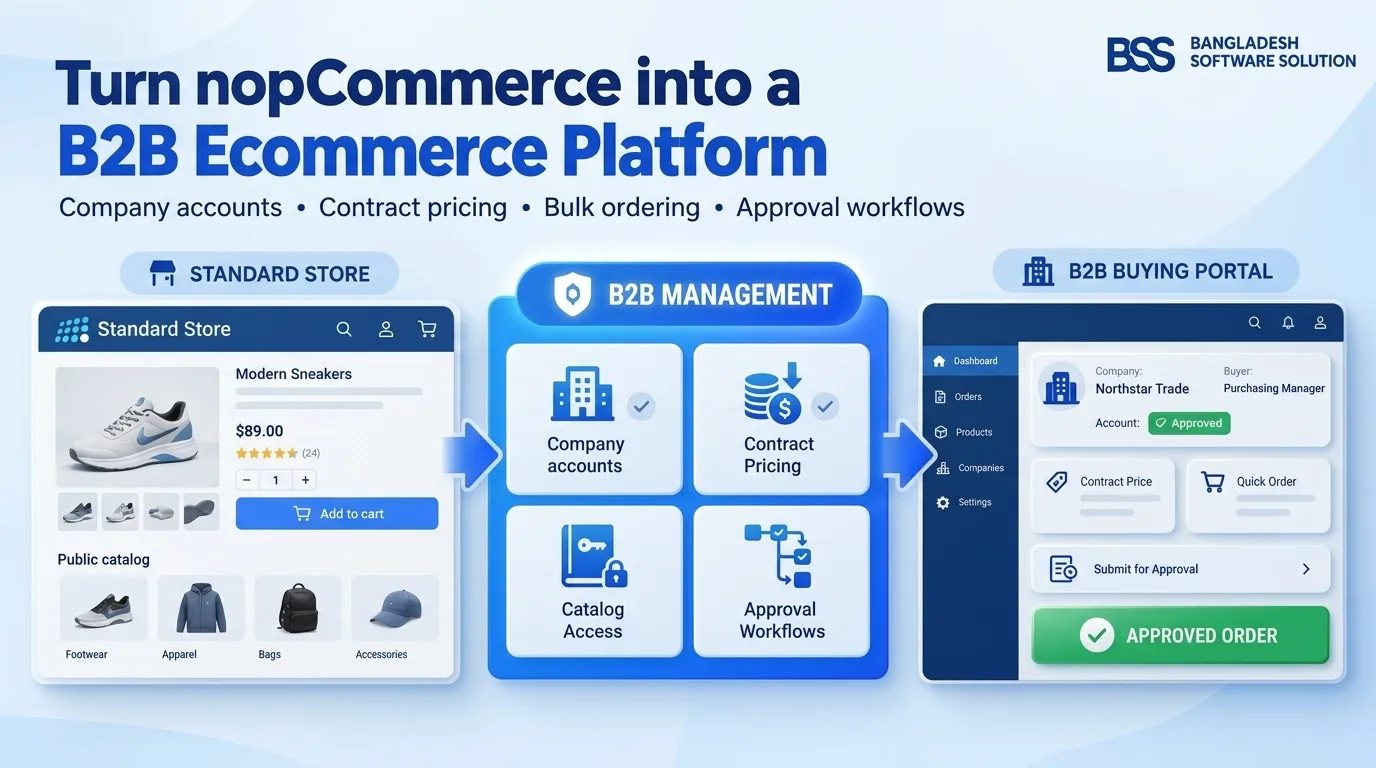
Once the native foundation is configured, the remaining gap becomes easy to describe: the store knows customers and roles, but it must also understand companies, contracts, purchasing authority, and repeat procurement. The following matrix separates the platform foundation from the B2B operating layer.
| Capability | Useful native foundation | When a B2B extension is needed |
|---|---|---|
| Company accounts | Customer company field and roles | Company profile, status, contacts, distributor tier, and centralized management |
| Registration | Administrator-approved customer registration | Dedicated B2B application and company approval lifecycle |
| Wholesale pricing | Role-based tier prices | Global price lists and company-specific rules |
| Contract pricing | Product price, discounts, and tiers | Negotiated product or variant prices with dates and override priority |
| Bulk ordering | Standard catalog and cart | Quick Order with search, variants, and rapid quantity entry |
| Order approval | Normal checkout and admin order management | Global or company purchase thresholds and approve/reject workflow |
| Catalog visibility | Role-limited products and categories | Company allow/deny rules across products, categories, and vendors |
| Repeat ordering | Re-order a previous order | Saved, editable order templates |
| Buyer workspace | Standard customer account and order history | Company dashboard for orders, approvals, details, and templates |
Managing companies instead of isolated customers
A company record should become the commercial parent for its buyers. It holds the relationship status, contact details, distributor level, internal notes, applicable pricing, approval threshold, and catalog policy. Individual customers then act within that context rather than carrying every rule independently.
Contract prices and price lists need a precedence rule
When several price sources may apply, write the priority before importing data. A common design is to evaluate an active company contract price first, then the company's assigned price list, then its distributor-level price, and finally the standard product price. Your actual hierarchy may differ; the critical point is that it must be deterministic and testable.
Quick Order should shorten procurement, not bypass validation
A useful Quick Order page lets buyers search products, choose attribute combinations, enter quantities, and add many lines efficiently. The resulting cart must still respect visibility, active pricing, inventory, minimum quantities, and approval rules. Speed is valuable only when the same commercial controls remain in force.
Order approvals belong before commitment
If a company requires approval above a purchase threshold, define who reviews the request, which total the threshold evaluates, and what happens after approval or rejection. The BSS B2B Management product describes global and company-specific thresholds with an administrative approve/reject queue. Confirm the exact workflow against your purchasing policy during acceptance testing.
The B2B dashboard should answer the next-task question
A buyer dashboard is useful when it surfaces the work a company actually returns to do: review orders, see approval status, update permitted company information, open a saved template, and start another purchase. Avoid filling it with retail account widgets that do not support procurement.
Add the B2B Operating Layer Without Building Every Workflow Separately
BSS B2B Management brings company profiles, B2B registration, price lists, contract pricing, Quick Order, threshold approvals, catalog controls, order templates, and a customer dashboard into one nopCommerce plugin.
Plugin or Custom Development?
The right question is not whether custom development is bad. It is whether your differentiating requirements are unique enough to justify owning a separate implementation.
A unified plugin can reduce the number of separate integrations you must coordinate, but it still requires due diligence. Confirm version compatibility, data ownership, extensibility, upgrade policy, and how its pricing precedence interacts with native discounts and tier prices. If your workflow is unusual, ask a nopCommerce development company to map the gap before writing code.
Avoid rebuilding standard B2B plumbing
Custom development creates the most value where the business rule is genuinely specific. Rebuilding company administration, approval queues, or Quick Order from zero adds maintenance responsibility without automatically creating a competitive advantage.
Step by Step: Turn a Standard nopCommerce Store into a B2B Store
Implement the conversion in dependencies-first order. Do not begin with dashboard styling or a bulk import of contract prices. First establish how a company is identified and which rules win; everything else depends on those decisions.
B2B implementation sequence
- 1Write the B2B operating rules. List company types, buyer roles, approval owners, price sources, catalog policies, tax evidence, ordering units, and repeat-order needs.
- 2Create native customer roles. Establish the broad groups used for access, shared wholesale tiers, tax display, free shipping, or other role-level behavior.
- 3Configure registration. Decide whether all registrations require approval or whether a dedicated B2B application should feed a separate company review process.
- 4Define the company model. Decide which data belongs to the company and which remains attached to an individual buyer.
- 5Set pricing precedence. Document how contract price, company price list, distributor tier, native tier price, discount, and standard price interact.
- 6Apply catalog visibility. Use native role restrictions for broad assortments and company-level allow/deny rules only where contracts require finer control.
- 7Configure quantity rules. Set minimum quantities and valid increments, then test them with attributes, Quick Order, cart updates, and reordering.
- 8Enable efficient ordering. Configure Quick Order for SKU-led entry and preserve standard checkout for buyers who still prefer browsing.
- 9Build the approval workflow. Define threshold scope, reviewer, notifications, approve/reject states, and what the buyer sees while waiting.
- 10Validate tax status. Collect appropriate evidence, approve exemptions deliberately, and test display and calculation with the configured tax provider.
- 11Configure templates and dashboard. Put repeat orders, approvals, company details, and relevant order history where buyers can act on them.
- 12Run company-based acceptance tests. Test at least one buyer from each commercial path and verify the visible catalog, final price, quantity validation, approval state, tax result, and reorder behavior.
Plan the rollout around real companies rather than abstract features. Pilot with a small set of buyers whose contracts represent different pricing and approval paths. Their results will expose precedence and data-quality problems before a full migration. Budgeting the implementation? Our guide to nopCommerce store cost explains why integration, data preparation, testing, and maintenance matter alongside the initial build.
Frequently Asked Questions
From Retail Checkout to a Company Buying System
The distributor from the opening scenario does not need a prettier cart. It needs the store to recognize the company, approve the buyer, reveal the contracted catalog, calculate the agreed price, accept a large order efficiently, route it for authorization, apply the correct tax status, and make the next order easier.
nopCommerce supplies several dependable pieces of that foundation. A B2B management layer connects them to the company-level workflows the platform does not provide as one native operating model. Begin with the rules, configure native features first, add the missing B2B capabilities, and test the entire path as each real company will experience it.