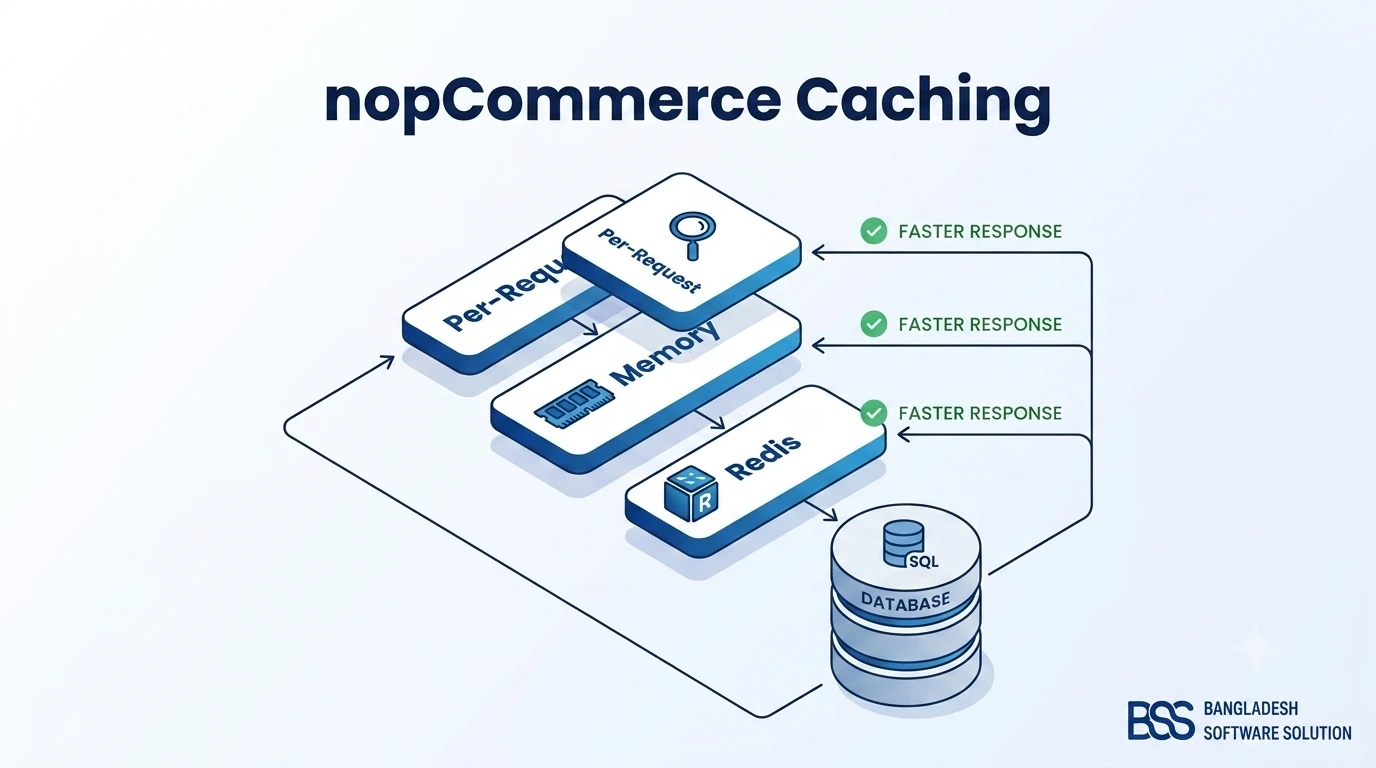
nopCommerce caching is the difference between a storefront that survives a flash sale and one that falls over under normal browsing load. Every page a shopper opens touches dozens of database reads — category trees, store-wide settings, ACL rules, localized strings, plugin configuration — and nopCommerce is deliberately designed to keep almost all of that out of the database after the first request. The mechanism that makes this possible is nopCommerce's caching layer, and understanding how it actually works is one of the highest-leverage things you can do for store performance.
This guide breaks down nopCommerce's three caching layers — the short-lived per-request cache, the default in-memory static cache, and the distributed Redis cache — and shows when each one matters. If your store is already showing symptoms of a caching problem, such as ballooning worker-process memory, pair this with our nopCommerce high memory usage fix guide — the two issues are closely related. If you're still getting oriented in the platform, our What Is nopCommerce? primer is a good starting point.
The Three Caching Layers in nopCommerce
Everything nopCommerce caches flows through one of three mechanisms. They differ in how long the data lives, whether it's shared across servers, and what kind of data belongs in each. Knowing which layer you're looking at is the first step to diagnosing a caching bug.
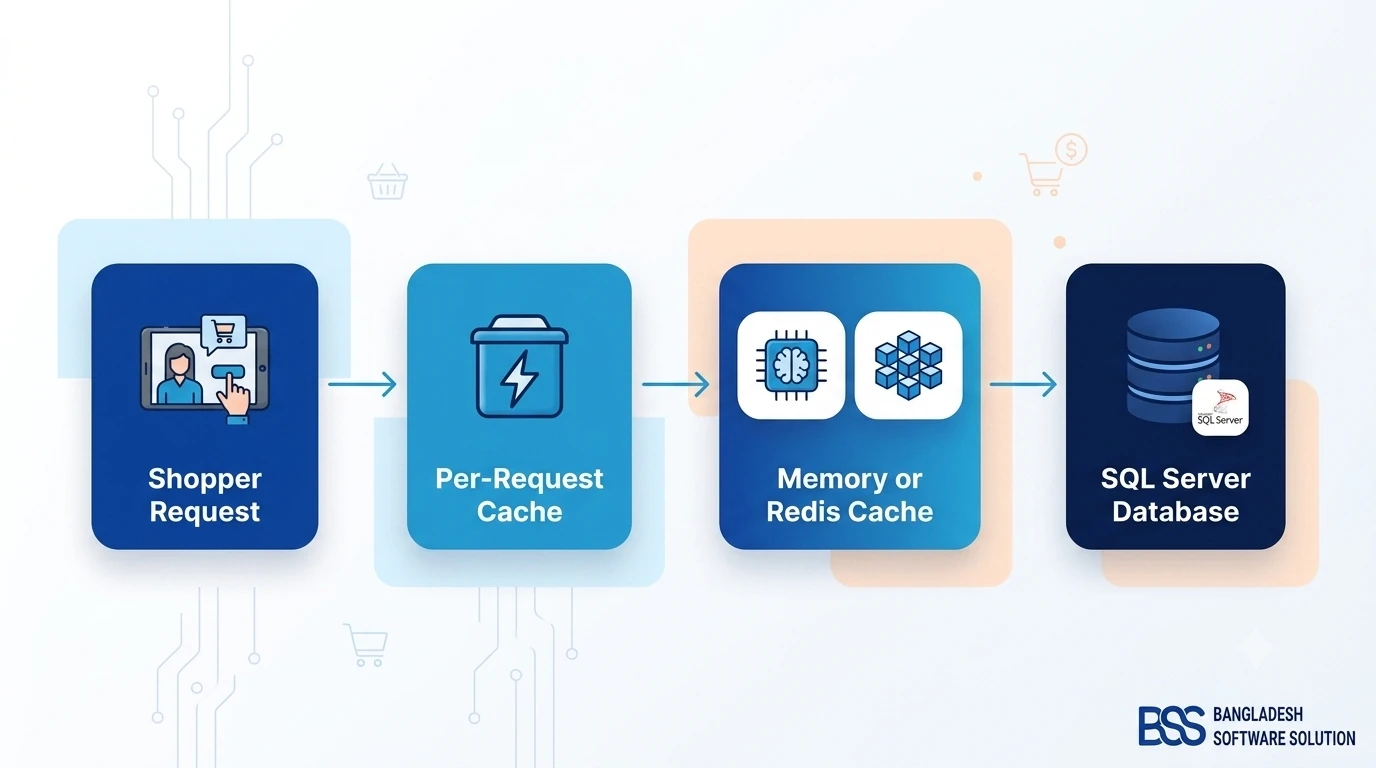
Internally, both the memory and Redis implementations satisfy the same IStaticCacheManager interface, so the application code that reads a category tree or a setting value never knows or cares which one is active. Switching between them is a configuration change, not a code change — which is exactly what makes Redis practical to adopt later, once a store outgrows a single server.
Memory Caching: The Default
Out of the box, nopCommerce uses MemoryCacheManager, an in-process implementation of IStaticCacheManager built on ASP.NET Core's memory cache. No configuration is required — it's what every fresh nopCommerce install runs on.
Key Fact: Memory cache lives inside the worker process. Restart the app, and the cache is empty again — the next request for each cached item pays the database cost once, then it's cached again.
Because it never leaves the process, memory cache is the fastest option available — there's no network round-trip to read a cached value.
What Actually Gets Cached
Settings, the category and manufacturer tree, ACL and store-mapping rules, active discounts, localized resource strings, and most plugin configuration values all go through the static cache. Product listings and search results generally don't — those are built from live database queries with their own indexing and query-level optimizations, which is a separate topic from caching.
Where Memory Cache Breaks Down
The limitation isn't speed — it's scope. Memory cache is private to one process. If you scale a nopCommerce store to two or more application instances behind a load balancer (a "web farm" in nopCommerce's own terminology), each instance keeps its own independent copy of the cache. An admin editing a category on instance A doesn't invalidate the stale copy sitting in instance B's memory, and a shopper routed to instance B keeps seeing the old category name until that instance's cache happens to expire or restart.
The Web Farm Trap
If your store runs on more than one server or worker process — including most containerized deployments with more than one replica — memory cache alone will produce inconsistent results between instances. This is one of the most common causes of "I changed a setting and it didn't take effect" tickets on multi-instance stores, and it's exactly what Redis distributed cache is built to fix.
Setting Up Redis Distributed Cache
Redis solves the web-farm problem by moving the static cache out of each process's private memory and into a shared store every instance can read and write. When one instance invalidates a cached item, every other instance sees that change on its next read — there's exactly one copy of the data, not one per server.
Configuring Redis in appsettings.json
Redis support is built into nopCommerce core — no plugin is required. It's configured through the DistributedCacheConfig section of appsettings.json:
"DistributedCacheConfig": {
  "Enabled": true,
  "DistributedCacheType": "Redis",
  "ConnectionString": "your-redis-host:6379,password=your-password",
  "SchemaName": "dbo",
  "TableName": "DistributedCache"
}
Set DistributedCacheType to Redis, point ConnectionString at your Redis instance — a managed Redis service or a self-hosted server both work the same way — and restart the application. From that point on, every IStaticCacheManager call is served from Redis instead of process memory, across every instance pointed at the same connection string.
What Redis Costs You
Redis is a network hop. A memory-cache read never leaves the process; a Redis read is a round-trip over TCP to another host. In practice that's usually sub-millisecond on a well-placed Redis instance — same region, ideally the same availability zone — but it's a new piece of infrastructure to keep available. If Redis becomes unreachable, cache operations will start failing, so treat it with the same monitoring and backup discipline you give the database itself.
Static Cache vs. Page and Asset Caching
"Static cache" is a name that trips people up, because it sounds like it should mean caching whole rendered HTML pages the way a CDN does. In nopCommerce it means something narrower: IStaticCacheManager caches application data — the objects your code works with — not rendered HTML output.
Key Fact: nopCommerce does not ship a built-in full-page HTML output cache. What it caches is the data those pages are built from, so the page is still assembled on every request — just from mostly-cached data instead of a stream of fresh database queries.
Where Full-Page and Asset Caching Actually Happens
For the layer above data caching — caching the finished HTML, images, CSS, and JavaScript — nopCommerce leans on standard ASP.NET Core and infrastructure tooling rather than a proprietary system:
- Static assets — theme CSS/JS and product images — are served with long-lived cache headers by ASP.NET Core's static file middleware, so browsers and CDNs cache them without re-requesting on every page view.
- Bundling and minification combine and version CSS/JS files so browser caches invalidate correctly when a theme changes, instead of serving stale assets after a deploy.
- A CDN or reverse proxy in front of the store is the standard way to cache whole rendered pages for anonymous, non-personalized traffic — nopCommerce itself doesn't need to know this layer exists.
If someone tells you to "turn on static caching" expecting full pages to be cached, point them at this distinction — it saves a lot of confused troubleshooting.
How Cache Invalidation Works — and Where It Breaks
Caching is easy; invalidating a cache correctly is where most of the real engineering effort goes. nopCommerce ties cache invalidation to its entity event system: whenever an entity is inserted, updated, or deleted through the data layer, nopCommerce publishes an event, and cache-invalidation consumers listen for exactly the events that affect their cached data.
Cache keys follow a predictable, prefixed naming convention — a store's category tree and an individual category's ACL rules, for example, share a common prefix — so a single change can clear every related cache entry in one call instead of tracking down every individual key.
Common Places It Breaks
Cache Troubleshooting Checklist
-
✓Bulk imports via SQL scripts or direct database edits bypass nopCommerce's event system entirely, so nothing tells the cache to invalidate. Change data through the admin UI or the application's services when you can, or clear the cache manually afterward.
-
✓Custom plugins that read their own settings should cache them behind the standard
IStaticCacheManagerand clear that cache in their own update handlers. A plugin that caches settings in a private static field instead will go stale and won't respond to the admin's cache-clear tools. Our guide to creating a nopCommerce plugin covers wiring this up correctly. -
✓Multi-instance deployments still running on memory cache will show a change on one server and not another — see the web farm note above. This is a configuration gap, not something to work around in code.
-
✓Manual database edits during migrations — after any direct database change, clear the cache from the admin's cache management page rather than assuming the next request will sort it out.
Choosing a Cache Backend: Quick Reference
There's no universally "better" backend — the right choice depends almost entirely on how many instances your store runs on.
| Factor | Memory (Default) | Redis (Distributed) |
|---|---|---|
| Setup complexity | None — works out of the box | Requires provisioning Redis and a connection string |
| Multi-instance / web farm safe | No — each instance caches independently | Yes — one shared cache |
| Read speed | Fastest — in-process, no network hop | Slightly slower — a network round trip, still sub-ms locally |
| Survives an app restart | No — cache is rebuilt from scratch | Yes — Redis keeps running independently |
| Best for | Single-server stores, dev/staging environments | Load-balanced production stores, any deployment with 2+ instances |
A useful rule of thumb: if you can't answer "exactly one" to the question "how many application instances serve this store right now," you should be running Redis.
Need a nopCommerce Developer? Hire the BSS Team
From custom plugins and theme work to full-store builds and performance tuning, our dedicated nopCommerce engineers ship production-grade code. Tell us what you need and we'll match you with the right developer.
Frequently Asked Questions
Final Thoughts
nopCommerce's caching system is genuinely well designed — three layers, each solving a distinct problem, all hidden behind one interface so switching backends is a config change rather than a rewrite. The mistakes that hurt stores in practice are almost always about mismatched expectations: running memory cache on a web farm, expecting "static cache" to mean full-page HTML caching, or invalidating data outside the paths nopCommerce actually watches.
If your store's caching setup needs a second pair of eyes — whether that's configuring Redis for a new web farm, chasing down a stale-cache bug, or a broader performance pass — the BSS engineering team handles exactly this kind of nopCommerce tuning work; see our nopCommerce services for details.