If you've been comparing ecommerce platforms and keep running into the name "nopCommerce," you're not alone. It's one of the most established open-source shopping cart platforms built on Microsoft's .NET stack, yet it gets far less mainstream attention than Shopify or WooCommerce — mostly because it isn't sold with a marketing budget behind it. It's free software that store owners, agencies, and enterprise IT teams choose deliberately, once they understand what it actually offers.
This guide answers the basic question — what is nopCommerce? — in plain language: what it is, how it's built, what it really costs to run, and how to tell whether it's a sensible fit for your next store.
What Is nopCommerce, Exactly?
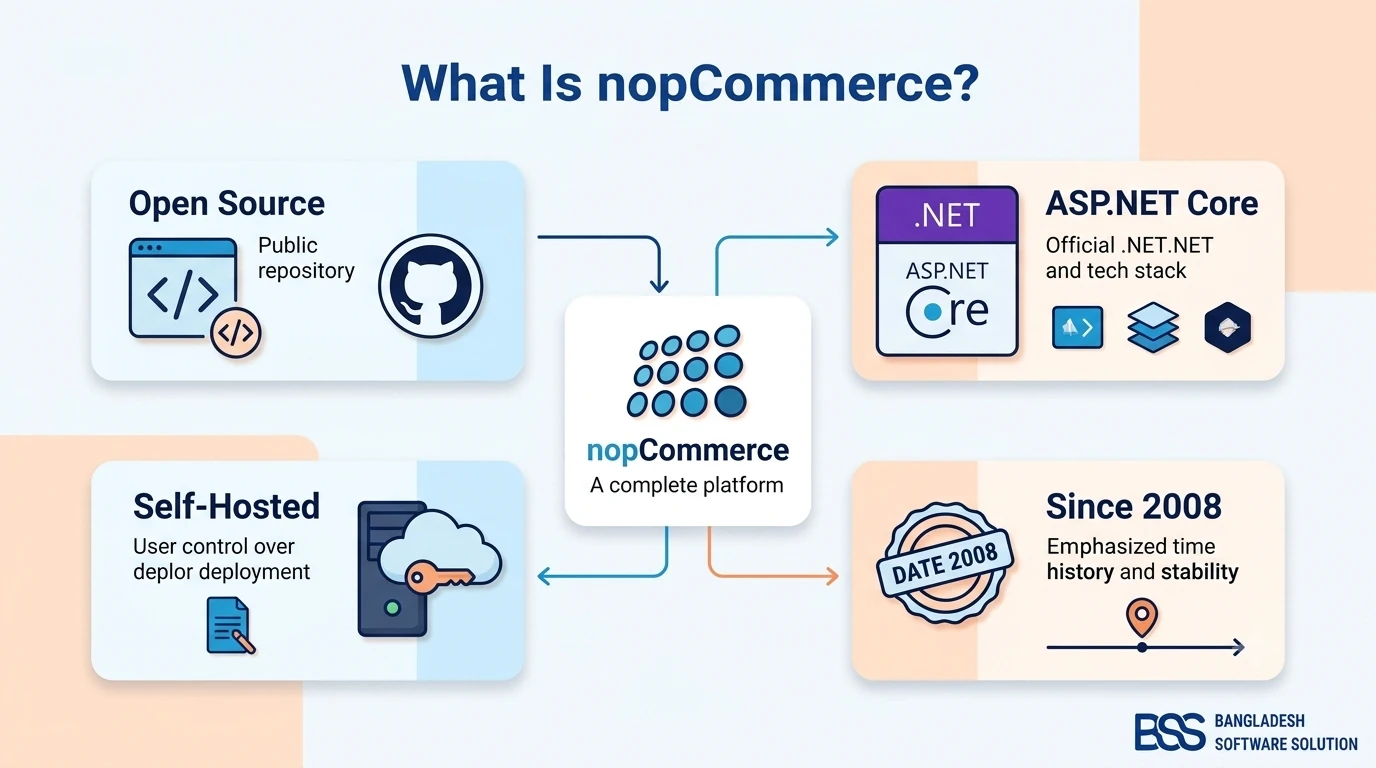
nopCommerce is a free, open-source ecommerce platform built on ASP.NET Core. Development began in 2008, when developer Andrei Mazulnitsyn started the project in Yaroslavl, Russia; the team behind it later relocated to Yerevan, Armenia, and has maintained the platform continuously since. Today it's one of the most established platforms in the .NET ecosystem, with an installation package downloaded more than three million times and an active developer community of over 250,000 members.
Key Fact: nopCommerce is self-hosted and source-available — you (or your hosting provider or development partner) run it on your own server, and you get the full application source code to inspect, modify, and extend.
That's the core distinction from a SaaS platform like Shopify: instead of renting a store on someone else's infrastructure, you own the codebase outright.
Who Actually Uses It?
nopCommerce spans the full range of store sizes, from single-owner shops to large multi-brand retailers. It has been publicly cited as running stores for recognizable brands including Volvo, Puma, Reebok, and Speedo, alongside tens of thousands of smaller independent merchants — a sign that the platform scales from a first store to an enterprise catalog without forcing a rebuild.
The Architecture: How nopCommerce Works
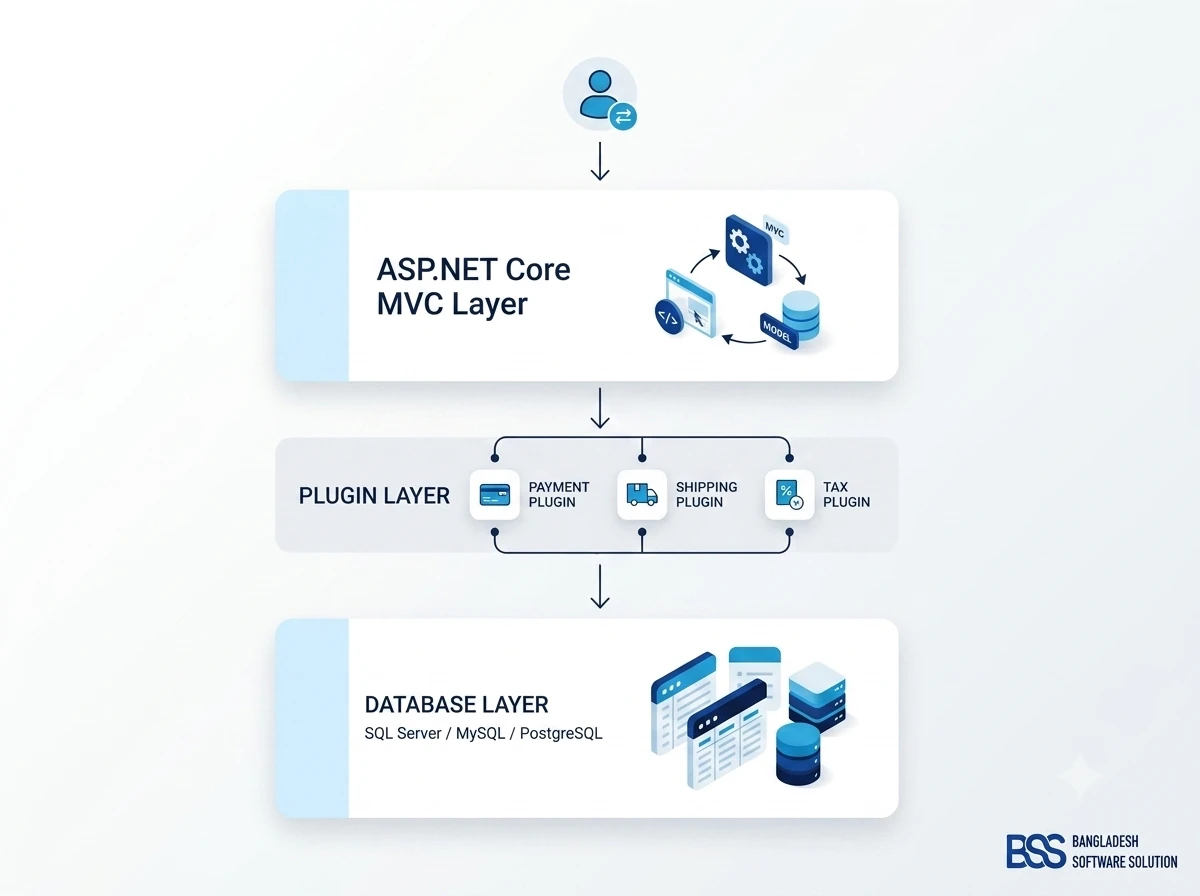
Understanding nopCommerce's architecture explains most of what makes it different from other platforms. It isn't a page builder or a hosted dashboard — it's a full ASP.NET Core MVC application, and everything about how it's structured is designed to be extended, not just configured.
Storefront and Admin Are Separate Layers
On top of that MVC and plugin foundation sits a Razor-based theming engine for the public storefront, and a distinct admin area with its own controllers and views at a separate route. In practice this means a theme redesign shouldn't touch business logic, and a plugin shouldn't touch the theme — the separation is what makes it realistic for one developer to reskin a store while another builds a custom shipping integration, without either stepping on the other's work.
Key Features and Capabilities
Because nopCommerce is a complete application rather than a bare framework, most of what a store needs ships in the box, and the rest is built to be added on top.
The same completeness extends to marketing and discoverability: search-engine-friendly URLs, canonical tags, and an auto-generated sitemap are built in, along with product reviews and ratings, a newsletter subscription module, and a blog and forum you can use for exactly the kind of content marketing this article is an example of.
Free Software Isn't a Free Store
Downloading nopCommerce doesn't cost anything, but running a real store does. You'll still need hosting, an SSL certificate, and either in-house .NET expertise or a development partner — like BSS Engineering — to configure, secure, and maintain the installation. Budget for that work up front rather than treating "free" as "zero cost."
nopCommerce vs. Shopify and WooCommerce
The honest answer to "should I use nopCommerce" depends on what you're optimizing for. Here's how it stacks up against the two platforms beginners compare it to most:
| Platform | Hosting Model | Where It Wins |
|---|---|---|
| nopCommerce | Self-hosted, source-available (ASP.NET Core / .NET) | Full code ownership, deep customization, no per-transaction platform fees |
| Shopify | Fully hosted SaaS | Fastest to launch, no server management, large app marketplace |
| WooCommerce | Self-hosted WordPress plugin (PHP / MySQL) | Familiar territory if you already run WordPress for content |
For a deeper side-by-side on pricing, performance, and extensibility, see our full comparisons of nopCommerce vs. Shopify and nopCommerce vs. WooCommerce.
Is nopCommerce Right for You?
-
✓You want to own your source code and data outright, not rent space on someone else's platform.
-
✓Your team knows — or is willing to hire for — a .NET/C# and SQL Server stack, or you're working with a nopCommerce partner.
-
✓You need customization a template-driven SaaS platform can't offer: unique checkout logic, B2B pricing tiers, or multiple storefronts from one install.
-
✓You'd rather budget for hosting and development than pay an increasing share of revenue in platform and transaction fees.
-
✓You're planning for the long term — nopCommerce has been actively maintained since 2008, so you're not betting on an unproven project.
Getting Started with nopCommerce
If nopCommerce sounds like the right fit, the practical path from zero to a running store looks like this. None of it happens in an afternoon — even a fairly standard store typically takes a developer several weeks to configure, theme, and test properly, and longer once custom features enter the picture — so plan the timeline accordingly.
- Check your hosting. You'll need a Windows or Linux server (or a Docker host) capable of running .NET 9, plus SQL Server 2012 or later, MySQL, or PostgreSQL for the database.
- Get the source. Download the free installation package or clone the source code from the official nopCommerce GitHub repository.
- Run the install wizard. Point it at your database, and it creates the schema and your admin account — no manual SQL scripting required.
- Configure the basics. Set up your catalog structure, payment and shipping providers, tax rules, and pick or customize a theme.
- Test before you launch. Run through checkout with every payment method and shipping rule you've configured, on both desktop and mobile, before pointing a domain at the store.
- Extend where you need to. Install existing plugins for common integrations, or bring in a partner like BSS Engineering's nopCommerce development services for custom plugin work, performance tuning, or a full store build.
Need a nopCommerce Developer? Hire the BSS Team
From custom plugins and theme work to full-store builds and performance tuning, our dedicated nopCommerce engineers ship production-grade code. Tell us what you need and we'll match you with the right developer.
Frequently Asked Questions
Final Thoughts
nopCommerce isn't the flashiest name in ecommerce, but it's one of the most durable: free, open-source, built on a mainstream .NET stack, and actively maintained since 2008. If you value owning your code, need customization a SaaS platform won't allow, and have — or can access — .NET development skills, it's worth serious consideration, not just as a cheaper alternative, but as a platform you can genuinely grow into.
Weighing nopCommerce against a specific alternative, or want a second opinion on whether it fits your project? Talk to BSS Engineering — we build, migrate, and support nopCommerce stores every day.