Your marketplace's first full month is in. Three vendors, a 10% commission, and a sales report that says you earned $2,000 in commission. Then you open the Stripe balance and the number is noticeably smaller, and nobody can quite explain where the difference went.
It went to the Stripe fee, and on most marketplaces the platform pays it. Card processing, a fee per payout, a fee per active vendor, and a refund that returned your commission but not Stripe's cut. None of it shows up on the commission line, which is why owners set a rate that looks generous and run a marketplace that barely breaks even.
This guide follows one 3-vendor order from checkout to payout and through a refund, with every dollar accounted for. When we set up split payments for nopCommerce marketplaces at BSS, this is the arithmetic we walk owners through before they publish a commission rate, because changing a rate after vendors have signed up is far harder than getting it right first.
Who Actually Pays the Stripe Fee
The short answer depends on one technical choice most owners never see: which account the charge is created on. Stripe Connect has three ways to take a marketplace payment, and the fee follows the charge.
| Charge type | Whose account takes the payment | Who pays the Stripe fee |
|---|---|---|
| Separate charges and transfers | The platform, which then transfers each vendor's share | The platform |
| Destination charges | The platform, on behalf of one connected account | The platform |
| Direct charges | The vendor's own connected account | The vendor |
Direct charges put the fee on the vendor, but each charge belongs to one seller, so a cart with products from three vendors would need three separate payments. That is a poor fit for a nopCommerce multi-vendor store, where the shopper expects one checkout.
A multi-vendor cart is exactly what separate charges and transfers exists for. Stripe's Connect documentation states that with this charge type the platform's balance is debited for Stripe fees, refunds and chargebacks. The customer pays once, the full amount lands in your balance, and you transfer each vendor their share.
Key fact: on a marketplace that takes one payment for a multi-vendor cart, the platform pays the Stripe fee. Your commission is the only place that fee can come out of, unless you deliberately move it elsewhere.
That is the model our BSS Stripe Connect Split Payment plugin uses: a single Stripe Checkout charge per order, split per vendor into gross, commission and net, with each vendor's net transferred from your platform balance. How that split is set up, onboarding and payout modes included, is covered in our walkthrough of how split payments work in nopCommerce. This post is about the money.
One Order, Three Vendors: Following Every Dollar
With the fee on your side of the ledger, the useful question is how big it is next to your commission. Here is one order, priced at Stripe's published US rate for domestic cards, 2.9% + 30¢ per successful charge.
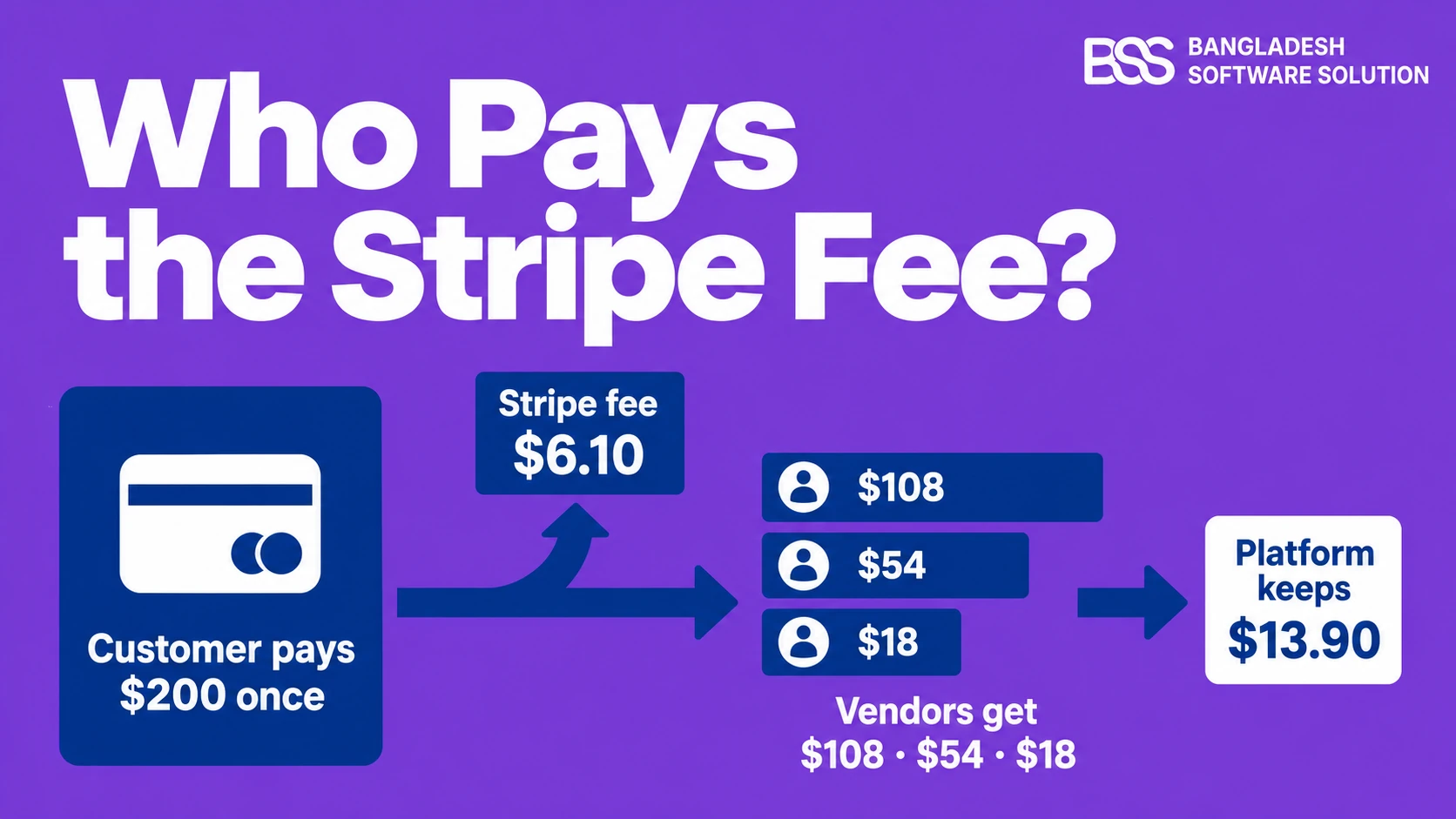
A shopper buys from three vendors in one checkout: a $120 item from Vendor A, a $60 item from Vendor B and a $20 item from Vendor C. The order total is $200, charged once. Your commission is 10% of each vendor's sales.
| Line | Vendor A | Vendor B | Vendor C | Order |
|---|---|---|---|---|
| Gross sale | $120.00 | $60.00 | $20.00 | $200.00 |
| Commission (10%) | $12.00 | $6.00 | $2.00 | $20.00 |
| Net transferred to vendor | $108.00 | $54.00 | $18.00 | $180.00 |
| Stripe fee (2.9% + 30¢ on $200) | - | - | - | $6.10 |
| Platform keeps | - | - | - | $13.90 |
The Stripe fee takes 30.5% of your commission on this order. The vendors receive exactly what the commission rule promised them. Every cent of the processing cost sits on your line.
A 10% commission is not a 10% margin. On this cart it is 6.95%, before refunds, payouts or a single support ticket.
BSS Engineering
There is one quiet advantage in this model. The 30¢ fixed part of the fee is charged once per order, not once per vendor, so a cart that spans three sellers costs you less to process than three single-vendor orders adding up to the same $200. Multi-vendor carts are cheaper per dollar than they look.
Percentage or Fixed Commission: The Same Cart, Two Answers
The 30¢ that helps a big cart hurts a small one, and that is where the commission model starts to matter. A percentage scales with the order; the Stripe fee has a fixed part that does not.
The BSS plugin offers both models: Percentage, a share of each vendor's sales, and Fixed, a set amount per vendor per order. Here is how each one performs on three different orders, using 10% against a fixed $3 per vendor.
| Order | Stripe fee | 10% commission: you keep | $3 per vendor: you keep |
|---|---|---|---|
| The 3-vendor $200 cart | $6.10 | $20.00 - $6.10 = $13.90 | $9.00 - $6.10 = $2.90 |
| One $20 item, one vendor | $0.88 | $2.00 - $0.88 = $1.12 | $3.00 - $0.88 = $2.12 |
| One $120 item, one vendor | $3.78 | $12.00 - $3.78 = $8.22 | $3.00 - $3.78 = -$0.78 |
A fixed commission loses money on the $120 order, because the percentage part of the Stripe fee keeps growing while your $3 does not. A percentage commission earns the least on the $20 order, where the 30¢ is a large slice of a small sale.
The useful habit is to run your own price list through both columns. Take your cheapest, typical and most expensive items, and the most common cart shape, and work out what you keep on each before you choose.
Refunds: Where Commission Margin Disappears
Everything so far assumes the order sticks. Refunds are where a marketplace's margin most often disappears, because two things happen at once: you hand back your commission, and Stripe keeps its fee. Stripe's own support documentation states that the processing fee on the original payment is not returned when you refund it.
Go back to the $200 cart. A week later the shopper returns Vendor C's $20 item, after every vendor has already been paid.
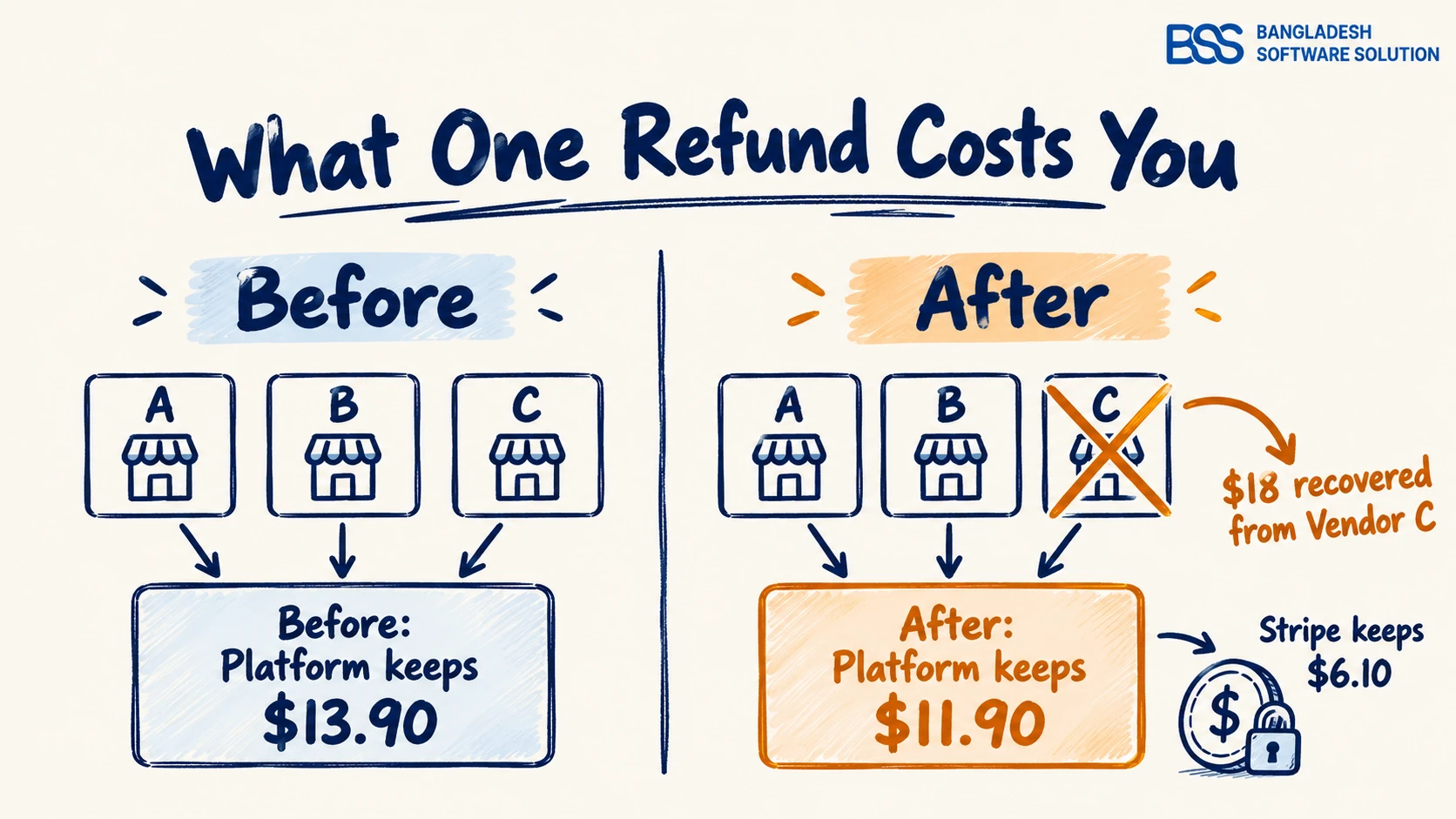
With the BSS plugin, a refund from Sales > Orders pays the customer back from your platform balance first, then recovers the vendor's share. Its Vendor Refunds screen lets you refund only Vendor C's product, so Vendors A and B are never touched. The arithmetic for that one item:
- Customer refunded: $20.00, from your platform balance.
- Recovered from Vendor C: $18.00, their net share, reversed through Stripe.
- Absorbed by the platform: $2.00, the commission on that item.
- Stripe fee: the full $6.10 stays paid; none of it comes back.
The platform now keeps $11.90 on an order worth $180. Refund the whole $200 cart instead and the result is worse: the customer gets $200, $180 is recovered from the three vendors, $20 of commission goes back with it, and the platform is $6.10 down on an order that no longer exists.
When we test payment plugins at BSS, refund paths get more test cases than checkout, and this is why. A refund rate that looks harmless on a dashboard is a direct deduction from the commission you thought you had.
Disputes cost more than refunds
A card dispute adds a separate fee, $15 per dispute on Stripe's US pricing, and with separate charges and transfers it is debited from the platform's balance. Your vendor terms should say plainly whether a vendor's share is recovered when a dispute is lost, because the payment system will not decide that for you.
If you need refunds to work differently, for example keeping a restocking fee or charging the vendor for a faulty-item return, that is a rule change in the plugin rather than a setting. This is the kind of nopCommerce customization BSS does for marketplace owners whose vendor terms do not match the default.
The Fees That Arrive Monthly, Not Per Order
Card fees and refunds are visible order by order. The next layer only shows up on your monthly Stripe invoice, which is why it surprised the owner in our opening scenario.
When the platform controls pricing for its vendors, Stripe's published Connect pricing adds $2 per monthly active account and 0.25% + 25¢ per payout sent. An account counts as active in a month when a payout is sent to its bank account or debit card. Those fees are billed to the platform, not the vendor.
The small-vendor case is the one to design around. Long-tail sellers are a large part of what makes a marketplace feel full, and on a flat monthly fee they are also the ones you subsidise.
The plugin's minimum payout amount is the lever here. A vendor whose pending balance is below it is held over to the next payout run, so a $40-a-month seller is paid every few months instead of every month, and only counts as active in the months a payout goes out. State the threshold in your vendor terms, so a held payout reads as policy, not a missing payment.
Picking a Commission Rate That Stays Profitable
Put the pieces together and a commission rate stops being a guess. You need four numbers from your own store: average order value, refund rate, your card mix (domestic or international) and your vendor size spread.
Start with the floor, the rate at which card fees and refunds alone eat the whole commission. For a store with a $60 average order, domestic cards and 5% of orders fully refunded, the payment cost is 2.9% of $60 plus 30¢, or $2.04 on every order, refunded or not. Commission is only kept on the 95% of orders that stick.
| Commission rate | Commission kept per average order | Stripe card fee | Net per order | Net as % of sales |
|---|---|---|---|---|
| 5% | $2.85 | $2.04 | $0.81 | 1.35% |
| 8% | $4.56 | $2.04 | $2.52 | 4.2% |
| 10% | $5.70 | $2.04 | $3.66 | 6.1% |
| 15% | $8.55 | $2.04 | $6.51 | 10.85% |
The break-even rate for this store is about 3.58%: $2.04 divided by the $57 of commissionable sales left after refunds. Below it, every order costs you money. Above it, what is left still has to cover Connect payout fees, disputes, hosting, support and the marketing that brings shoppers in. That is why the useful comparison is the last column, not the first.
Before you publish a commission rate
-
Pull your average order value and refund rate from nopCommerce's order reports, or estimate them from your category if you have not launched yet.
-
Check Stripe's pricing page for your own country. The US rates above are the example; the method is the same everywhere.
-
Run your cheapest, typical and most expensive item through both percentage and fixed commission. Reject any model that goes negative on a real product.
-
Re-run the numbers with your expected share of international cards added at the higher rate.
-
Set a minimum payout amount that keeps your smallest vendors from costing more in monthly Connect fees than they earn you.
-
Write the refund, dispute and payout-threshold rules into your vendor terms before the first vendor signs up.
There are two ways to move part of the cost off your line. You can fold it into the rate and tell vendors the commission includes payment processing, which keeps one number on every payout row. Or you can use the plugin's additional fee, a flat or percentage checkout surcharge that its documentation says is not returned to the customer on a refund. Card surcharges are restricted in some places, including a ban on most consumer cards in the EU under the second Payment Services Directive, so check your own rules first.
If your terms call for something the default split does not do, such as a processing fee shown as its own line on each vendor's payout, that is a build rather than a setting. Many owners at this point hire a .NET developer from BSS to extend the plugin, and keep their own team on vendor recruitment. If you are still choosing a gateway for your region, our comparison of nopCommerce payment plugins is the place to start before any of this arithmetic.
Building a Multi-Vendor Marketplace? Bring in the BSS Team
From Stripe Connect split payments and vendor payout rules to custom refund logic and full marketplace builds, our nopCommerce engineers do the payment work that has to be right the first time. Tell us how your marketplace earns, and we will match you with the right developer.
Frequently Asked Questions
Final Thoughts
Back to that first month. The commission report said $2,000 and the Stripe balance said less, and now every part of the gap has a name: 2.9% + 30¢ on every order, the fee Stripe keeps on every refund, the commission handed back with it, and the monthly Connect fees for every vendor you paid.
None of that means 10% was the wrong rate. It means the rate has to be tested against your real average order, refund rate, card mix and vendor spread, and the refund and payout rules have to be written down before vendors arrive. Do that once, and the commission line and the Stripe balance tell the same story.
If you want the split itself handled, the BSS Stripe Connect Split Payment plugin does the per-vendor commission, payouts and refund recovery inside nopCommerce, and its documentation walks through every setting used in this post.
If you would rather talk through your own numbers before you set a rate, our team is happy to work through them with you.