Your new nopCommerce store is almost ready. The default storefront works, a free theme could launch this week, and a polished premium theme promises stronger merchandising without months of design work. The difficult question is not which screenshot looks better—it is which option leaves you with the right cost, flexibility, and risk six months after launch.
This free vs premium nopCommerce themes guide follows that decision from launch pressure through long-term ownership. By the end, you will know when free is the disciplined choice, when premium earns its price, and when neither option is enough.
Begin with your store requirements, not a theme demo. The best choice is the smallest maintainable solution that delivers the customer experience your business actually needs.
What “Free” and “Premium” Really Mean
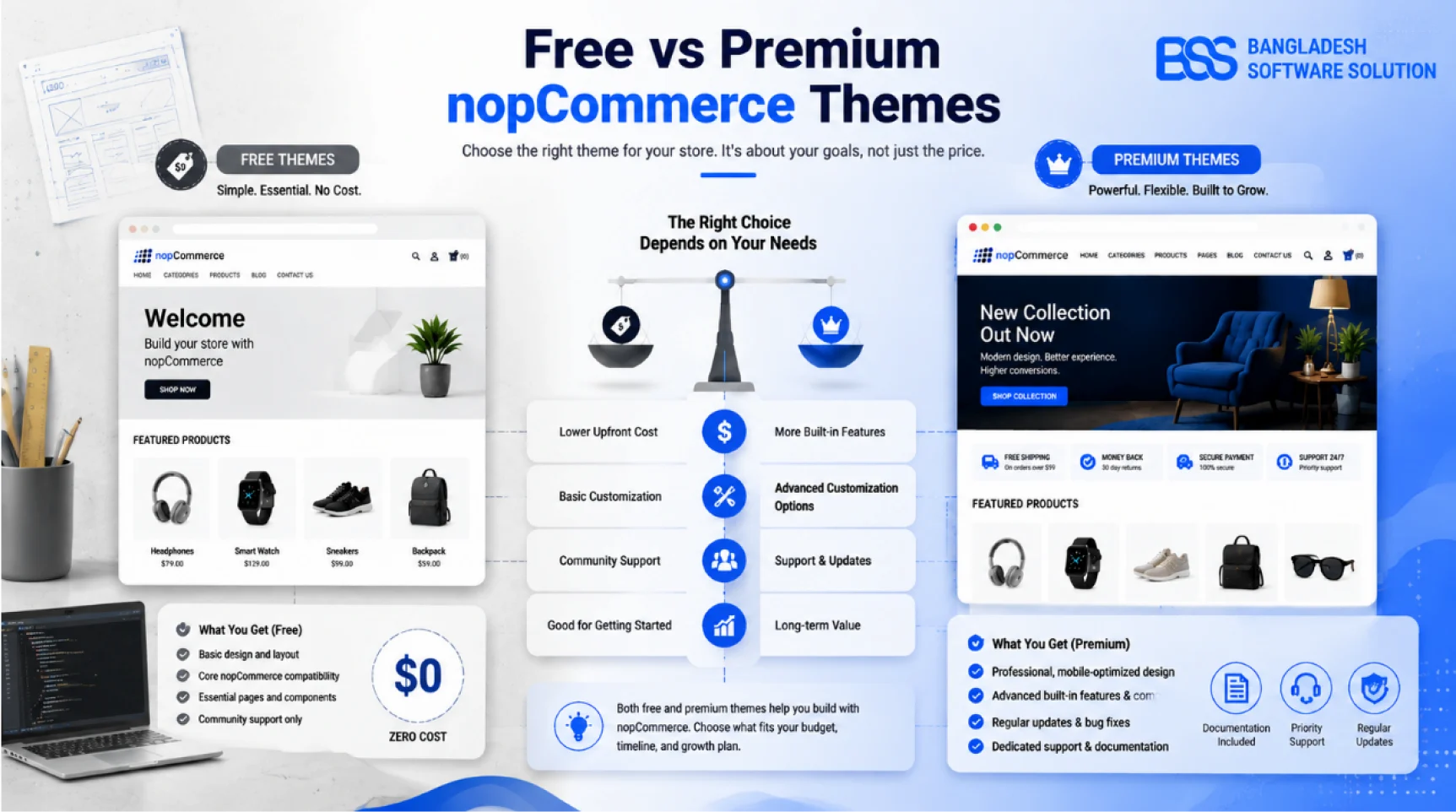
A free theme has no licence purchase price, but it still needs installation, configuration, content preparation, testing, and possibly custom styling. A premium theme charges for a packaged design system and usually adds storefront components, documentation, updates, and a defined support channel.
Price alone therefore gives an incomplete comparison. The useful question is: how much of your required storefront is already solved, how reliably is it maintained, and what will your team have to build or repair?
Write the requirement list first
Define page types, navigation, search, product presentation, mobile behavior, accessibility, localization, integrations, brand controls, and upgrade expectations. Then score themes against evidence.
Free vs Premium nopCommerce Themes at a Glance
| Decision factor | Free theme | Premium theme |
|---|---|---|
| Upfront cost | Low or zero licence cost | Paid licence, sometimes per store or domain |
| Launch speed | Fast for a simple store with modest design needs | Often faster when required sections and widgets are included |
| Design depth | Usually a clean baseline with fewer layouts | More page patterns, merchandising blocks, and visual controls |
| Support | Community help or limited maintainer assistance | Typically a documented vendor-support channel |
| Updates | Cadence and version coverage may be uncertain | Usually clearer, but still dependent on the vendor |
| Customization | Simple base can be understandable; missing features require work | More controls, though large bundled systems can be harder to override |
| Performance | Can be lean when scope is small | Can be efficient or heavy; audit actual assets and widgets |
| Best fit | MVPs, internal catalogs, proof-of-concept stores, capable technical teams | Brand-led launches, richer catalogs, teams buying speed and support |
When a Free nopCommerce Theme Is the Better Choice
Free is sensible when the store is validating demand, the catalog and customer journey are straightforward, and the team can work comfortably with nopCommerce views, CSS, widgets, and testing. In that situation, buying a large feature bundle before you know which features matter can increase—not reduce—complexity.
A free theme also makes sense as a clean foundation for a deliberate custom build. Compare the effort with our guide to creating a custom nopCommerce theme from scratch before assuming “free” means “finished.”
Compare Total Cost of Ownership, Not the Price Tag
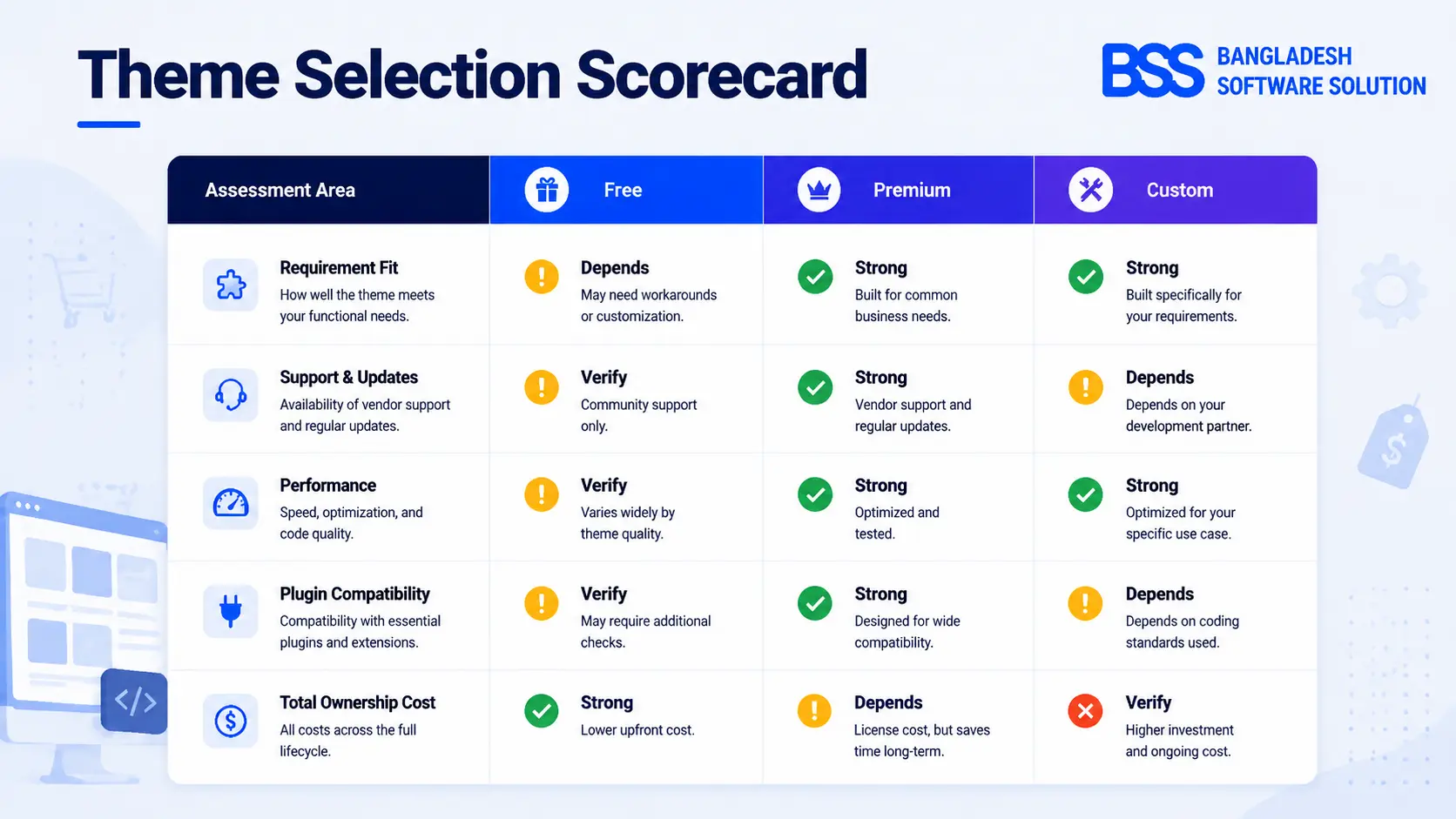
Return to the launch scenario. The free option saves the licence fee, but perhaps needs layout work, extra testing, and ongoing developer availability. The premium option costs more on day one, but may eliminate much of that work—or introduce a dense framework your team struggles to maintain.
- Acquisition: licence, renewals, store or domain limits, bundled assets, and required extensions.
- Implementation: installation, configuration, content migration, brand styling, integrations, and QA.
- Operations: support time, bug fixes, performance work, accessibility improvements, and staff training.
- Change: nopCommerce upgrades, plugin compatibility, redesigns, additional stores, and replacement.
For the wider budget, continue with how much a nopCommerce store costs to build; theme price is only one line in that model.
How to Evaluate Theme Quality Before You Commit
A polished demo can hide weak engineering. Test expensive-to-discover states: long product names, empty results, validation errors, logged-in account pages, checkout steps, mobile menus, keyboard navigation, multiple currencies, localization, RTL if relevant, and third-party plugin widgets.
Pre-purchase theme audit
- 1Confirm compatibility with your exact nopCommerce version and upgrade plan.
- 2Review release history, documentation, support terms, renewal rules, and licence scope.
- 3Test responsive behavior at intermediate widths—not only desktop and one phone preset.
- 4Measure page weight, requests, layout stability, and interactions with realistic content.
- 5Check required plugins, widgets, checkout changes, languages, currencies, and RTL.
- 6Verify overrides can survive theme and nopCommerce updates.
Risks That Apply to Both Free and Premium Themes
Free themes are not automatically unsafe, and paid themes are not automatically well engineered. Either can be abandoned, incompatible with a required plugin, inaccessible, slow, overly opinionated, or difficult to upgrade.
Maintenance risk
The theme may lag behind nopCommerce releases or stop receiving fixes.
Compatibility risk
Overrides can conflict with plugins, widgets, checkout changes, or copied views.
Performance risk
Unused assets, oversized media, and broad scripts can undermine an attractive demo.
Lock-in risk
Proprietary widgets and page structures can make a future redesign more expensive.
Before an upgrade or major plugin purchase, follow a repeatable theme and plugin compatibility test in staging.
A Simple Decision Framework
Choose a free theme when the store is early-stage, requirements are simple, cash preservation matters, and technical capacity is available. Choose a premium theme when verified components save meaningful implementation time, brand presentation affects trust, and vendor support reduces launch risk.
Choose a custom theme when the experience is a competitive advantage, workflows are unusual, strict performance or accessibility targets matter, or adapting an off-the-shelf theme would create more exceptions than value.
Do not decide from the initial budget alone
If a free theme needs extensive reconstruction, or a premium theme needs half its framework removed, the apparently cheaper option is not the economical one.
Need an Independent Theme Fit Review?
BSS Engineering can evaluate theme architecture, required features, plugin compatibility, mobile behavior, performance, accessibility, customization effort, and upgrade risk before you commit.
Frequently Asked Questions
Final Thoughts
Back at the launch decision, the right answer is clearer: use free when it keeps a simple or experimental store lean; pay for premium when verified components and support remove more work than the licence adds; build custom when the storefront itself is part of your competitive advantage.
The winning theme is not the one with the lowest price or longest feature list. It is the one that meets requirements with the least long-term friction. If you need help comparing real candidates, BSS nopCommerce services can review fit before implementation begins.