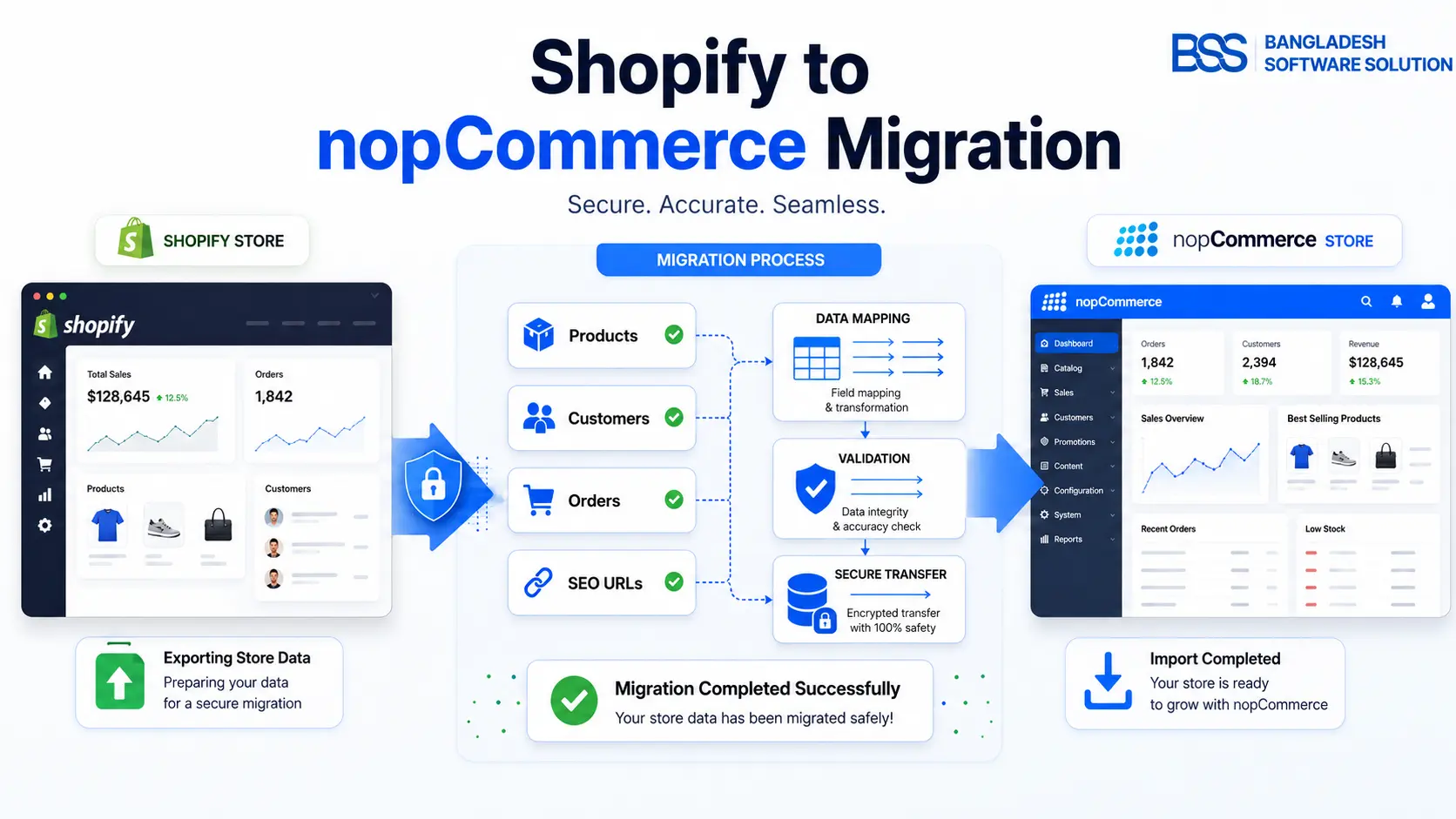
Shopify to NopCommerce migration is not just a platform switch. It is a controlled business move where catalog structure, product variants, customer data, order history, SEO URLs, payment workflows, taxes, shipping rules, theme behavior, and reporting all have to land correctly.
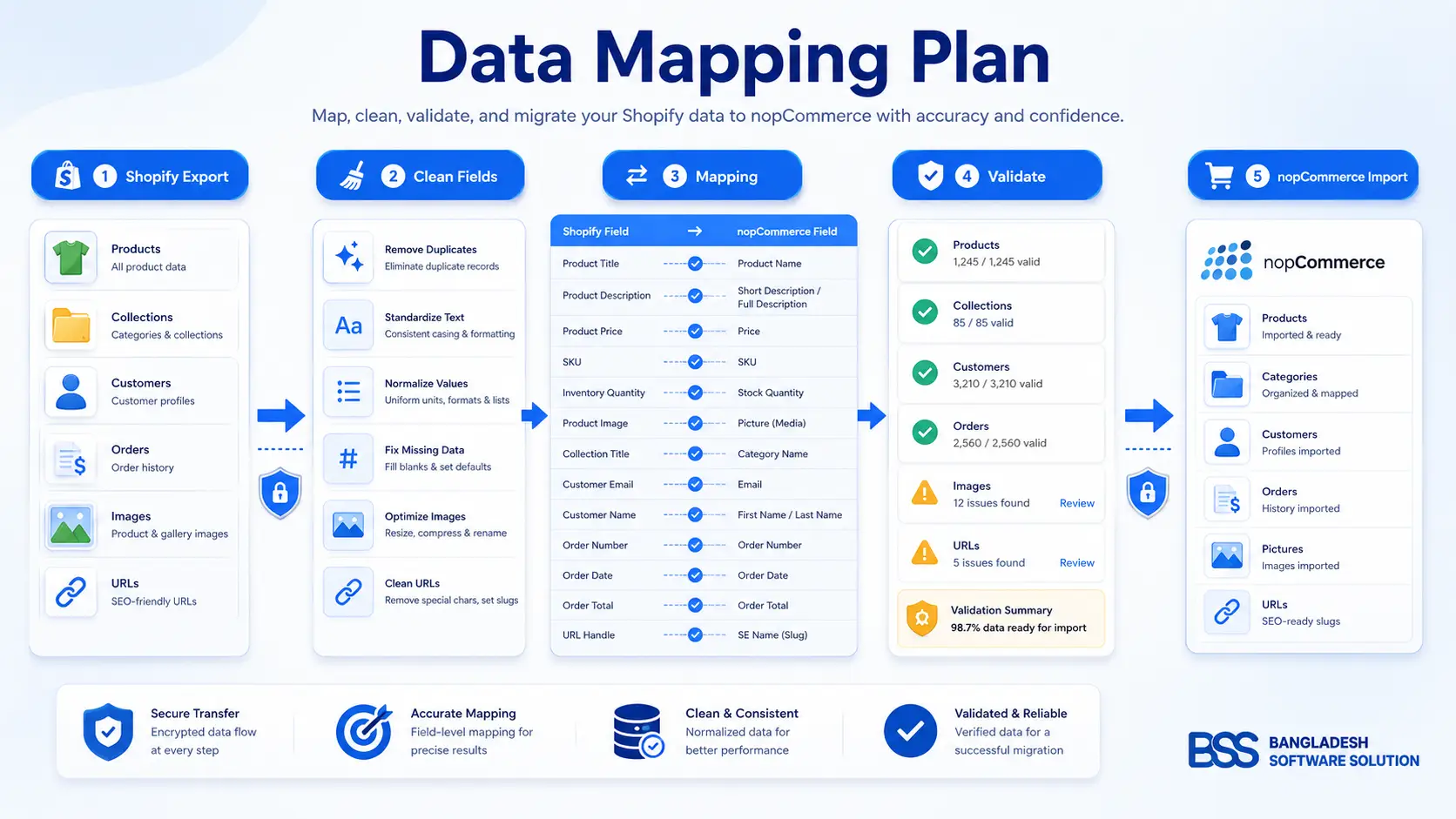
In our deployments, the stores that migrate cleanly are the ones that treat Shopify as the source system, nopCommerce as the new operating model, and the migration spreadsheet as the bridge between them. The technical import matters, but the real success comes from mapping decisions before data is moved.
What this guide covers: how to audit Shopify data, plan a nopCommerce data import, migrate products and customers, protect SEO traffic, test checkout, and decide when a DIY process is enough versus when professional implementation saves time.
Authoritative reference points used while preparing this guide include Shopify Help Center guidance on exports and redirects, nopCommerce documentation on catalog/import capabilities, and Google Search Central guidance on site moves and URL redirects. They are referenced in plain text only, with no third-party links, as required by this workflow.
Start by defining what actually needs to migrate
A common mistake we see when auditing setups is exporting everything from Shopify without deciding what deserves to live in the new nopCommerce store. Old products, abandoned collections, test customers, outdated discount codes, and thin content can make the migration messy before development even starts.
Before you move store from Shopify to nopCommerce, mark every data group as migrate, rebuild, archive, or discard. That simple classification prevents the new store from inheriting years of clutter.
Plan the nopCommerce data import before exporting Shopify
Shopify exports and nopCommerce imports do not share identical data models. Shopify product options, variants, handles, collections, metafields, customer addresses, and app-generated fields often need transformation before they fit nopCommerce products, attributes, categories, manufacturers, specification attributes, topics, and plugins.
Pro tip: migrate a small sample first
Do not start with the full catalog. Import a controlled sample of 20 products, including simple products, variants, images, sale prices, tags, and edge-case SKUs. If the sample exposes attribute, image, category, or SEO field problems, fix the mapping before running the full import.
Choose the right migration approach
There are three common ways to handle Shopify to nopCommerce migration. The right choice depends on catalog size, order-history needs, SEO risk, app complexity, and how much downtime the business can tolerate.
| Approach | Pros | Cons / time investment |
|---|---|---|
| Manual / DIY import | Lowest direct cost, good for small catalogs, gives the owner visibility into data cleanup. | High time investment; risky when variants, order history, redirects, or custom app data are complex. |
| Custom engineering from scratch | Best fit for unusual data structures, ERP sync, API work, and strict validation rules. | Higher cost; requires planning, testing, and rollback discipline. |
| Turnkey tools or professional implementation | Balances speed, repeatability, validation, SEO mapping, and launch support. | Best business value when revenue, rankings, and operational continuity matter. |
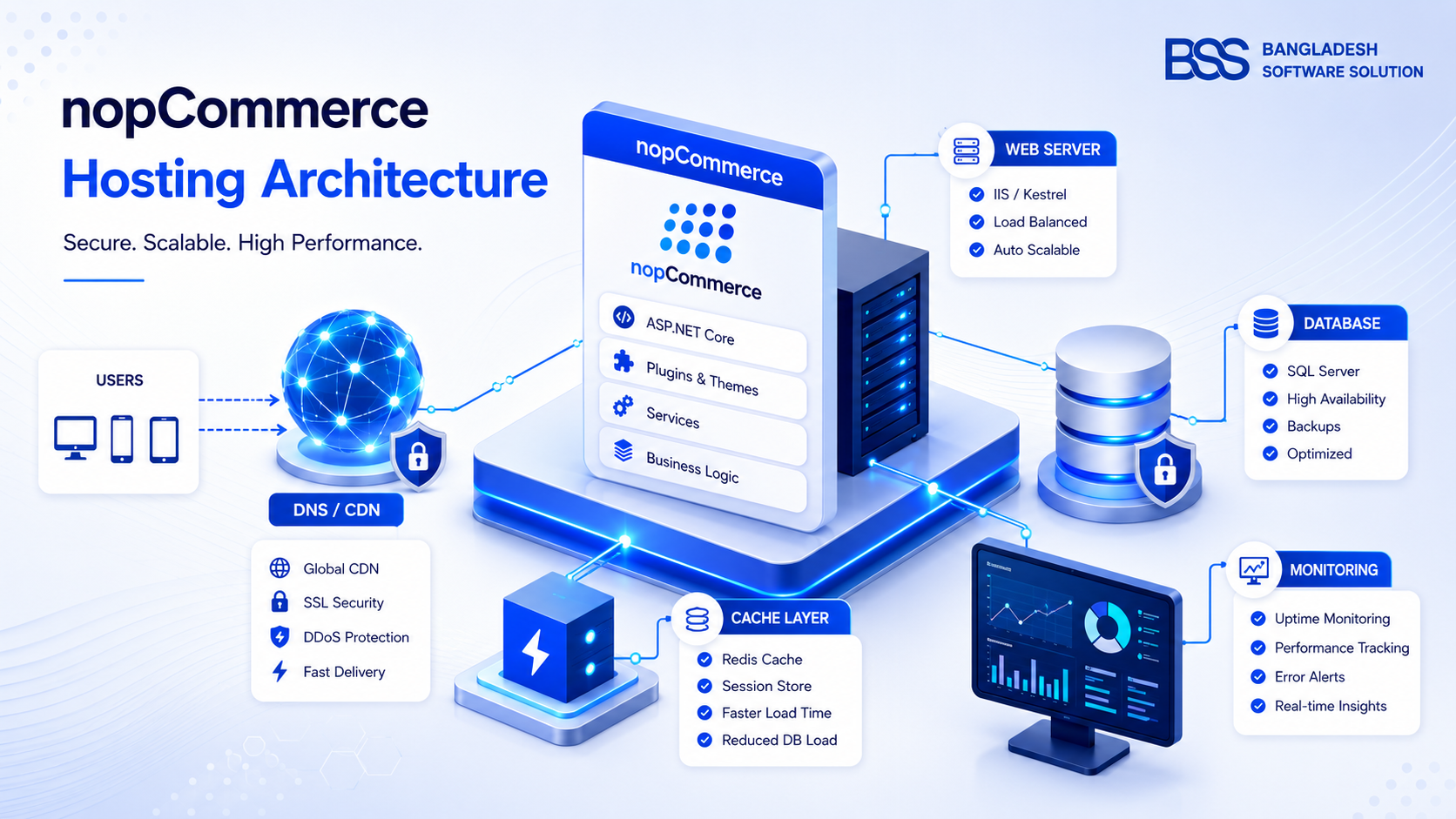
If your move includes a new hosting plan, read the nopCommerce hosting guide before the final import. Hosting affects image processing, imports, search, scheduled tasks, and launch-day performance.
Protect SEO during the platform move
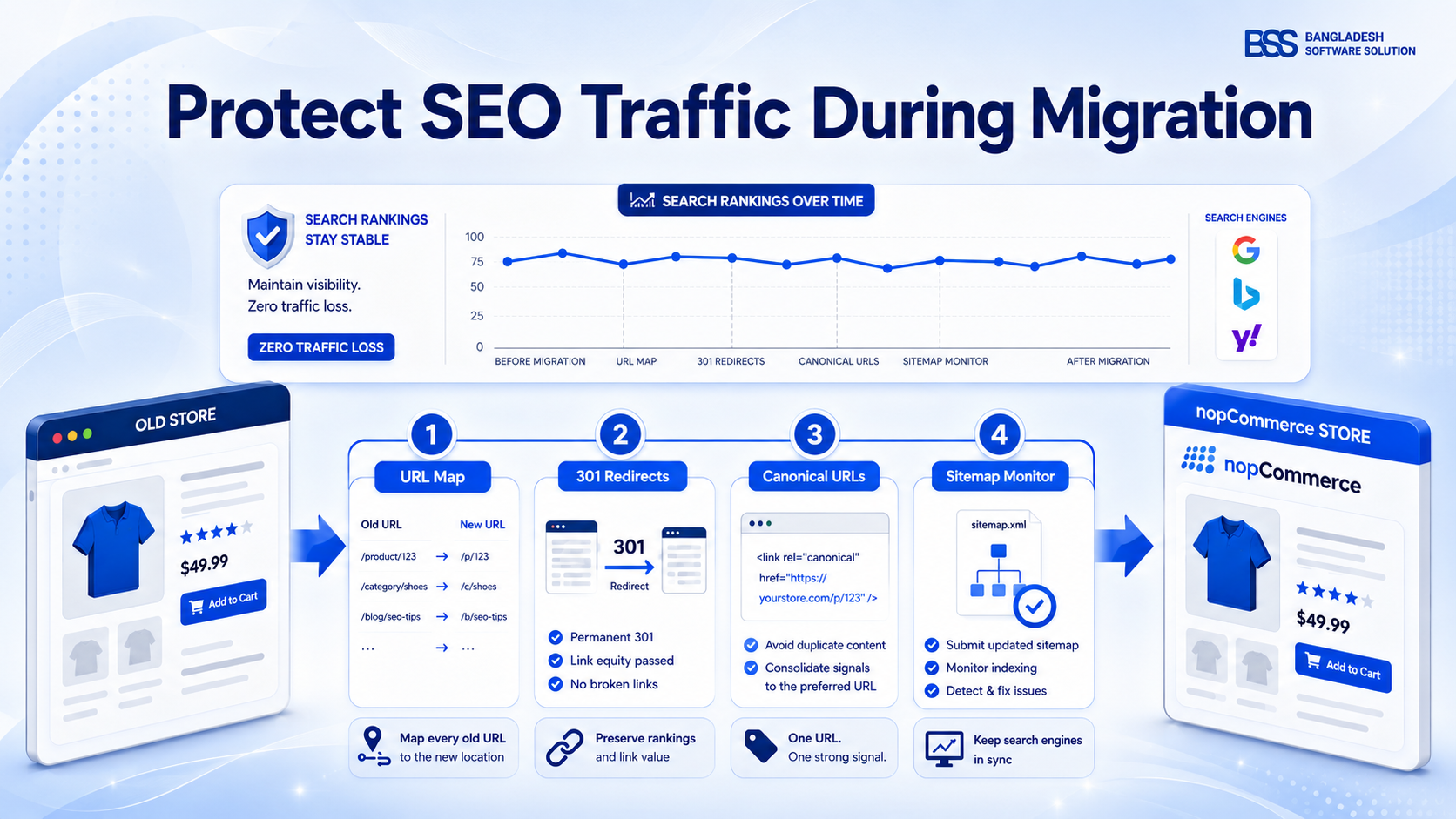
Shopify URL structures and nopCommerce SEO-friendly URLs are different, so redirects need deliberate planning. Product migration nopCommerce work is incomplete until old product, collection, blog, and page URLs resolve to the closest relevant new URLs.
Google Search Central recommends careful URL mapping, permanent redirects where pages move, and post-launch monitoring during site moves. For a detailed SEO-focused migration checklist, use the BSS guide on avoiding SEO traffic loss during nopCommerce migration.
Shopify to nopCommerce migration checklist
To solve this efficiently, the best approach is to break the move into controlled phases: audit, map, import, validate, redirect, launch, and monitor. Do not compress these into one weekend unless the catalog is very small and SEO risk is low.
Migration execution checklist
- 1Export Shopify products, customers, orders, pages, redirects, discount rules, and app-dependent data where available.
- 2Clean product titles, SKUs, images, variant options, collection structure, and duplicate records before import.
- 3Map Shopify handles and collection URLs to final nopCommerce SEO-friendly URLs and redirect targets.
- 4Run a sample nopCommerce data import, inspect admin records, storefront pages, images, prices, and variant behavior.
- 5Test checkout, payment, shipping, tax, email, order processing, analytics, feeds, and customer account flows.
- 6Launch redirects, submit the new sitemap, monitor crawl errors, compare orders, and keep Shopify data available during the validation window.
For store owners still comparing the two ecosystems, the BSS article nopCommerce vs Shopify helps clarify when the extra ownership and flexibility of nopCommerce is worth the migration effort.
What to check after launch
The first week after launch is not the time to redesign core pages or install experimental plugins. Keep the environment stable while you compare Shopify source data against nopCommerce orders, product pages, customer records, redirects, search visibility, and checkout behavior.
Watch for missing images, incorrect variant prices, unmapped collection URLs, shipping rule mismatches, payment callback issues, customer address formatting, abandoned cart tracking, analytics changes, and app functionality that needs a nopCommerce equivalent. If the migration includes custom plugins or API work, the nopCommerce API documentation walkthrough is a useful next read.
Need a safer Shopify to nopCommerce migration?
The BSS team can plan data mapping, product import, redirect strategy, plugin replacement, hosting, testing, and post-launch validation so the move is controlled instead of rushed.
Where BSS adds practical value: Bangladesh Software Solution handles nopCommerce implementation work across data import, custom plugin development, hosting readiness, SEO migration, theme setup, and integration planning. For Shopify migrations, that means fewer assumptions, cleaner handoff from old data to new structure, and a launch plan that protects both operations and search visibility.
Frequently Asked Questions
Final Thoughts
A Shopify to nopCommerce migration succeeds when it is treated as a structured operational project, not a one-click export. Products, customers, orders, redirects, checkout, hosting, apps, and staff workflows all need a defined destination.
Move in phases, test with sample data, validate every business-critical path, and keep SEO mapping visible throughout the project. That is how you move store from Shopify to nopCommerce without turning launch week into recovery week.