A customer places an order, receives confirmation, and then hears nothing for three days. The parcel may be moving normally, but the silence creates the same feeling as a delay: uncertainty. The customer checks the account page, searches email, opens the carrier website, and may contact support simply to ask, “Where is my order?”
A well-designed nopCommerce order tracking plugin turns that quiet period into a guided post-purchase experience. It connects shipment records and carrier events to a branded tracking view, useful notifications, and clear exception handling.
This guide explains what nopCommerce already provides, where a tracking plugin adds value, which features matter, and how to implement tracking without making promises your fulfillment operation cannot keep.
Start with nopCommerce’s Native Shipment Model
nopCommerce separates order, payment, and shipping statuses. A physical order can be not yet shipped, partially shipped, shipped, or delivered, and an order can contain multiple shipments. Administrators can create a shipment, assign quantities, enter a tracking number, mark it shipped, and later mark it delivered.
That foundation matters because a tracking plugin should enrich the shipment workflow rather than invent a conflicting order state. The official nopCommerce model also supports shipping-provider plugins returning an IShipmentTracker, including a tracking URL and shipment events.
Tracking quality begins with operational data
If warehouse staff do not create shipments accurately, assign the correct carrier and tracking number, or update shipped and delivered states, the storefront cannot present reliable information—regardless of plugin quality.
Where the Post-Purchase Experience Commonly Breaks
Native tracking numbers answer a functional need, but customers usually expect a more coherent journey: recognizable milestones, one destination for updates, meaningful delivery estimates, mobile-friendly presentation, and help when something goes wrong.
The opportunity is not merely adding a progress bar. It is translating operational events into language customers can understand and act on.
Features That Make an Order Tracking Plugin Useful
| Capability | Customer value | Implementation check |
|---|---|---|
| Branded tracking page | One familiar destination for shipment progress | Works for guests, registered users, mobile, and multiple stores |
| Carrier event mapping | Consistent milestones across carriers | Preserves raw carrier detail while normalizing customer labels |
| Proactive notifications | Fewer silent periods and missed delivery events | Configurable by event, channel, store, language, and consent |
| Multi-shipment support | Clear visibility when items ship separately | Tracks each shipment without incorrectly completing the whole order |
| Exception messaging | Explains delays, failed attempts, pickup, or return-to-sender | Includes a clear next action and escalation path |
| Admin diagnostics | Support can answer questions with evidence | Shows sync time, provider response, retries, and event history |
Feature depth should match fulfillment complexity. A single-carrier local store may need a clean tracking page and email updates; a multi-warehouse operation may need carrier abstraction, webhooks, retry queues, partial shipments, and regional messaging.
Design the Journey Around Customer Questions
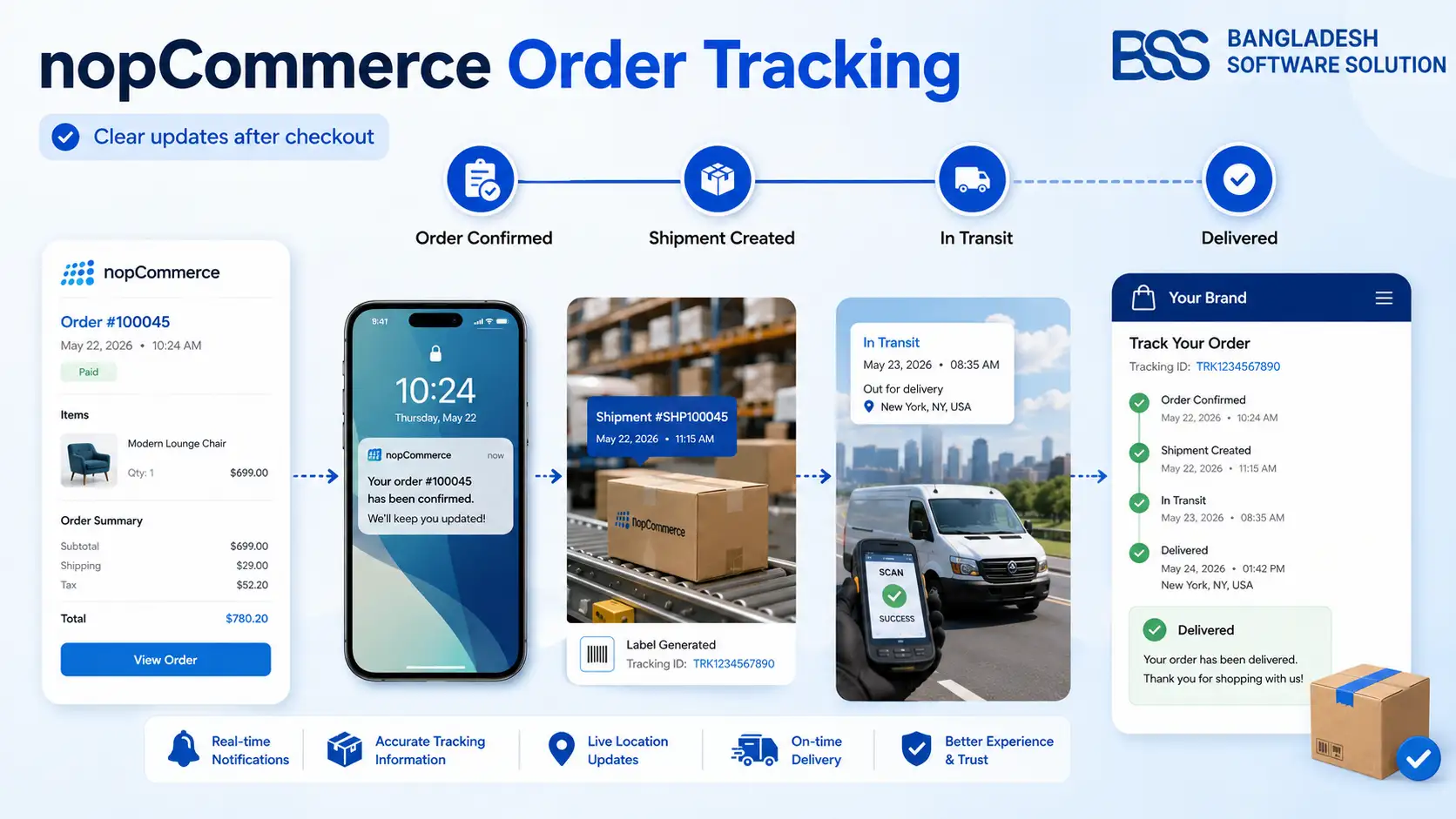
Return to the customer waiting three days. Each stage should answer one question: Was the order accepted? Is it being prepared? Did it leave the warehouse? Where is it now? When should it arrive? What should I do if delivery fails?
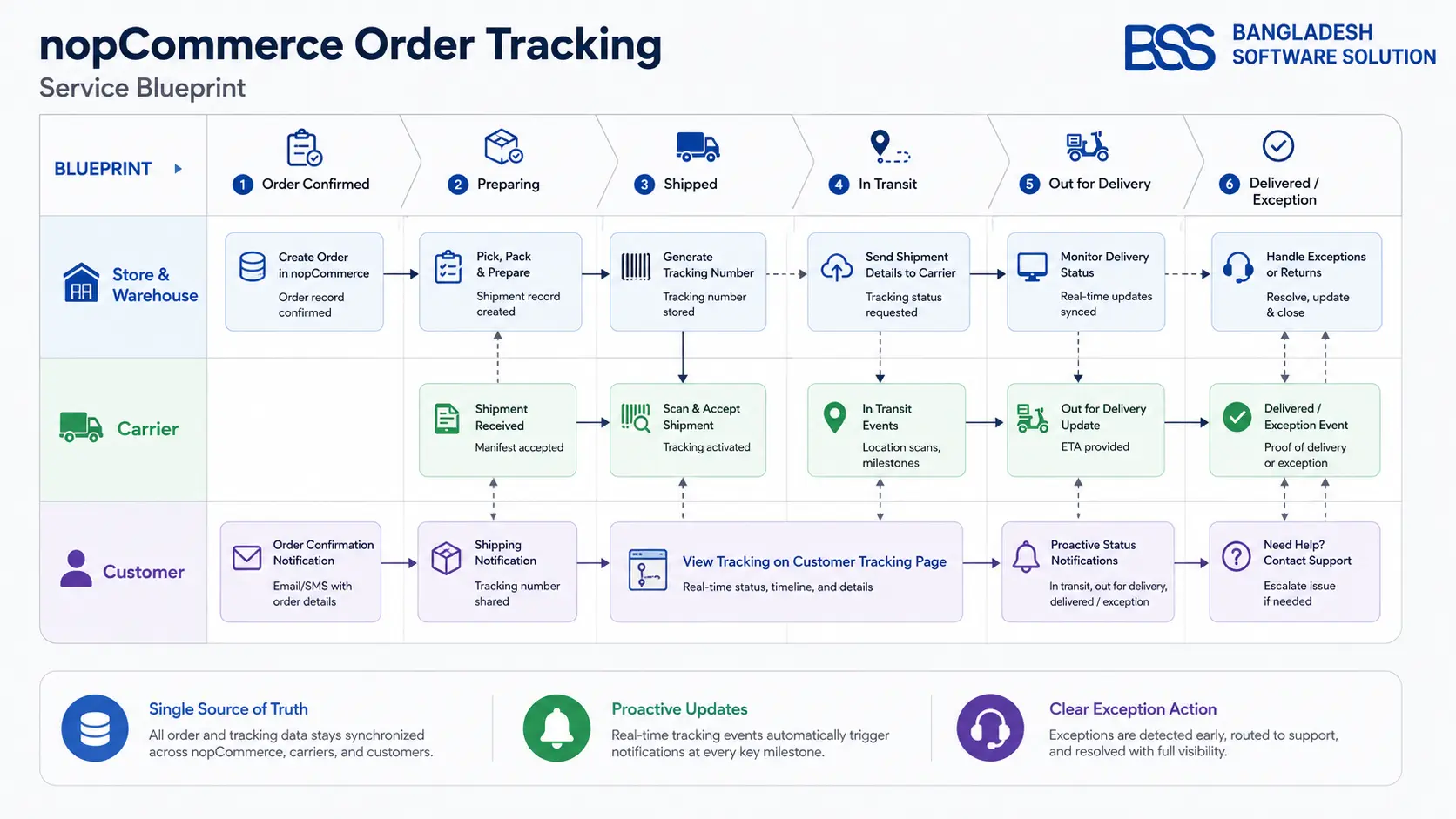
- Order confirmed: acknowledge the purchase and explain the next operational step.
- Preparing shipment: distinguish fulfillment work from carrier movement.
- Shipped: show the carrier, tracking reference, shipment contents, and first meaningful scan.
- In transit: present recent events, current expectation, and any revised estimate carefully.
- Out for delivery or ready for pickup: provide timely, actionable instructions.
- Delivered or exception: close the loop or guide the customer toward the right resolution.
Use Notifications to Reduce Uncertainty, Not Create Noise
Notify customers when information changes meaningfully: shipment created, carrier accepted, out for delivery, delivered, pickup ready, or an exception requires attention. Repeating every low-level scan can train customers to ignore the messages.
Keep the store identity clear, state which shipment changed, include a safe tracking link, explain the next expected step, and avoid guaranteed delivery language unless the carrier contract and data justify it. Ensure transactional email is dependable by following the checks in our nopCommerce SMTP configuration and email fix guide.
Do not expose more data than the customer needs
Guest tracking should use an appropriately protected lookup flow. Avoid predictable identifiers, sensitive addresses, internal comments, provider credentials, or unrestricted order data in URLs and client-side responses.
How to Evaluate an Order Tracking Plugin
Pre-installation evaluation
- 1Confirm compatibility with your exact nopCommerce version, active theme, checkout, and shipping plugins.
- 2List required carriers, regions, tracking APIs, webhook support, rate limits, and fallback behavior.
- 3Verify partial shipments, multiple tracking numbers, pickup, returns, and guest orders.
- 4Review data storage, privacy, access control, secret handling, retention, and provider terms.
- 5Test notification templates, localization, time zones, accessibility, mobile behavior, and unsubscribe boundaries.
- 6Check update history, documentation, support policy, licensing, and upgrade strategy.
Use the vetting approach in our nopCommerce Marketplace guide, then validate the plugin in staging with realistic shipment data before production deployment.
Implement Tracking in Controlled Stages
Start with one store, one carrier, and a small set of shipment events. Map provider events to customer-facing milestones, configure retry and failure visibility, then test partial shipments, delayed first scans, duplicate webhooks, out-of-order events, carrier outages, and manual corrections.
Source of truth
Define which system owns shipment creation, tracking numbers, carrier events, and delivered status.
Sync resilience
Use idempotent processing, bounded retries, timestamps, and visible failure states.
Customer language
Translate carrier codes into consistent wording without hiding meaningful exceptions.
Operational review
Monitor stale shipments, sync errors, notification failures, and recurring support questions.
Before rollout, apply the same staged discipline used for nopCommerce plugin compatibility testing.
Measure Whether Tracking Improves the Experience
A tracking page is successful when it changes customer and operational outcomes—not merely when it loads. Establish a baseline and monitor tracking-page use, notification delivery, stale shipments, exception resolution time, contacts asking for order location, repeat visits, and customer feedback.
Interpret changes carefully. Contact volume can rise temporarily when a new tracking experience exposes real fulfillment problems. That is useful evidence: fix the process behind the status instead of hiding the status.
Make support part of the loop
Give agents access to the same timeline customers see plus internal diagnostics. Repeated questions and confusing event labels should feed the next tracking-page and template improvement.
Need a Reliable Tracking Workflow?
BSS Engineering can connect nopCommerce shipment records, carrier events, branded tracking pages, notifications, guest access, exception handling, and support diagnostics into one maintainable experience.
Frequently Asked Questions
Final Thoughts
The customer from the opening scenario does not need to know every system involved. They need timely, accurate answers and a clear next step. A good tracking plugin creates that clarity by respecting nopCommerce shipment states, carrier evidence, notification boundaries, and fulfillment reality.
Start with clean operational data, add only the customer-facing capabilities you can support, and improve the journey using real exception and support evidence. If the workflow spans custom carriers, multiple shipments, guest security, and integrations, BSS nopCommerce services can help design and implement it safely.