
Advanced SEO Schema
Created on: May 14, 2026
PRE-REQUISITES
-
The plugin requires you to install the BSS Core plugin first.
INSTALLATION
-
Go to the Order Details Page and Download plugin package
-
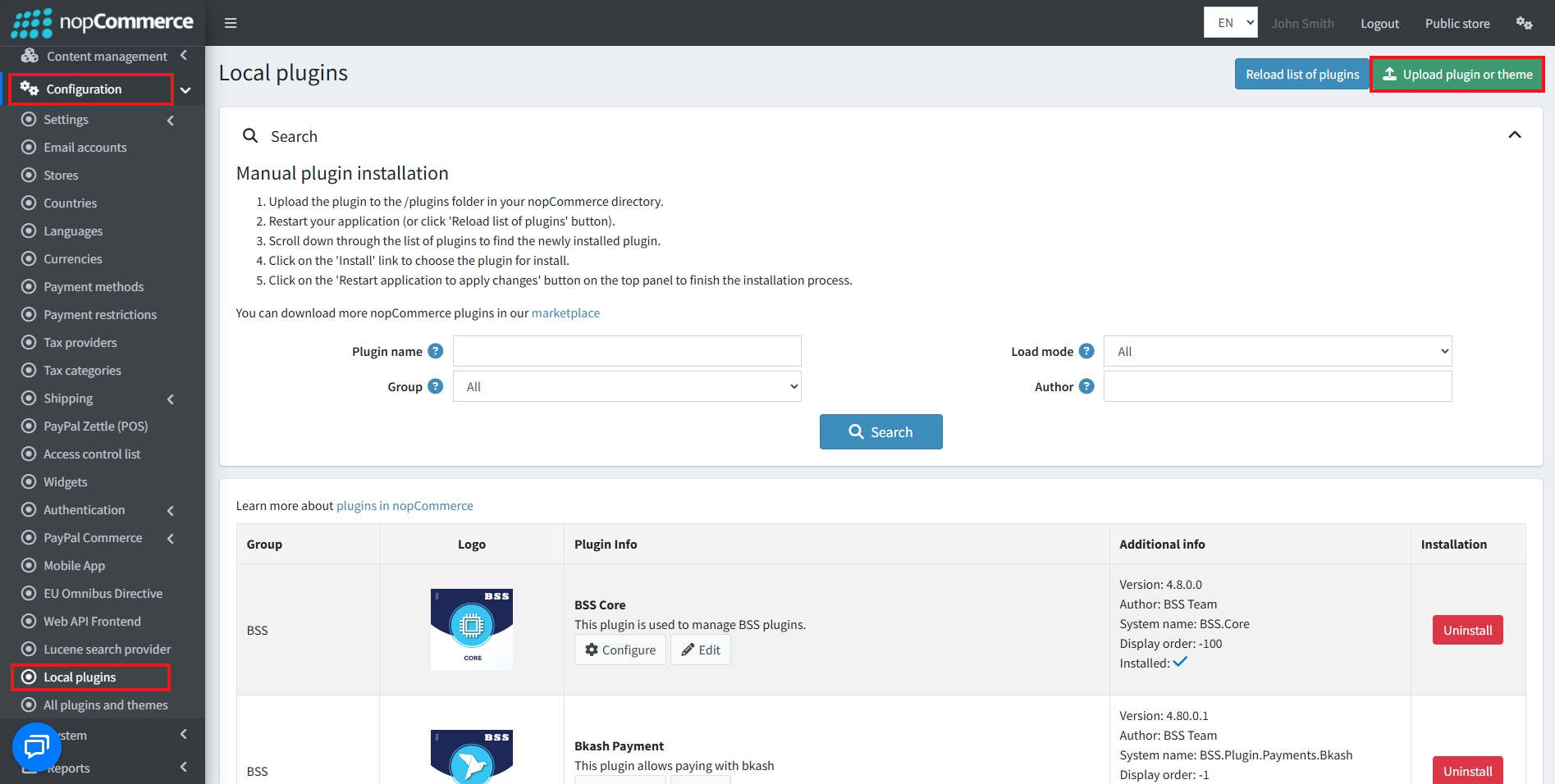
Go to Administration → Configuration → Local plugins
-
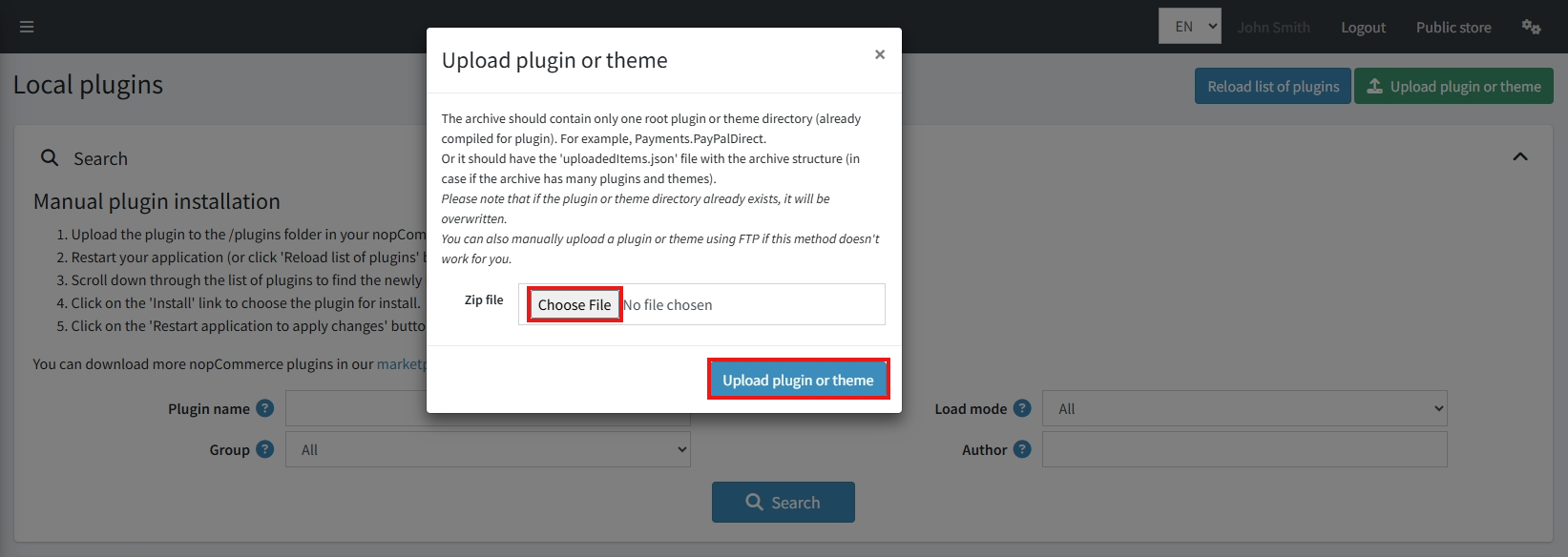
Within the bundle, you get all the required files, including BSS.Core
-
Upload the zip files using the ‘Upload plugin or theme’ button
-
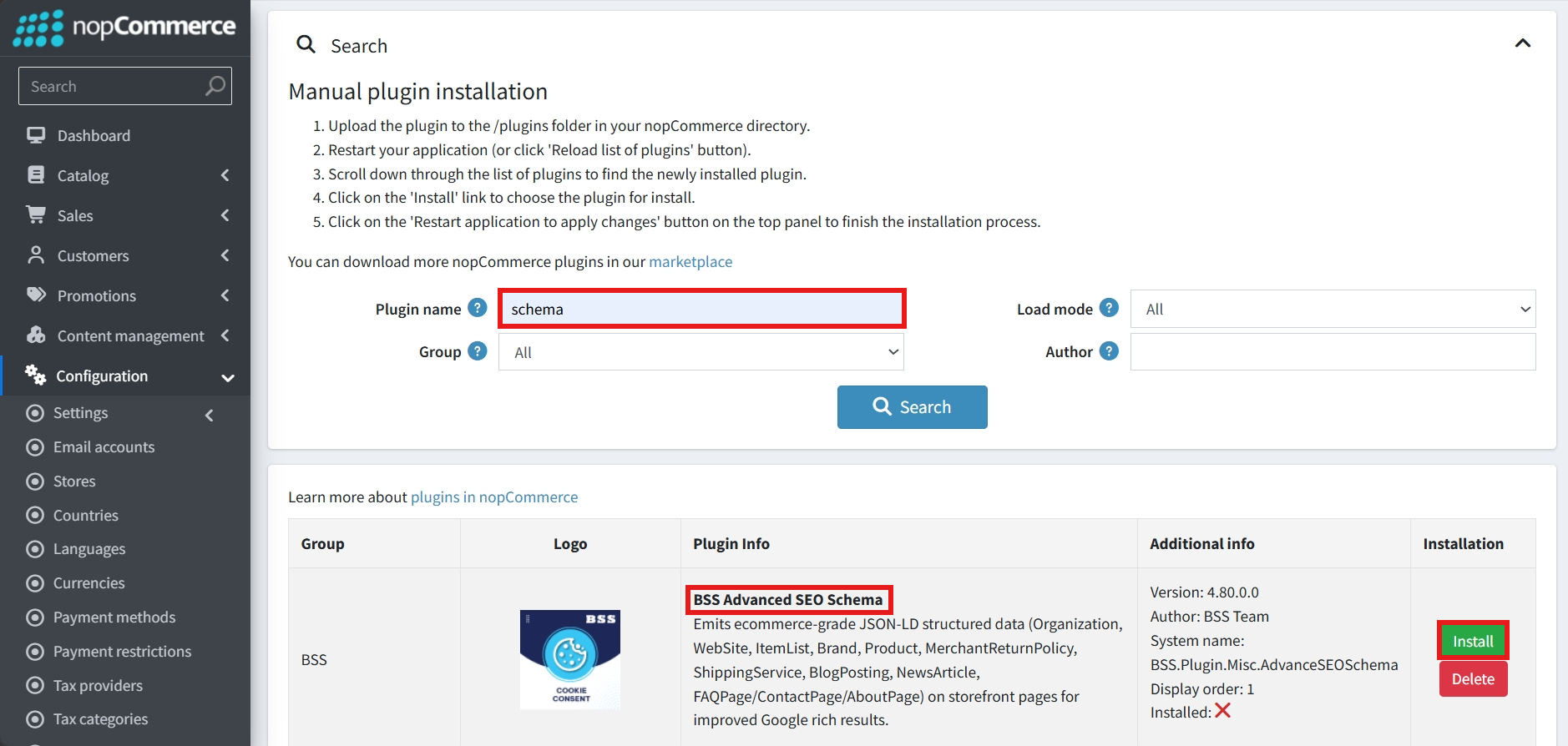
After uploading, install the ‘BSS Core’ Plugin first.
-
Then scroll down or write the name of the plugin in the search bar, and install ‘BSS Advanced SEO Schema’
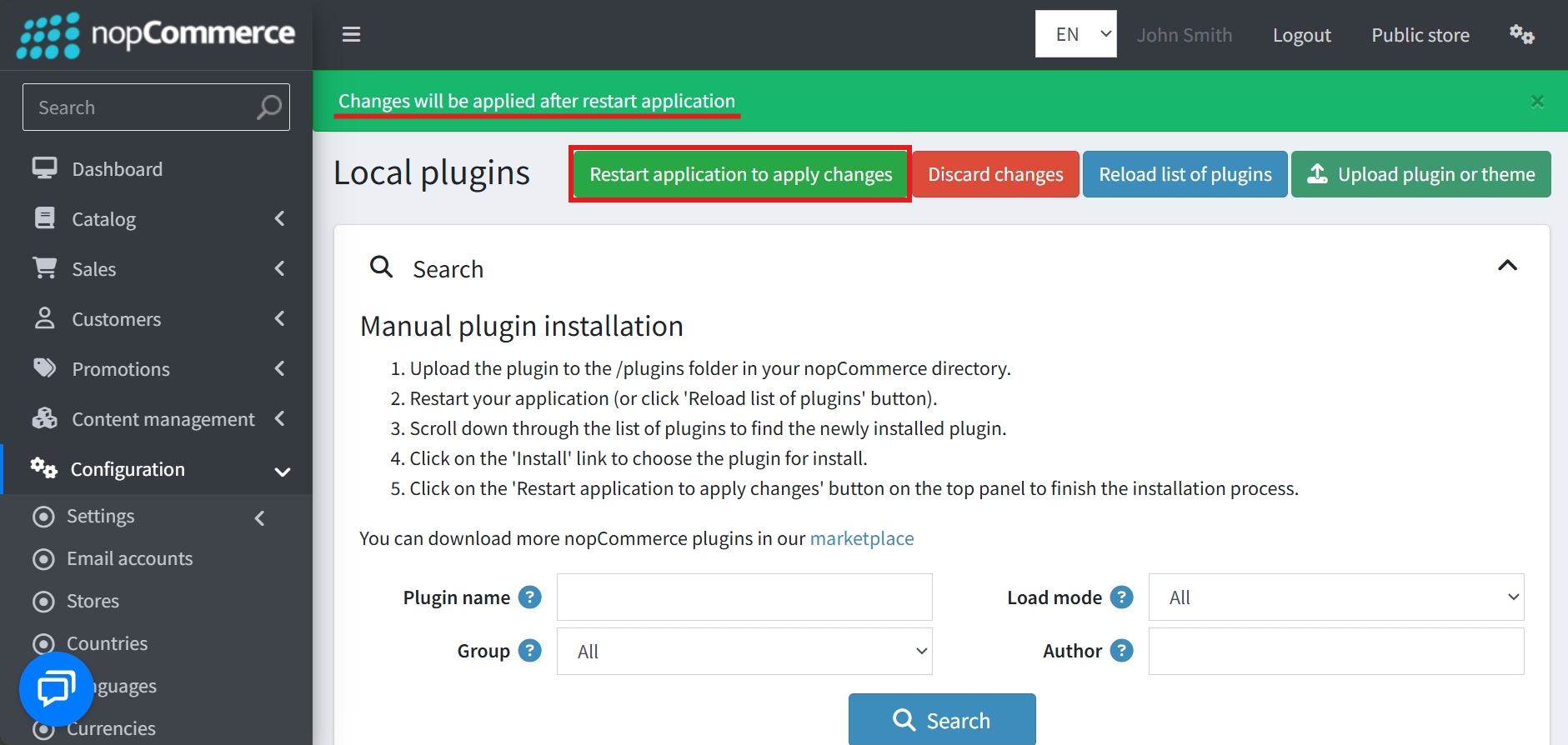
- To make the plugins functional, restart the application
Recommendation: Go to > App Settings. If you find JavaScript bundling and minification, CSS bundling and minification are checked, then uncheck these two options and disable them.

CONFIGURE
-
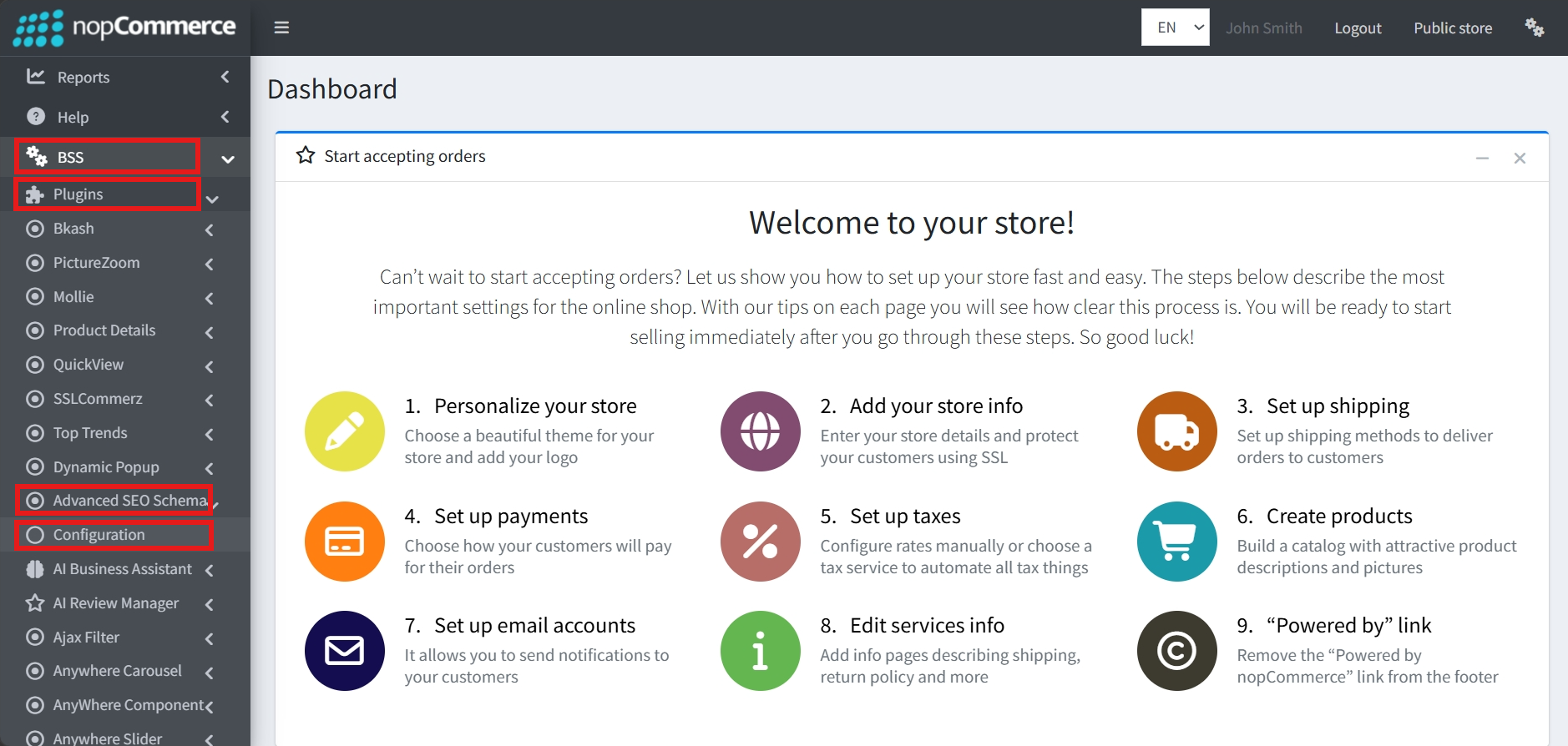
Go to Admin → BSS → Plugins → Advanced SEO Schema → Configuration
-
Enter the License string and save it. Then clear cache.

-
Then again go to BSS → Plugins → Advanced SEO Schema → Configuration to set the configuration.
GENERAL SETTINGS
-
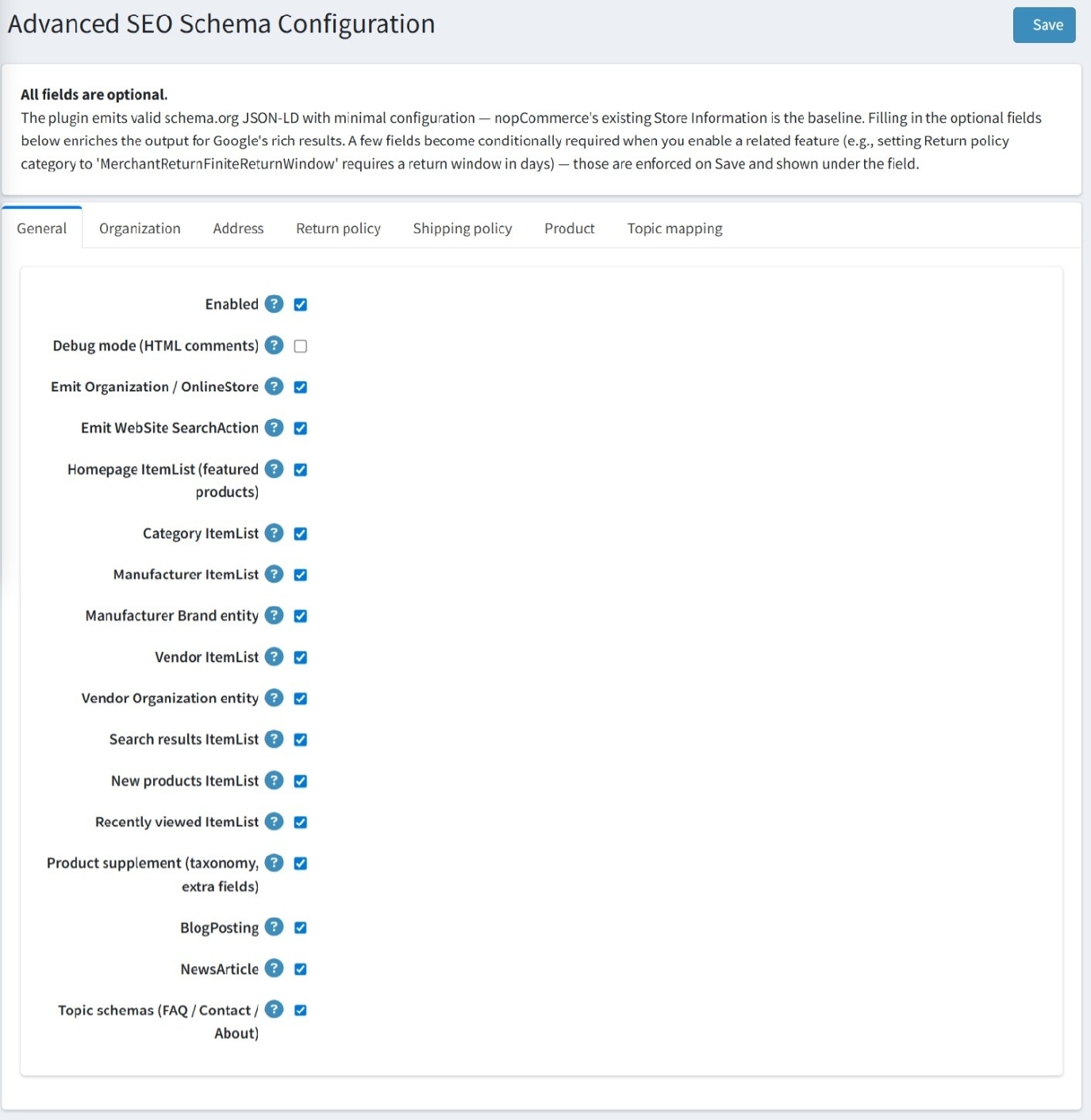
Enabled: A master switch to turn the plugin's schema generation on or off.
-
Debug mode (HTML comments): When enabled, this adds comments to the HTML source code to assist in troubleshooting the generated schema.
-
Emit Organization / OnlineStore: Controls the generation of schema defining your business as an organization or online store.
-
Emit WebSite SearchAction: Enables search action schema, which can help search engines display a search box directly in search results for your site.
-
List & Entity Schema Controls: You can toggle schema generation for various product and entity lists across your store, including:
-
Homepage ItemList (featured products), Category ItemList, and Manufacturer ItemList.
-
Search results ItemList, New products ItemList, and Recently viewed ItemList.
-
Vendor ItemList and Vendor Organization entity for multi-vendor environments.
-
Manufacturer Brand entity to specifically identify brand information.
-
-
Product supplement: Enables schema for extra product metadata, such as taxonomy and additional fields.
-
Content Types: You can enable specific schemas for BlogPosting, NewsArticle, and Topic schemas (which cover FAQ, Contact, and About pages).
ORGANIZATION
-
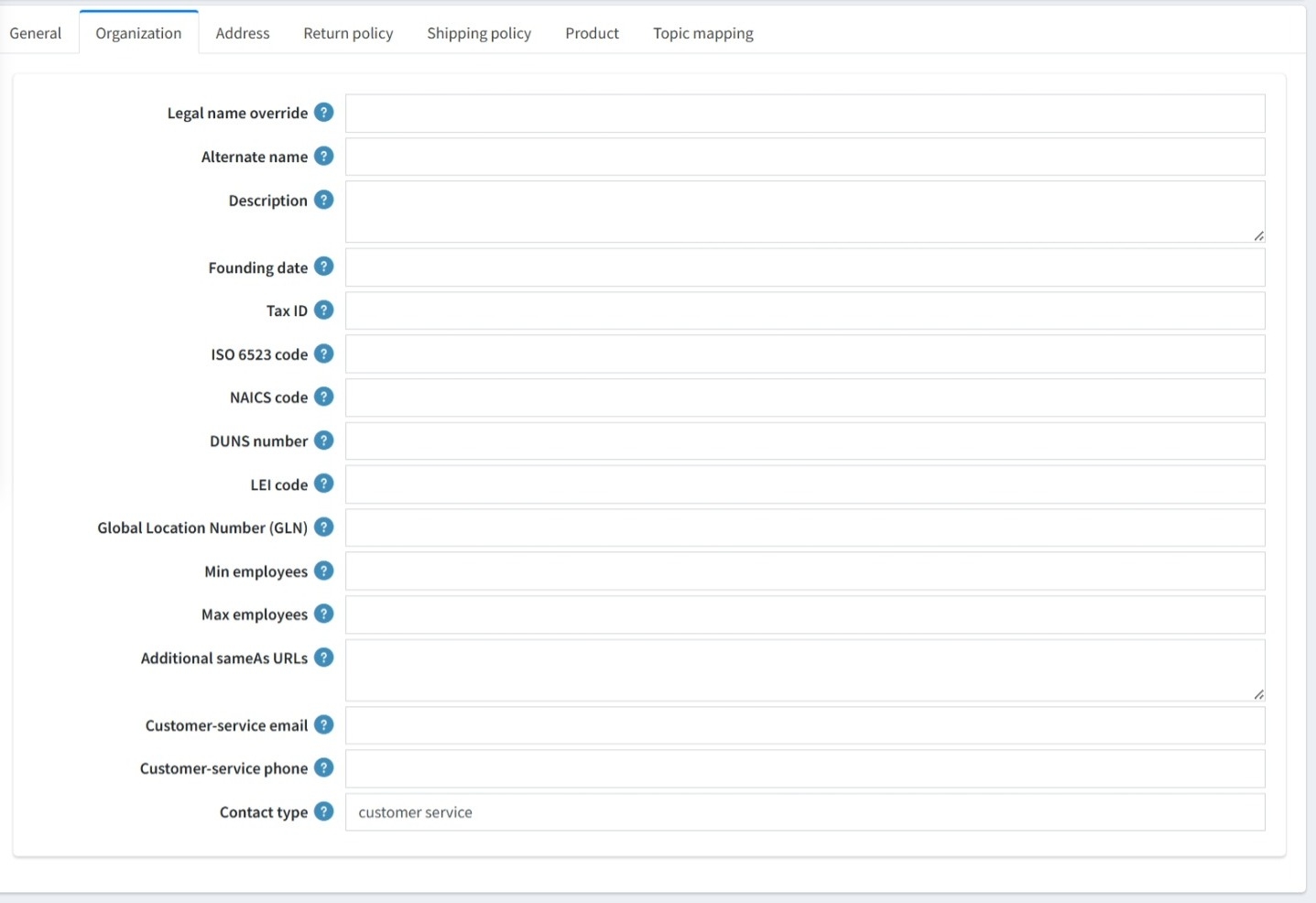
Legal name override & Alternate name: Allows you to specify the official legal name of your organization and any common aliases.
-
Description: A field to provide a brief summary of your business.
-
Founding date: The date the organization was established.
-
Professional Identifiers: To increase business credibility, you can provide various industry-standard IDs, including:
-
Tax ID
-
ISO 6523 code
-
NAICS code
-
DUNS number
-
LEI code
-
Global Location Number (GLN)
-
-
Employee Count: Fields to specify the minimum and maximum number of employees.
-
Additional sameAs URLs: A space to list official social media profiles or other high-authority URLs that represent the same organization, helping search engines link your entities together.
-
Customer-service email & phone: Direct contact information for your support team.
-
Contact type: A field to categorize the contact point, which defaults to "customer service"
ADDRESS
-
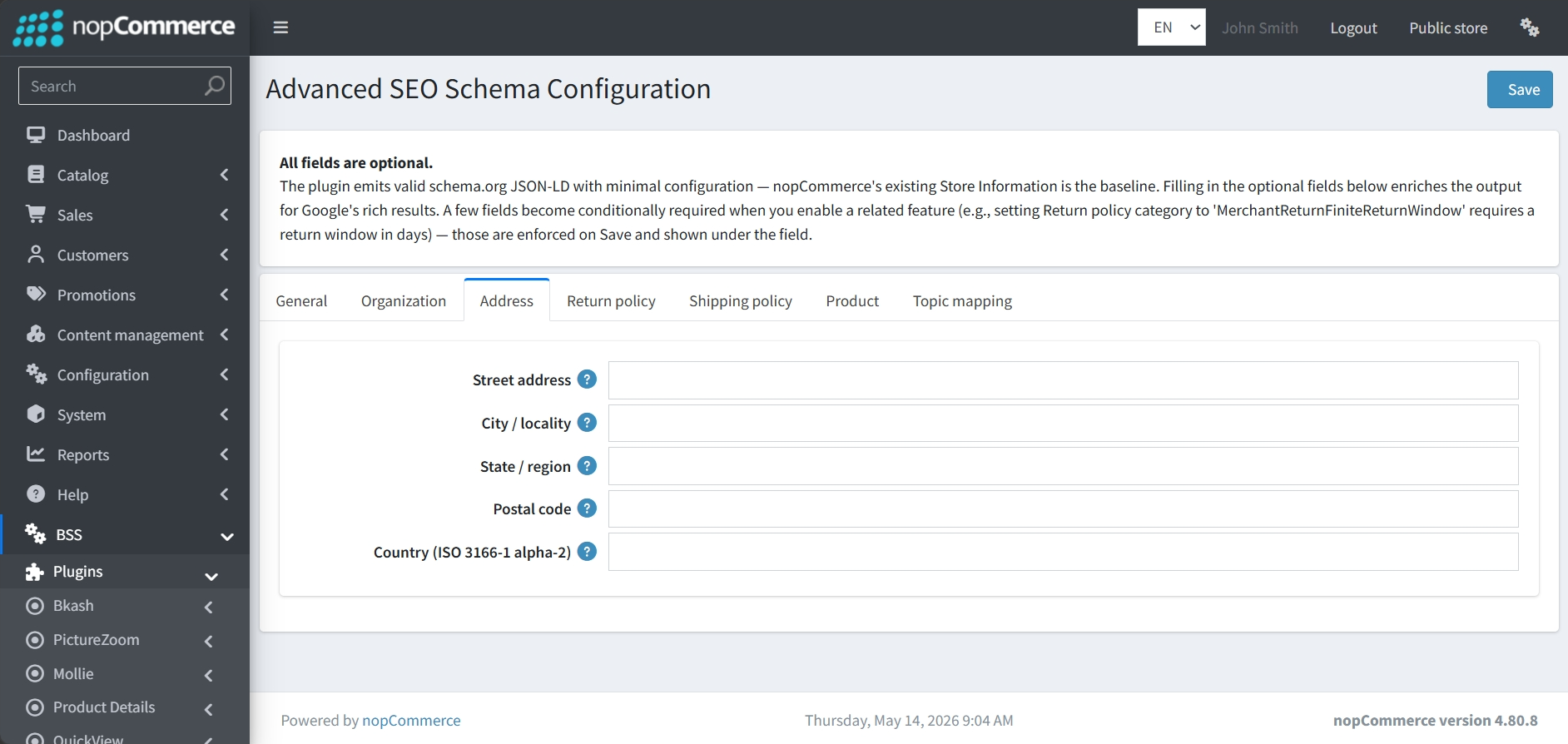
Street address: The specific street-level location of your business.
-
City / locality: The city or town where your organization is based.
-
State / region: The state, province, or region of the business address.
-
Postal code: The zip or postal code for the location.
-
Country (ISO 3166-1 alpha-2): The two-letter country code representing the business's country of operation.
RETURN POLICY
-
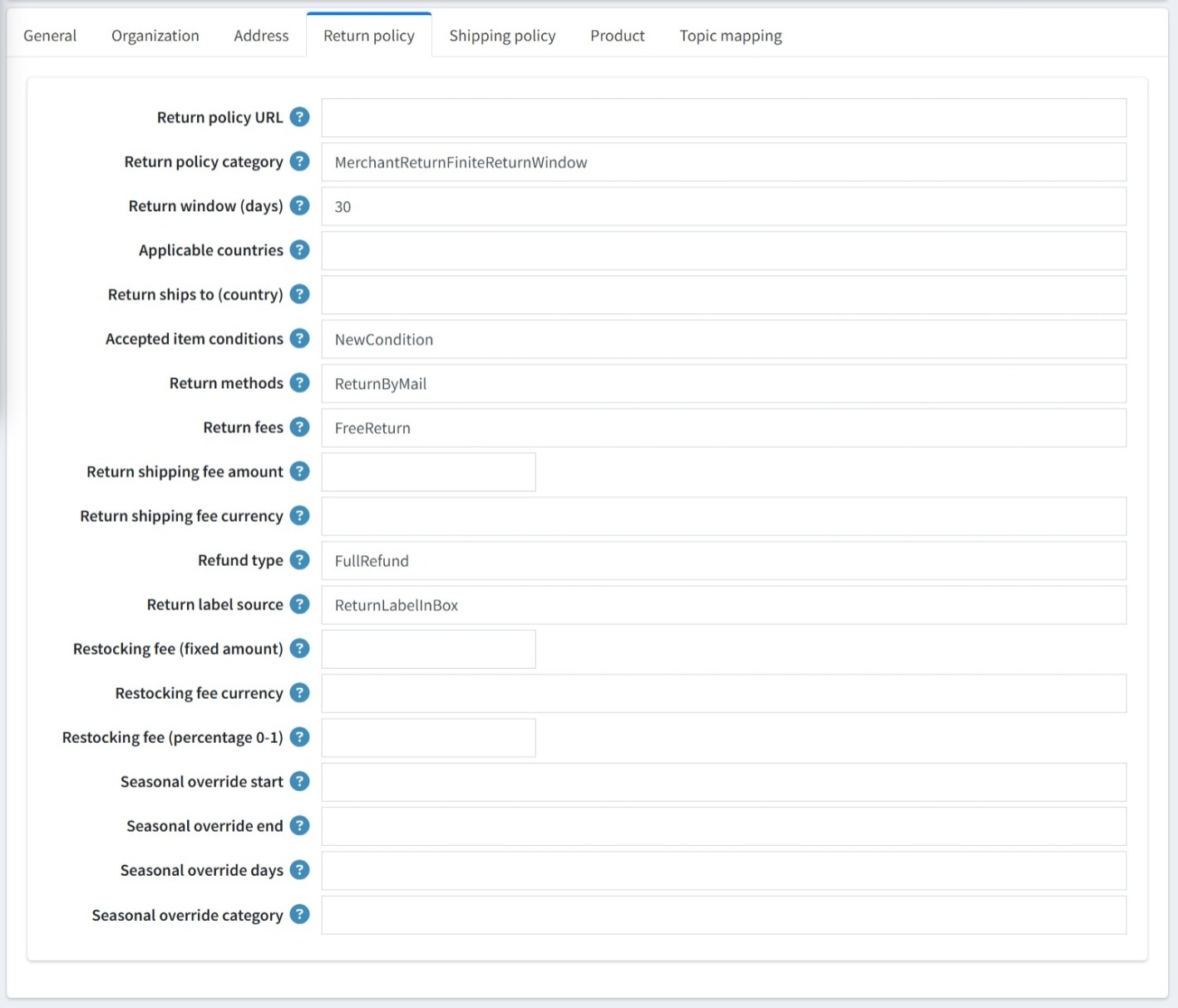
Return policy URL: A direct link to your store's full return policy page.
-
Return policy category: Defines the type of policy, defaulting to "MerchantReturnFiniteReturnWindow".
-
Return window (days): Specifies the timeframe for returns, which defaults to 30 days. Note that if you use a finite return window category, this field becomes required.
-
Applicable & Shipping Countries: Fields to define which countries the policy applies to and where items should be shipped back to.
-
Accepted item conditions: Sets the required state for returned items, such as the default "NewCondition".
-
Return methods: Specifies how items are returned, defaulting to "ReturnByMail".
-
Return label source: Indicates how customers receive return labels, with a default of "ReturnLabelInBox".
-
Return fees: Categorizes return costs, defaulting to "FreeReturn".
-
Return shipping fee: Allows you to specify a specific amount and currency for return shipping if it is not free.
-
Refund type: Defines the refund provided, defaulting to "FullRefund".
-
Restocking fees: You can set restocking fees as a fixed amount (with currency) or as a percentage (0–1).
-
Seasonal Overrides: For special periods like holidays, the plugin provides fields for Seasonal overrides, allowing you to set specific start/end dates, override days, and a unique return category for that timeframe.
SHIPPING POLICY
-
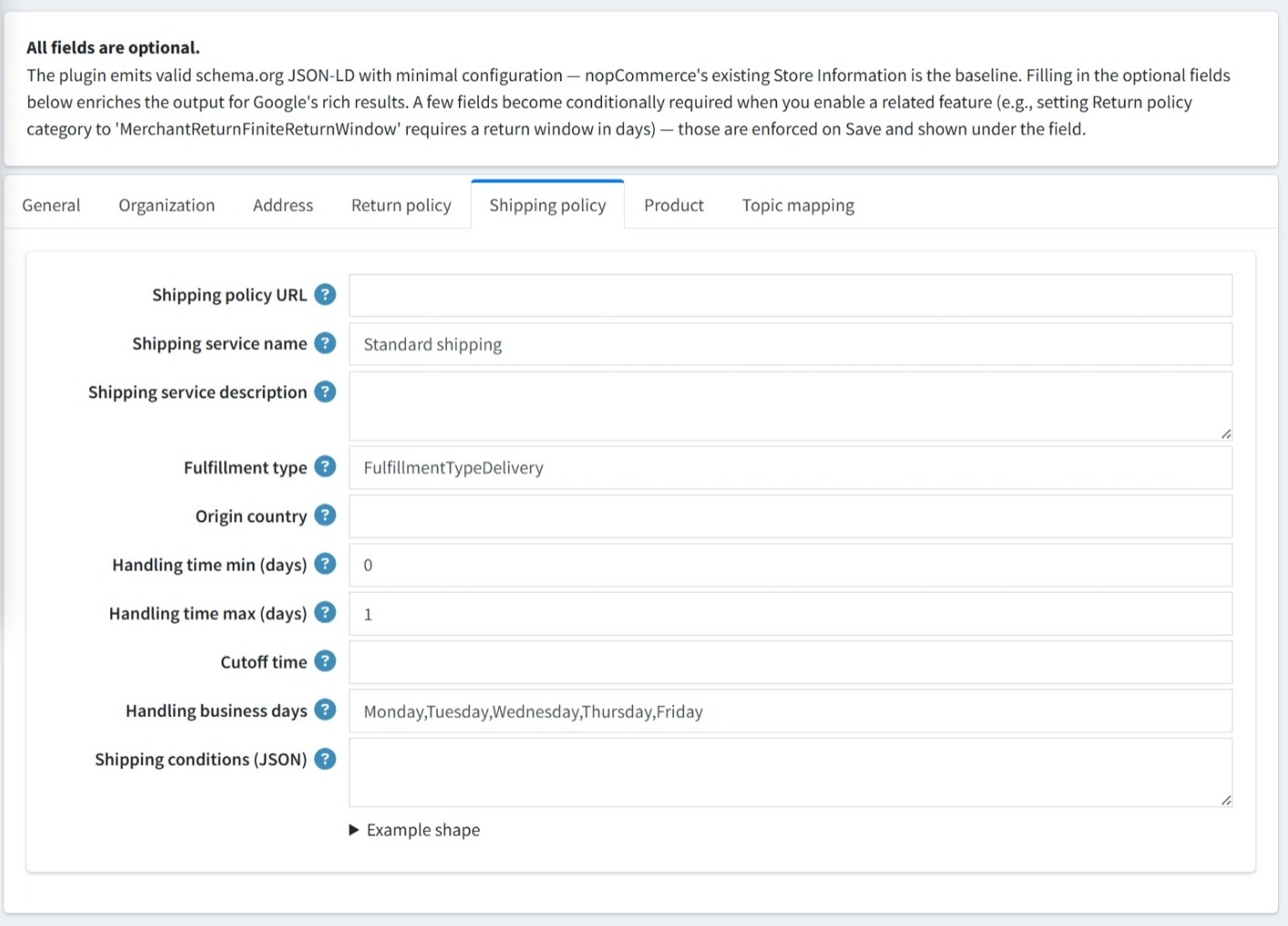
Shipping policy URL: A direct link to your store’s full shipping information page.
-
Shipping service name: The name of the delivery service, which defaults to "Standard shipping".
-
Shipping service description: A field to provide further details about the specific shipping service offered.
-
Fulfillment type: Defines how orders are fulfilled, with a default of "FulfillmentTypeDelivery".
-
Origin country: The country from which your products are shipped.
-
Handling time (min/max days): Allows you to specify the minimum and maximum number of days it takes to process an order before shipping.
-
Cutoff time: The daily time limit for an order to be processed on the same day.
-
Handling business days: Specifies which days of the week are considered business days for order handling.
-
Shipping conditions (JSON): A field for entering complex shipping rules in JSON format. The interface includes an "Example shape" dropdown to assist with the correct formatting.
PRODUCT
-
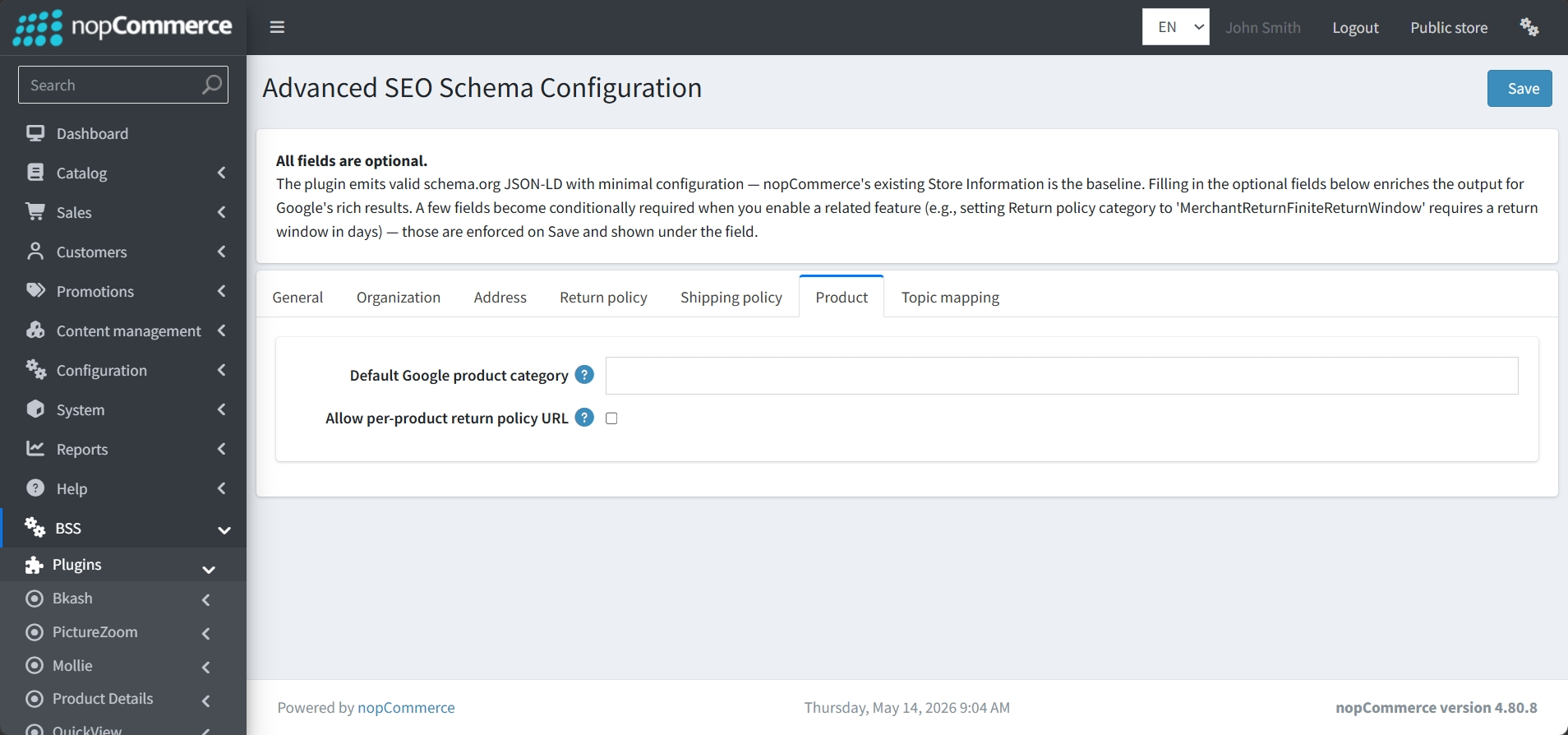
Default Google product category: A field to specify the primary Google product category for your items to ensure they are correctly indexed in shopping results.
-
Allow per-product return policy URL: By enabling this checkbox, you can define specific return policies for individual products rather than relying solely on a global store policy.
TOPIC MAPPING
-
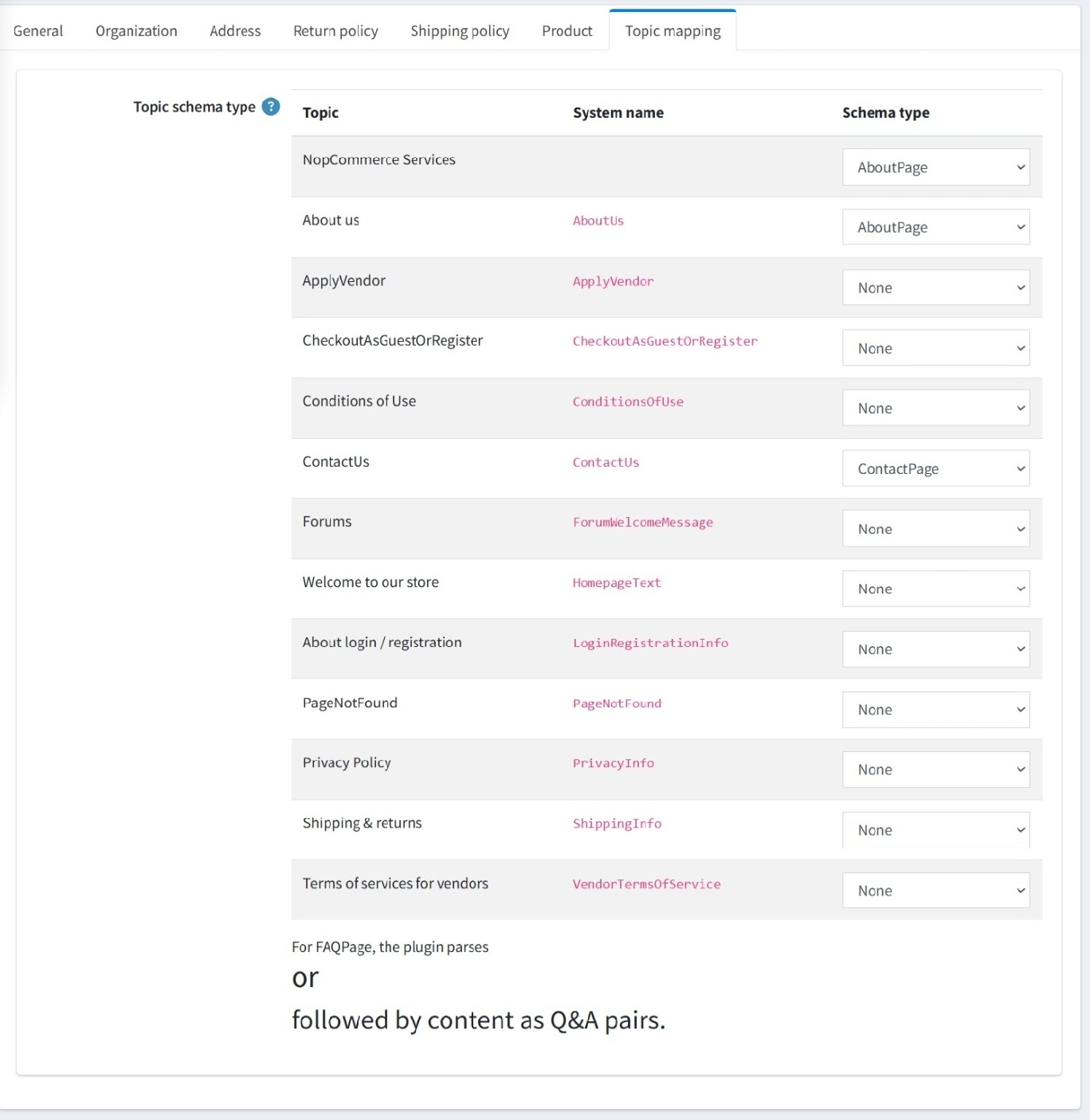
Manual Assignments: You can assign specific schema.org types to your store's informational pages to enhance their visibility in search results, like "About us" to AboutPage and "ContactUs" to ContactPage, using a simple dropdown interface.
-
Automated FAQ Parsing: For the FAQPage schema, the plugin automatically identifies Q&A pairs by parsing heading tags followed by content, eliminating manual data entry.
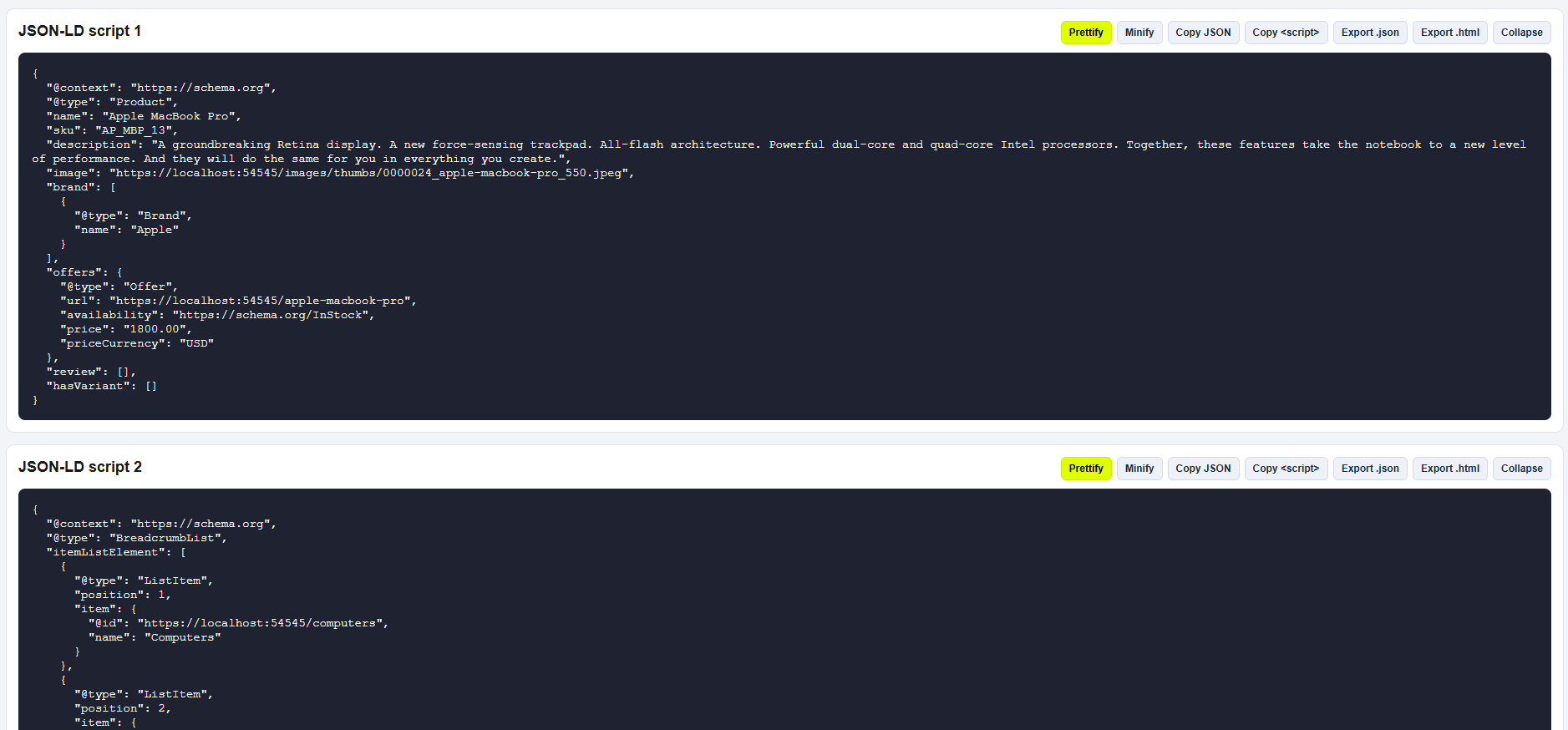
EXAMPLE SCHEMA JSON-LD
FEATURES
-
Automated Schema Generation: Uses your existing nopCommerce store information as a baseline to automatically emit valid schema.org JSON-LD.
-
Rich Result ItemLists: Automatically generates schema for featured products, categories, manufacturers, and search results to improve their appearance in search listings.
-
WebSite SearchAction: Enables a search box for your site to appear directly within Google search results.
-
Granular Policy Metadata: Supports detailed Shipping and Return policies, including seasonal overrides for holiday periods and per-product rules.
-
Professional Business Identity: Enhances authority with optional fields for Tax IDs, DUNS numbers, LEI codes, and social media profile links.
-
Topic Mapping: Allows manual assignment of specific schema types like AboutPage or ContactPage to your store's informational topics.
- Intelligent FAQ Parsing: Automatically identifies Q&A pairs from topic pages by parsing heading tags, eliminating the need for manual data entry.


