
BSS AI Review Manager
Created on: May 15, 2026
PRE-REQUISITES
-
The plugin requires you to install the BSS Core plugin first.
INSTALLATION
- Go to the Order Details Page and Download plugin package
- Go to Administration → Configuration → Local plugins
- Within the bundle, you get all the required files, including BSS.Core
- Upload the zip files using the 'Upload plugin or theme' button
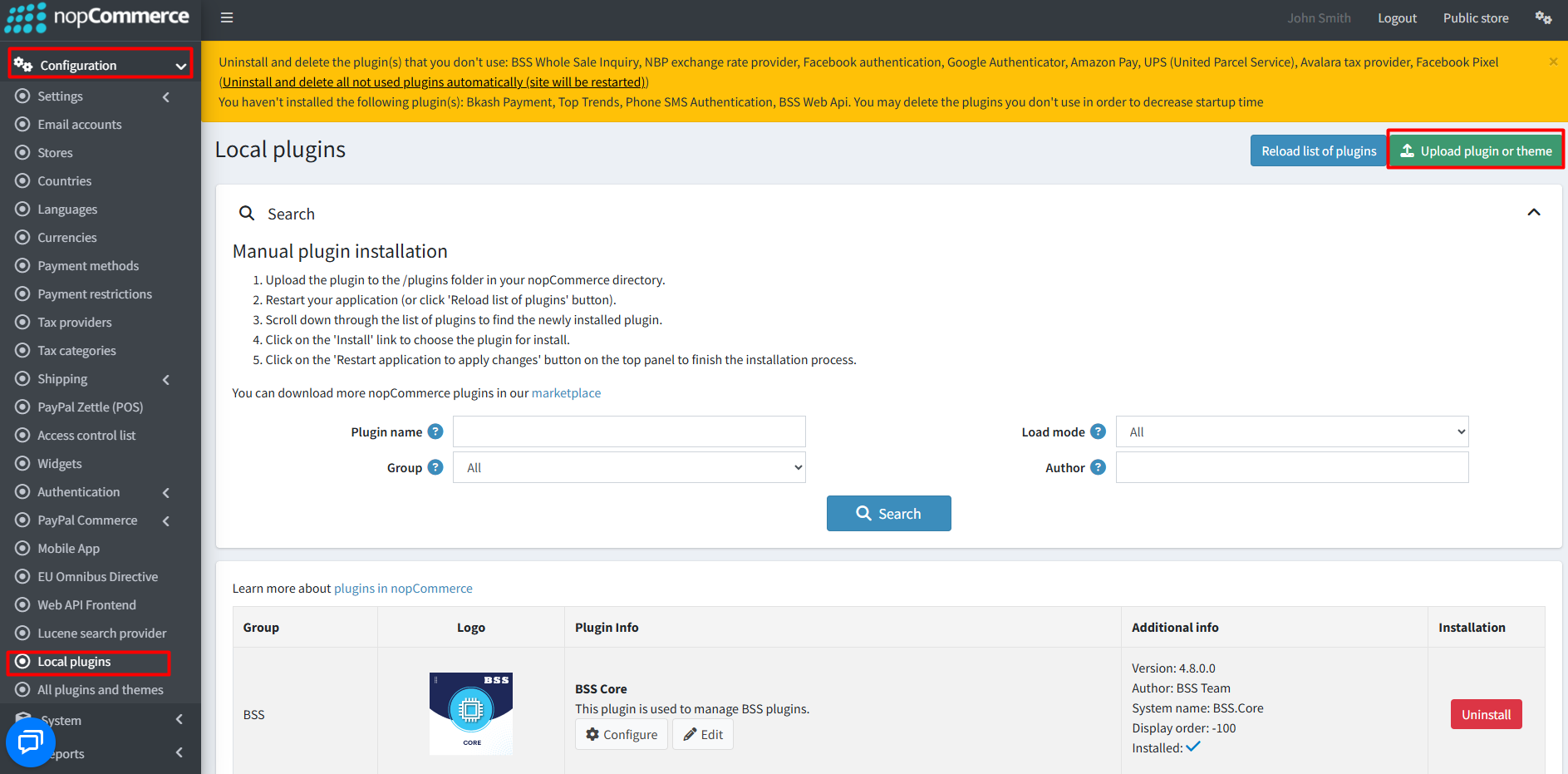
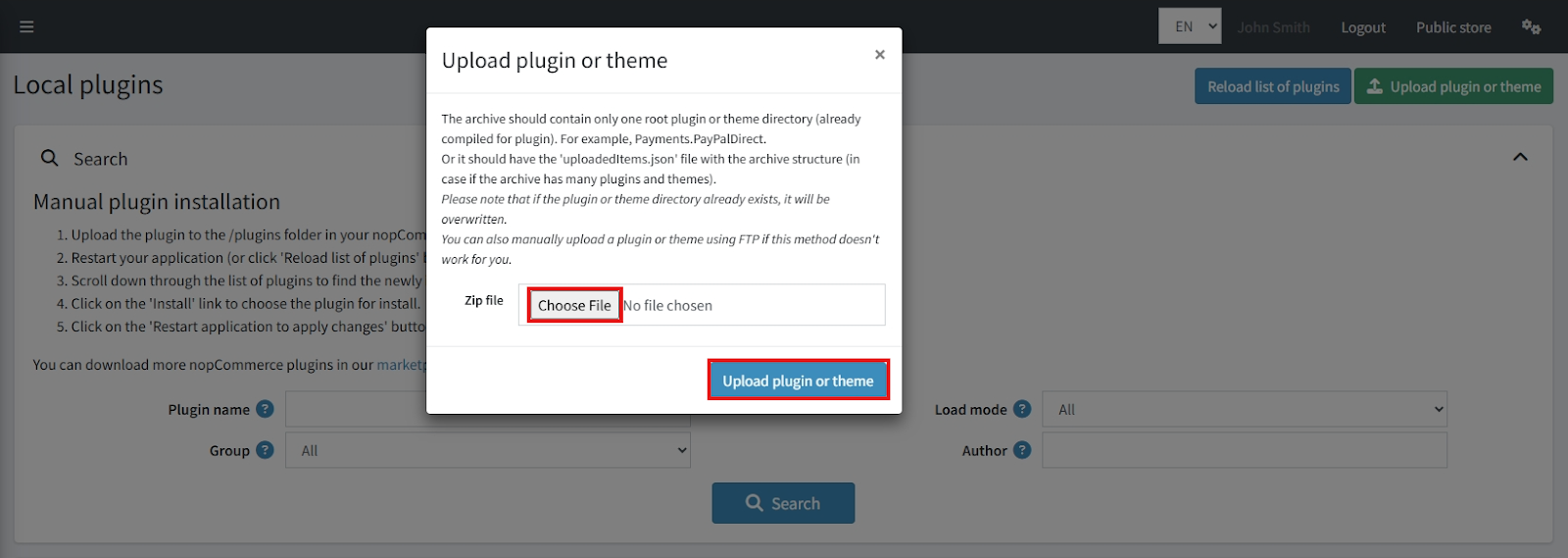
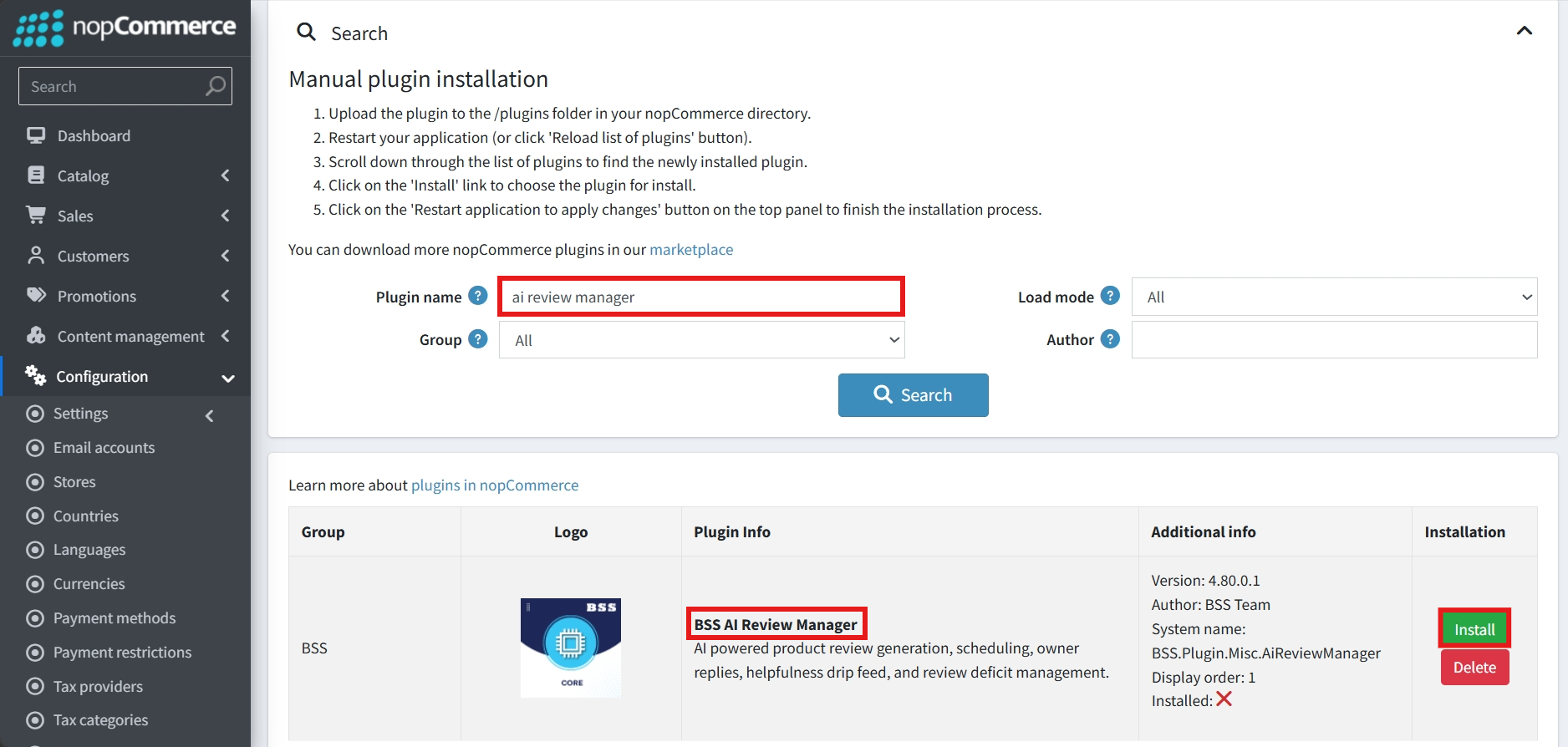
- After uploading, install the ‘BSS Core’ Plugin and ‘BSS AI Review Manager’.
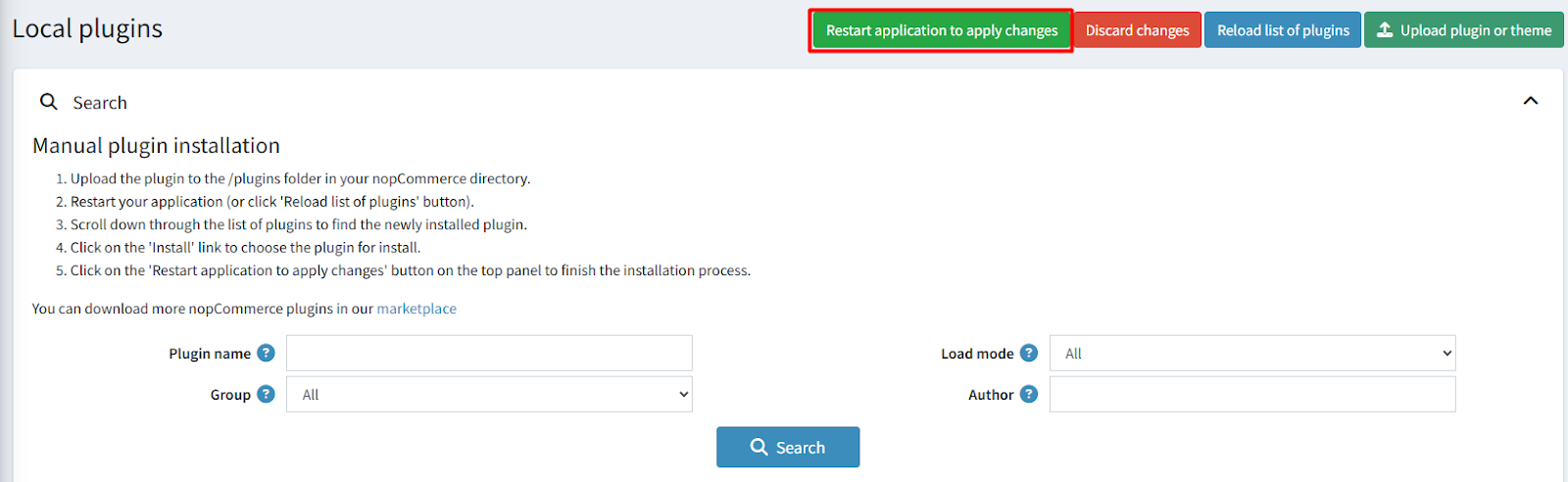
- To make the plugins functional, restart the application.
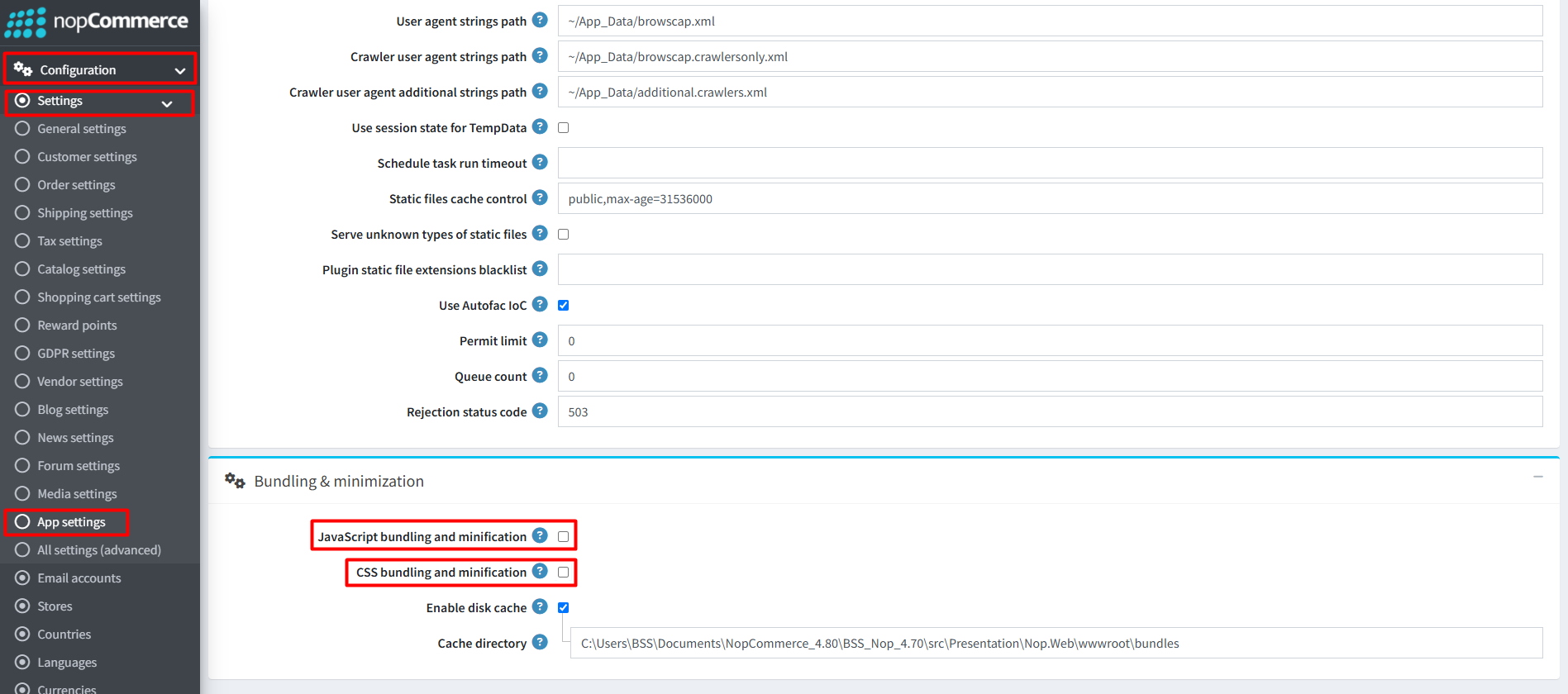
Recommendation: Go to > App Settings. If you find JavaScript bundling and minification, CSS bundling and minification are checked, then uncheck these two options and disable them.
CONFIGURE
-
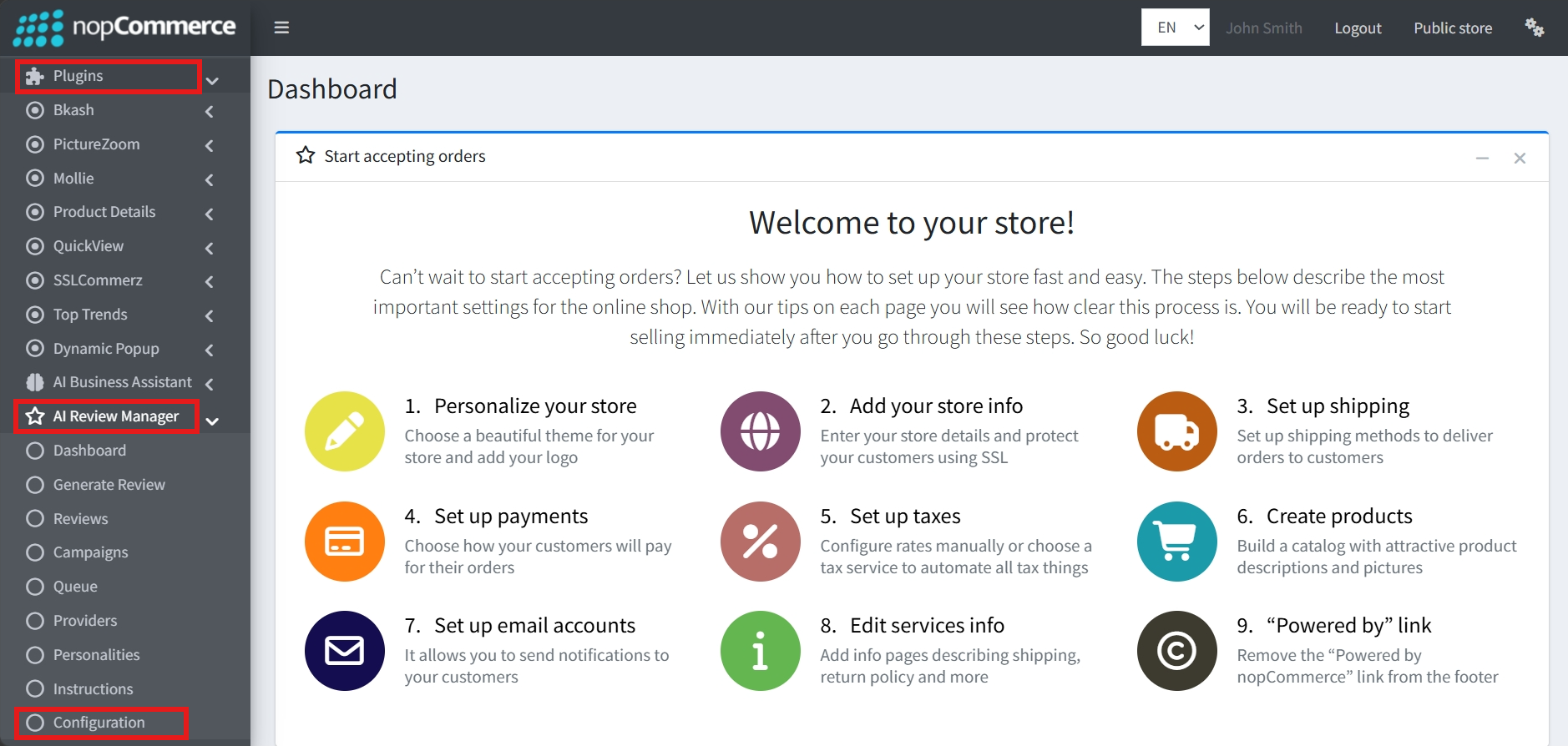
Go to Admin → BSS → Plugins → AI Review Manager → Configuration
-
Enter the License string and save it. Then clear cache.

-
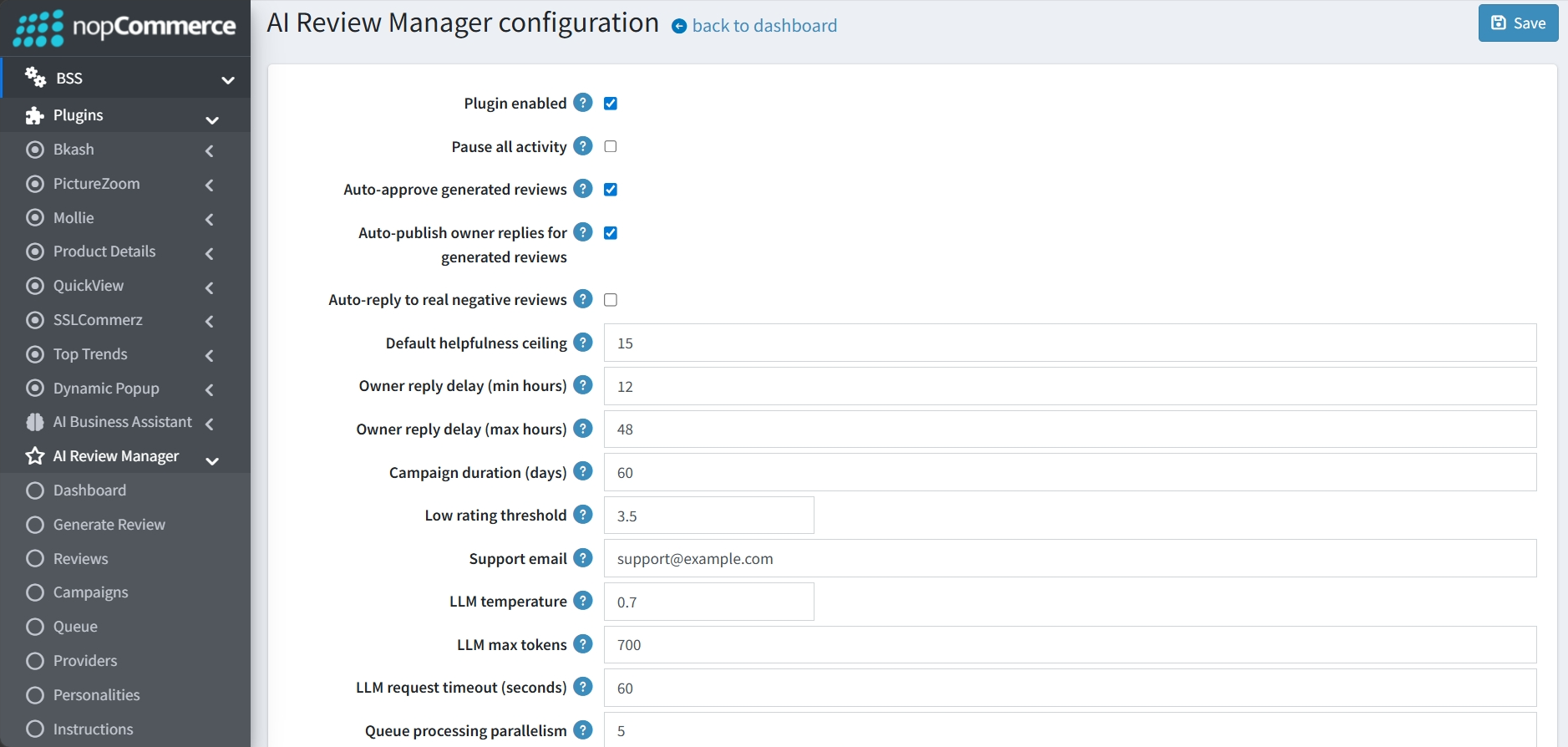
Then again go to BSS → Plugins → AI Review Manager → Configuration to manage the automation, behavior, and technical parameters of the AI's review generation and response system.
-
Activity Control: A master toggle to enable the plugin or pause all activity across the system.
-
Approval & Publishing: Options to auto-approve generated reviews and auto-publish owner replies ensure that AI-created content can go live without manual intervention.
-
Auto-reply to real negative reviews: A toggle that allows the AI to automatically respond to actual customer feedback that falls below a certain rating.
-
Engagement Metrics: A Default helpfulness ceiling can be set to manage the simulated helpfulness of generated content.
-
Owner Reply Delays: Configurable minimum and maximum hour ranges (e.g., 12 to 48 hours) ensure that owner responses do not appear instantly, mimicking human behavior.
-
Campaign Management: A default Campaign duration (e.g., 60 days) can be defined for drip-feed campaigns that gradually add reviews over time.
-
Low Rating Threshold: Defines the star rating that triggers the auto-reply feature for negative feedback.
-
Support Email: A designated field for the store's contact address to be used within the system.
-
LLM Temperature: Adjusts the creativity of the AI output, with a default of 0.7.
-
Max Tokens & Timeout: Sets the maximum length for generated text (e.g., 700 tokens) and the time the system will wait for a response (e.g., 60 seconds).
-
Queue Processing Parallelism: Determines how many generation tasks the system can process simultaneously.
LLM PROVIDERS
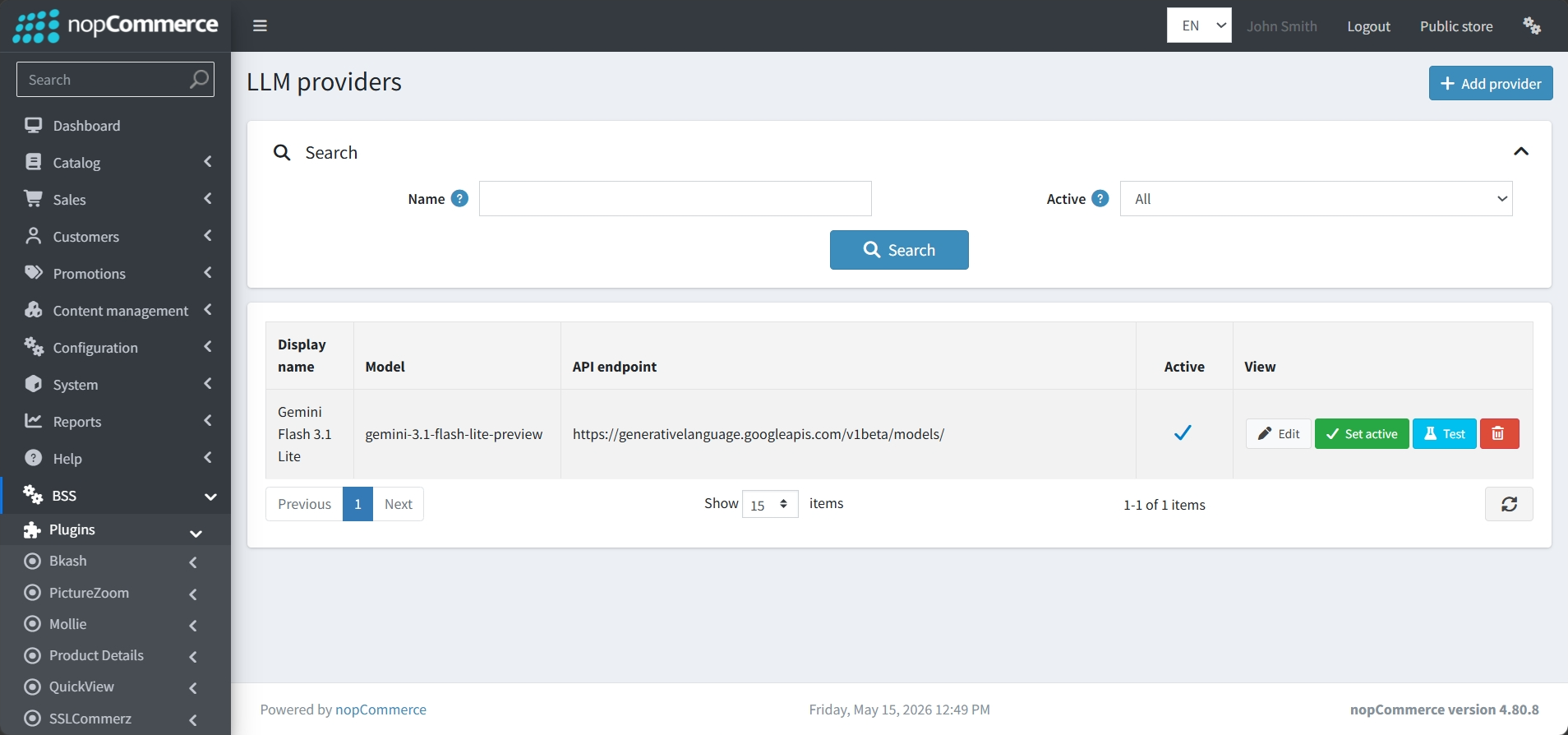
- Go to Admin → BSS → Plugins → AI Review Manager → LLM Providers to view and manage LLM Providers.
-
Provider Overview: Displays the Display name, specific Model version, and the API endpoint URL.
-
Status Control: Shows which providers are Active and allows you to quickly Set active a specific model to be used by the plugin.
-
Testing & Maintenance: Includes a Test button to verify the API connection is working correctly, as well as options to Edit or Delete existing providers.
-
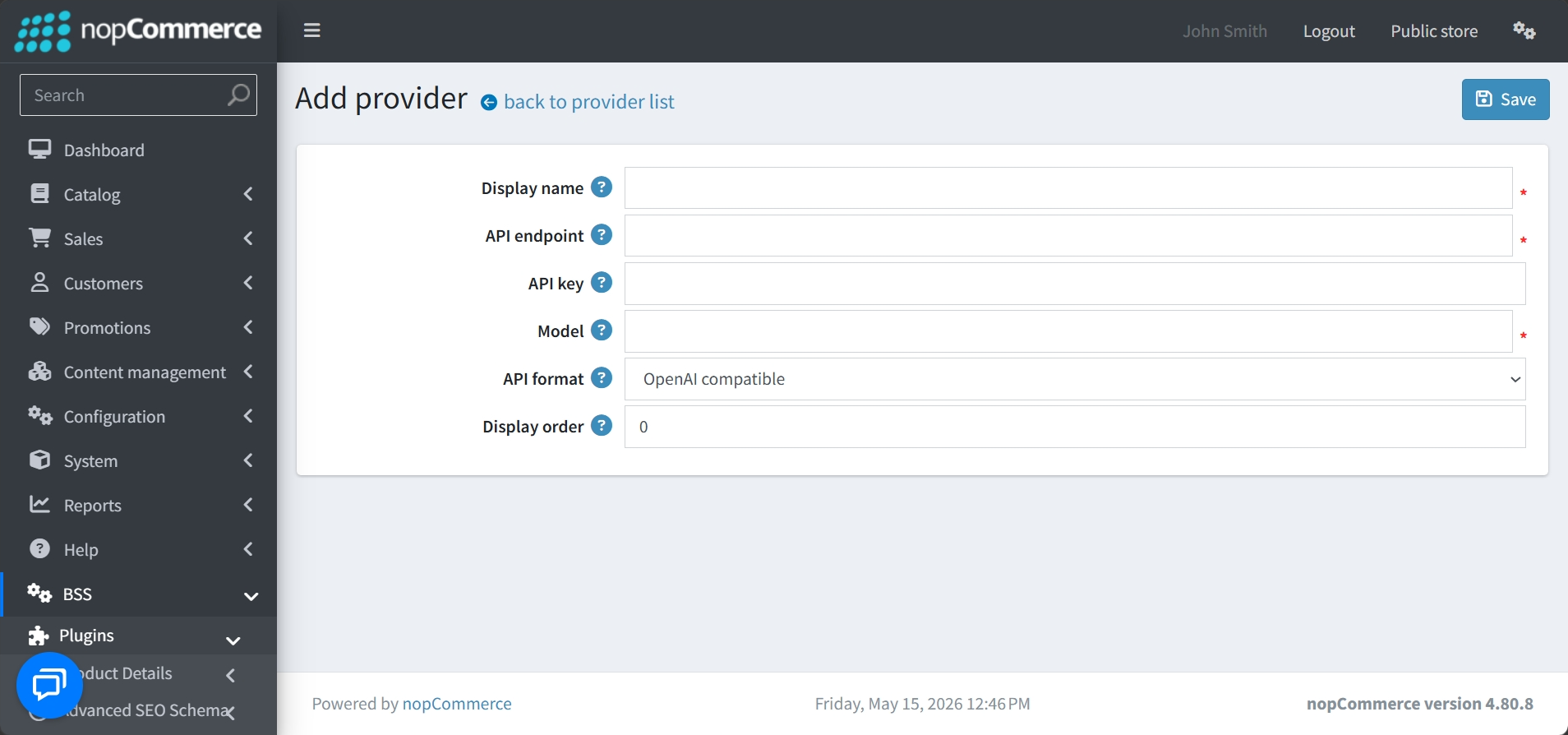
Adding a New Provider: Click on the Add New button at the top right to add a new provider.
-
Enter a recognizable Display name for the provider.
-
Provide the API Endpoint (base URL) for the service.
-
Enter the API Key provided by your AI service
-
Specify the exact AI Model you wish to use
-
Select the API Format from the dropdown menu
-
Set the Display Order to determine where the provider appears in your lists
REVIEWER PERSONALITIES
-
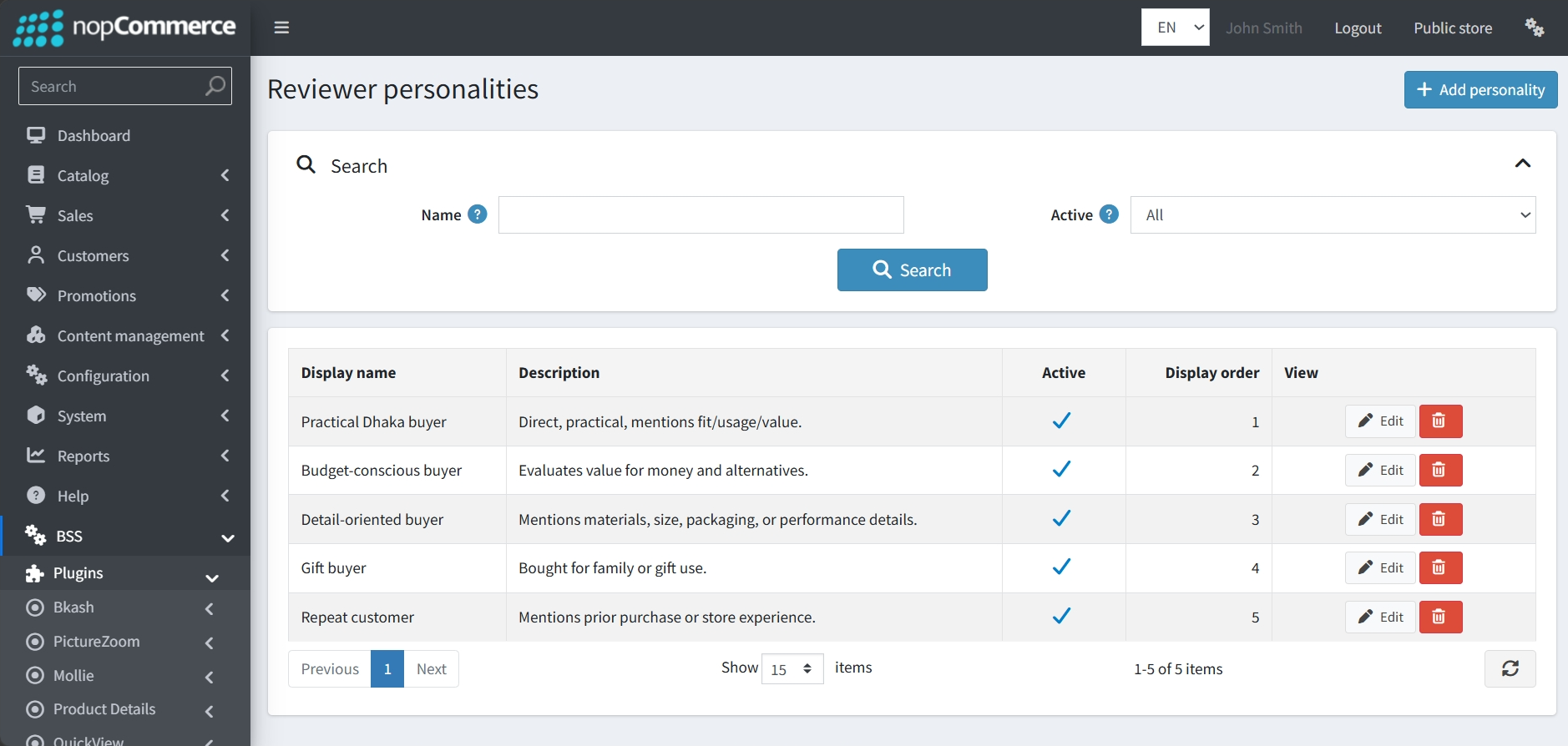
Go to BSS → Plugins → AI Review Manager → Personalities to define and manage distinct personas for the AI to adopt when generating content.
-
Search: Find specific personalities by Name or Active status.
-
Display name & Description: Identifies the personality type and their specific behavioral focus.
-
Active Status: A toggle to enable or disable specific personas from being used in campaigns or manual generation.
-
Display order: Controls the sequence in which these personalities appear in selection menus across the plugin.
-
Modify: Use the Edit or Delete buttons to update or remove existing personas.
-
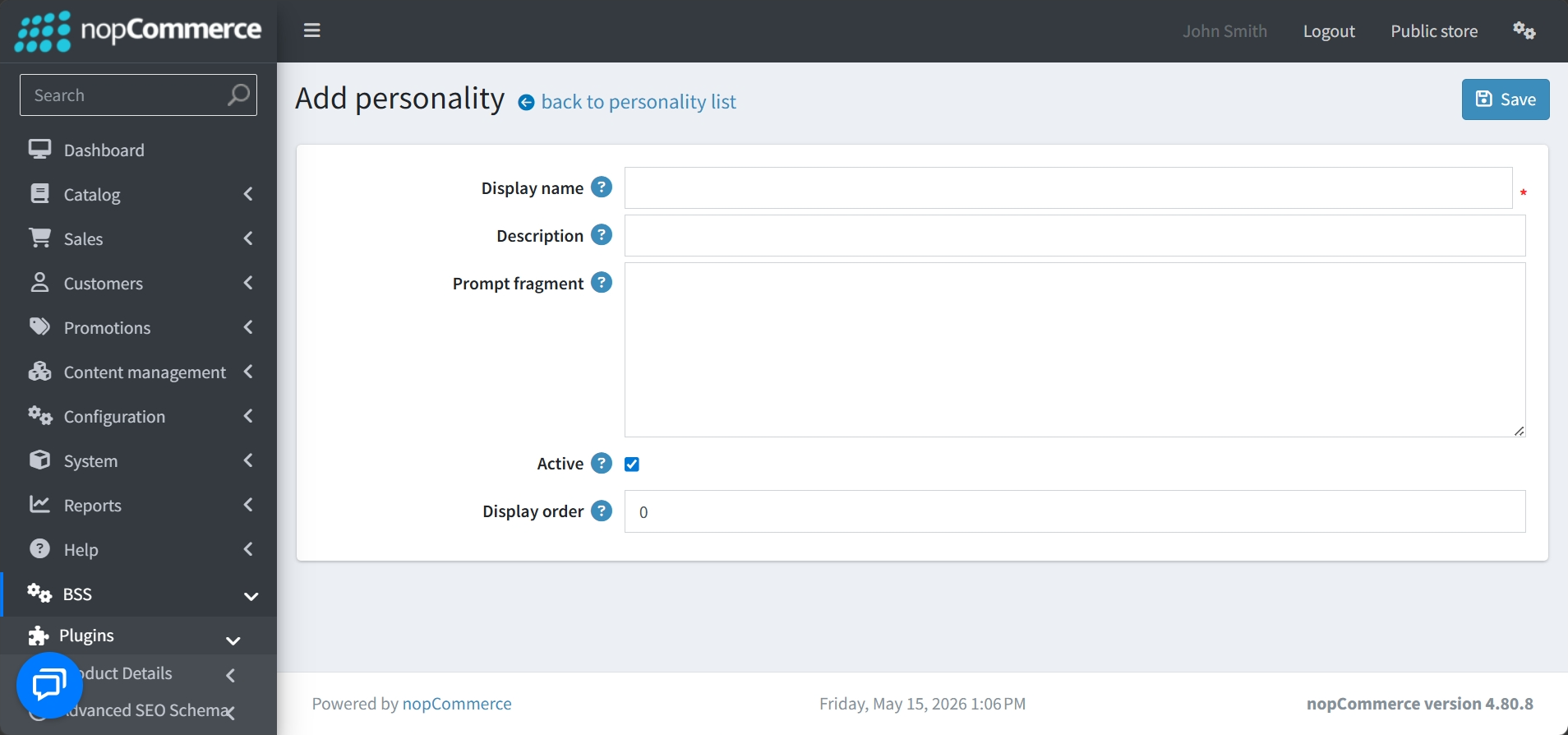
Create: Add new reviewer types via the Add personality button at the top right.
-
Display name: The required internal name for the persona.
-
Description: A brief summary of what this reviewer represents.
-
Prompt fragment: The most critical field, where you provide the specific behavioral instructions or traits the Large Language Model should adopt when writing the review.
-
Management settings: You can set the initial Active status and assign a Display order before saving.
INSTRUCTION PRESETS
-
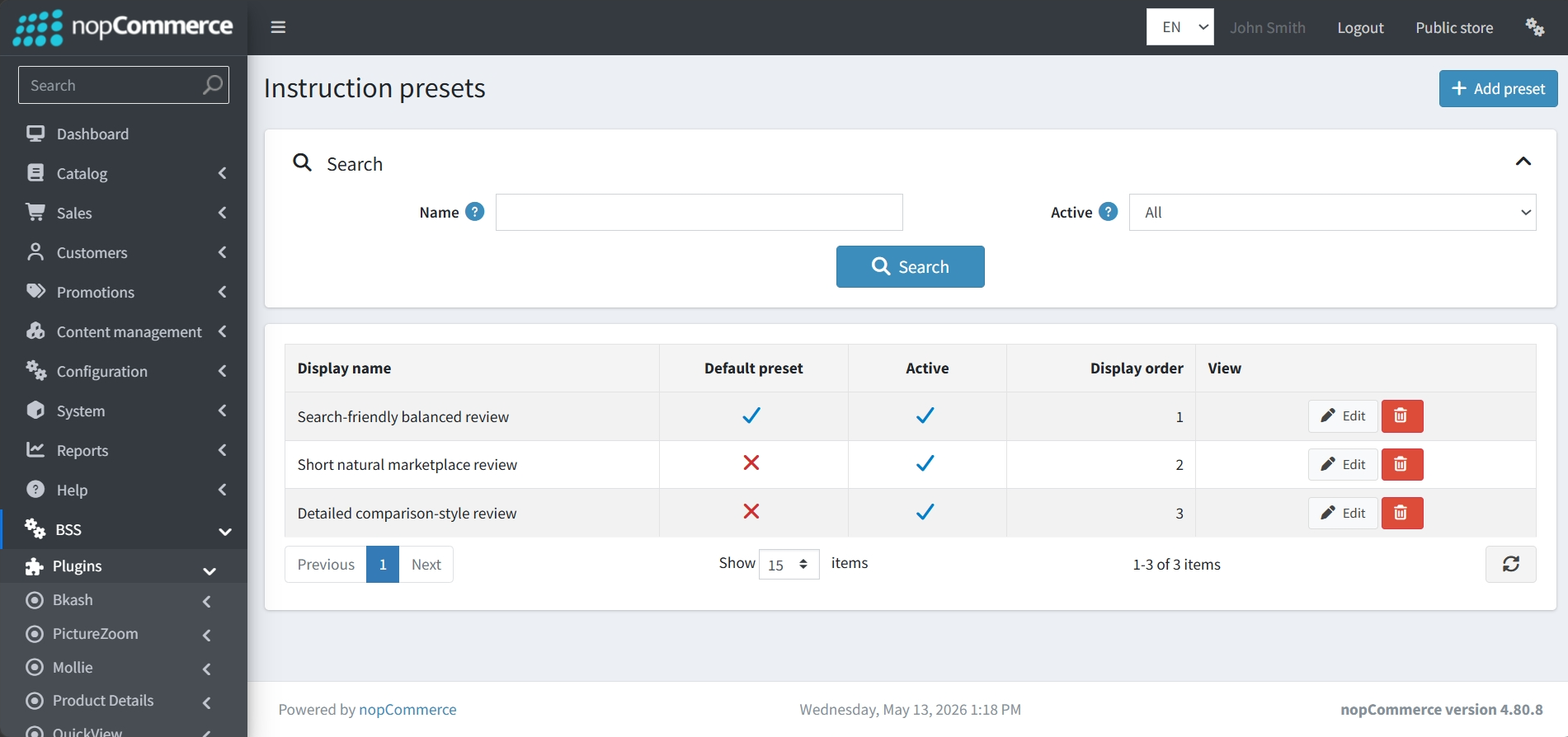
Go to BSS → Plugins → AI Review Manager→ Personalities to create and manage specific guiding prompts that tell the Large Language Model (LLM) exactly how to structure and write a review.
-
Preset Overview: Displays the Display name of the preset, its Active status, and its Display order in selection menus.
-
Default Status: Clearly indicates which preset is currently marked as the Default preset.
-
Search & Modify: Includes a search bar to find specific presets and buttons to Edit or Delete existing ones.
-
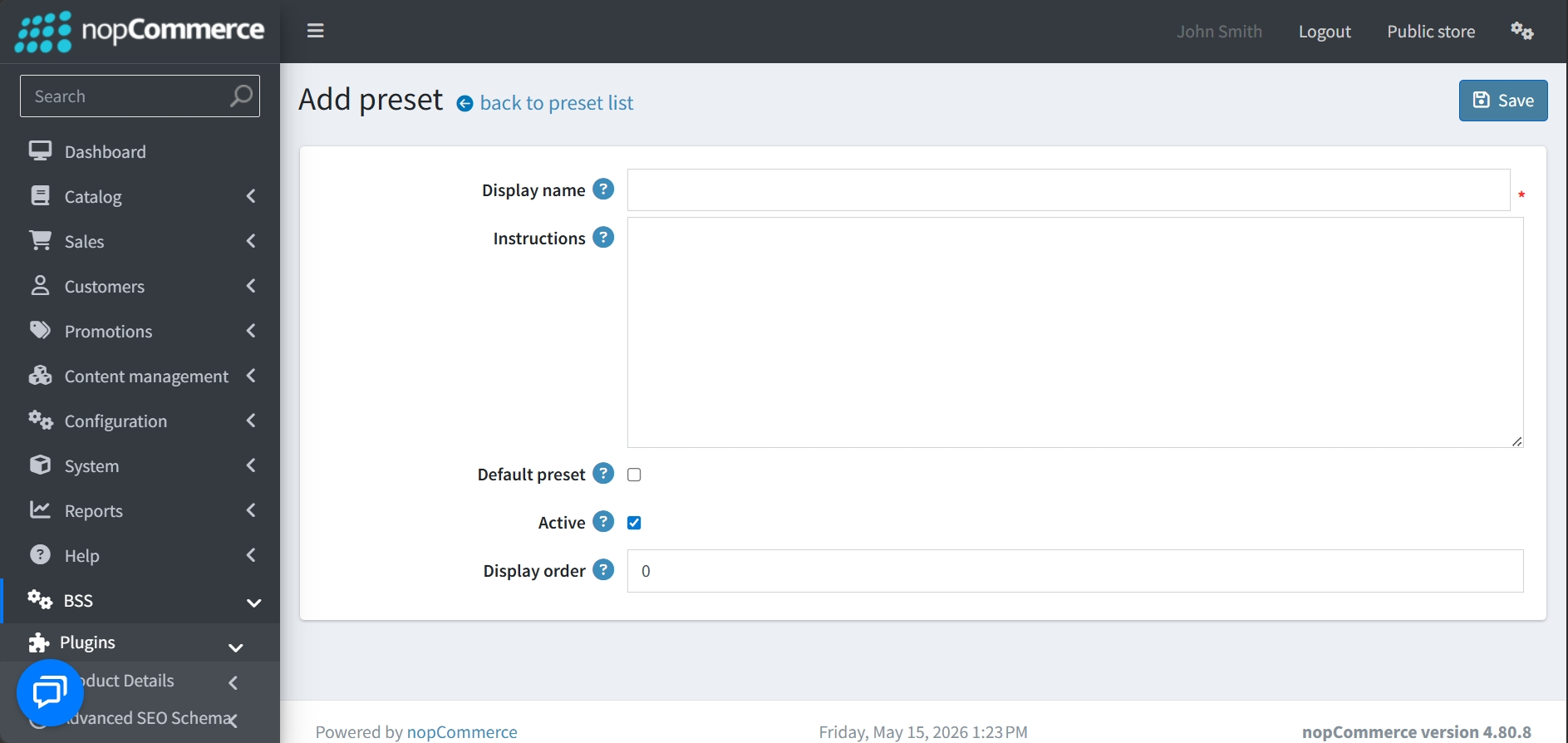
Create: Add new presets via the Add preset button at the top right.
-
Display name: The internal name used to identify the preset throughout the plugin.
-
Instructions: The core field where you enter the detailed prompt for the LLM. This defines the style, length, and specific elements (like pros/cons or SEO keywords) the AI should include.
-
Default preset: A checkbox that, if selected, makes this the primary choice for new campaigns and manual generations.
-
Active & Order: Settings to enable the preset and control its position in selection lists.
GENERATE AI REVIEWS
-
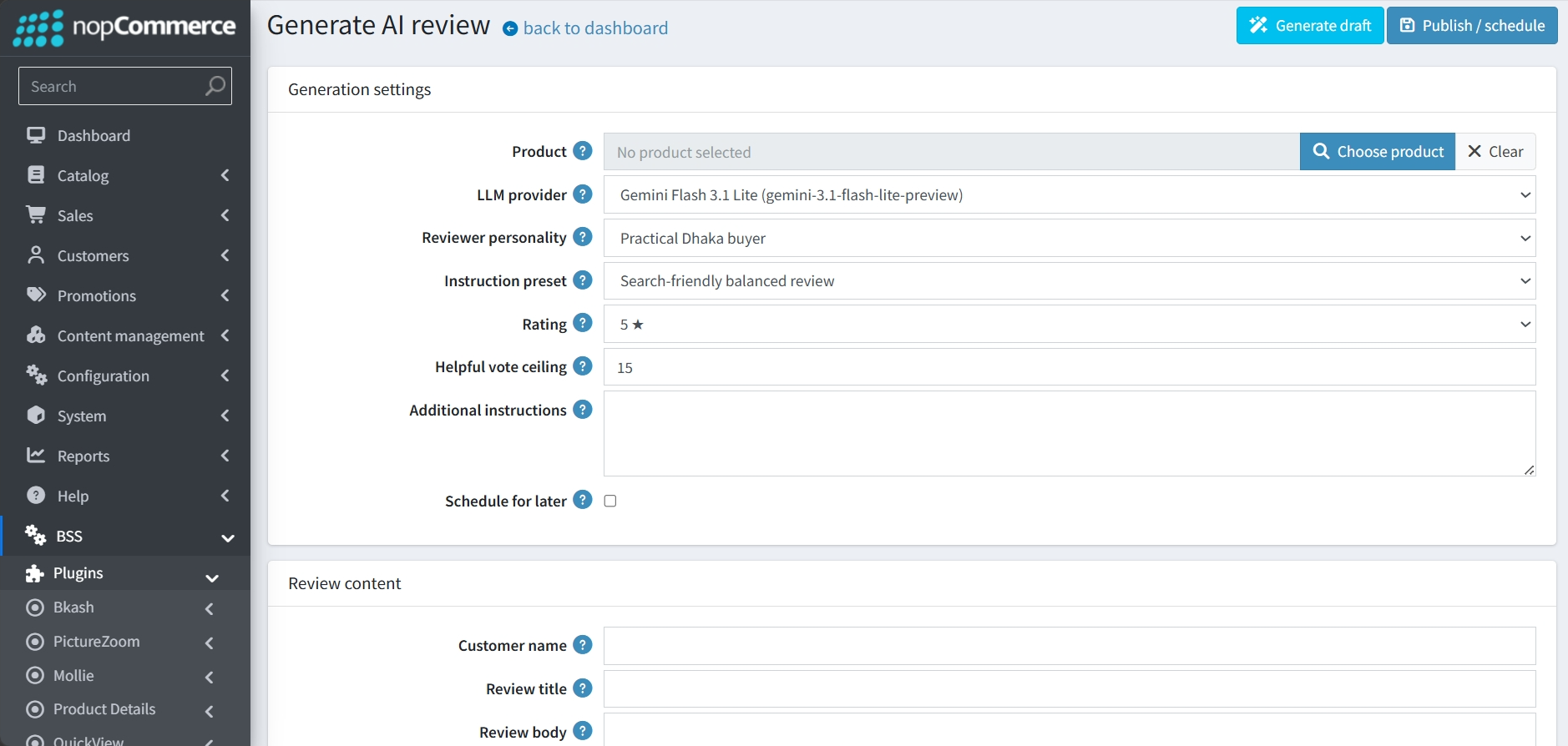
Go to BSS → Plugins → AI Review Manager→ Generate Review to create specific, one-off reviews for any product in your catalog. On the Dashboard, clicking the Generate button next to any product will take you to the generation interface with that product already selected.
-
Product Selection: A field to manually "Choose product" if you did not arrive here via the deficit scanner in the Dashboard.
-
Core Parameters: Dropdown menus to select the specific LLM provider, Reviewer personality, and Instruction preset to be used for the task.
-
Rating: A selectable star rating (1–5 stars) that the AI should reflect in its review.
-
Helpful vote ceiling: A field to define the maximum number of simulated helpfulness votes the review can receive, which defaults to 15.
-
Additional instructions: A text area where you can enter specific custom prompts or keywords for the AI to include in this particular review.
-
Schedule for later: A checkbox that allows you to delay the publication of the review rather than posting it immediately.
-
Once your settings are configured, the tool offers a two-step process:
-
Generate draft: Clicking this button prompts the AI to create the content based on your chosen parameters.
-
Review Content: The generated Customer name, Review title, and Review body will appear in the fields at the bottom of the page, allowing you to review and edit the text before it goes live.
-
Publish / schedule: Once satisfied with the content, you can use this button to finalize the review and either publish it immediately or add it to the Generation queue for its scheduled time.
-
DRIP-FEED CAMPAIGNS
-
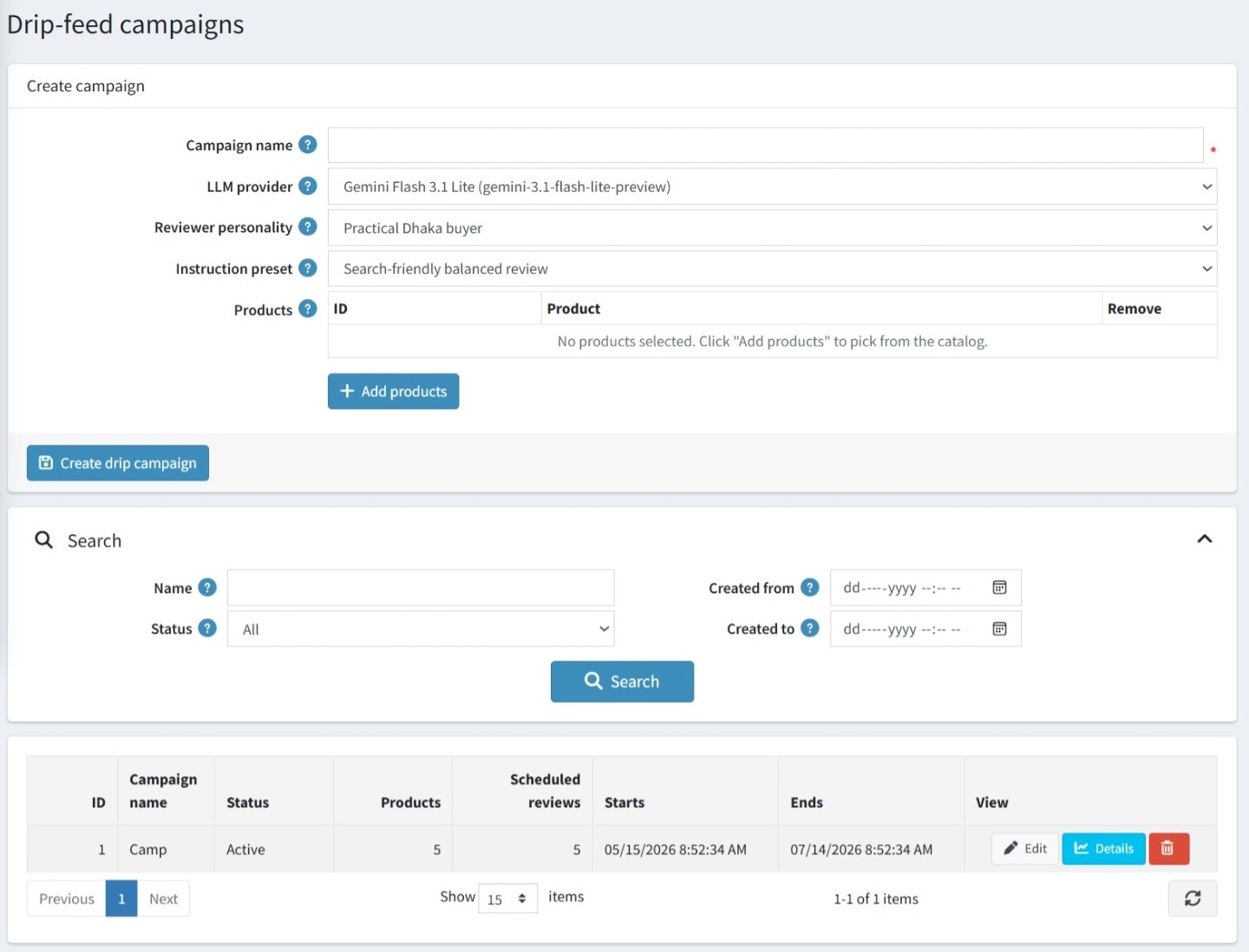
Go to BSS → Plugins → AI Review Manager→ Campaigns to automatically generate product reviews for multiple products simultaneously with a specific AI configuration over a sustained period to ensure natural-looking store activity.
-
Identification: A Campaign name is required for internal tracking and management.
-
AI Configuration: You must select a specific LLM provider, a Reviewer personality, and an Instruction preset to guide the writing style.
-
Product Selection: A dedicated Products section allows you to Add products from your catalog to include them in the campaign's generation cycle.
-
Finalization: Once configured, the Create drip campaign button initiates the process.
CAMPAIGN MANAGEMENT & MONITORING
-
Search and Filtering: A dedicated search section allows you to filter your campaign list by Name, Status, and specific Created from/to date ranges.
-
Scope and Volume: The list displays the total number of Products included in the campaign and the total count of Scheduled reviews to be generated over its duration.
-
Status and Timing: Clearly see if a campaign is Active and monitor its specific Starts and Ends dates.
-
Campaign Management: Each entry in the campaign list includes direct buttons to Edit the campaign's parameters, view its full Details, or Delete the initiative entirely.
GENERATION QUEUE
-
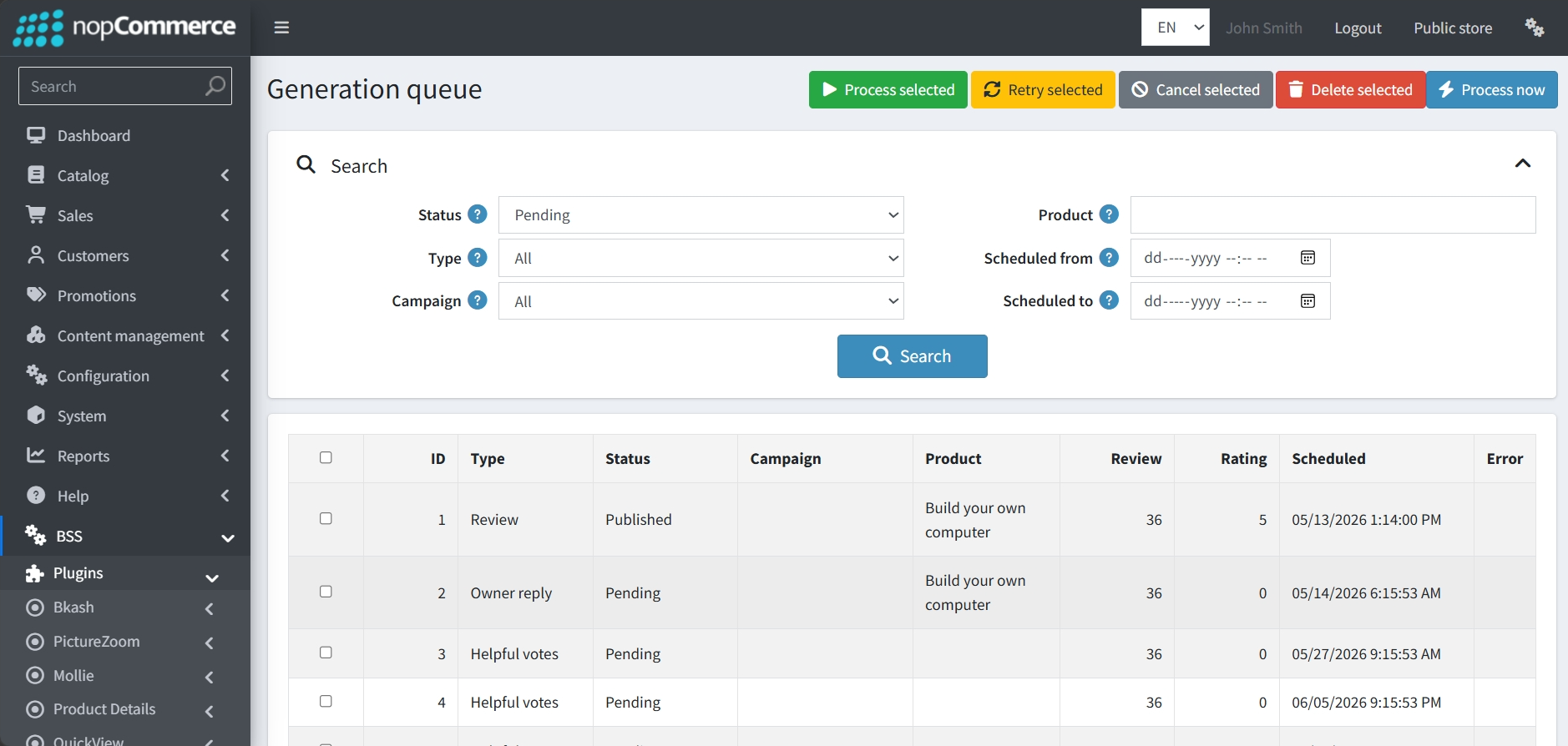
Go to BSS → Plugins → AI Review Manager→ Queue to view all scheduled and background activities.
-
Task Types: The queue manages three distinct types of automated actions: Reviews, Owner replies, and Helpful votes.
-
Status & Scheduling: You can see exactly when a task is Scheduled to run and its current Status. This allows you to verify that owner replies and helpfulness votes are being drip-fed over time to appear natural.
-
Queue Controls: Administrators have several tools to manage these tasks, including buttons to Process selected items immediately, Retry failed tasks, Cancel upcoming ones, or Delete entries from the list.
-
Advanced Filtering: You can search the queue by Product, Campaign, Status, Type, or specific date ranges to monitor the progress of your SEO strategy.
REVIEW MANAGEMENT
-
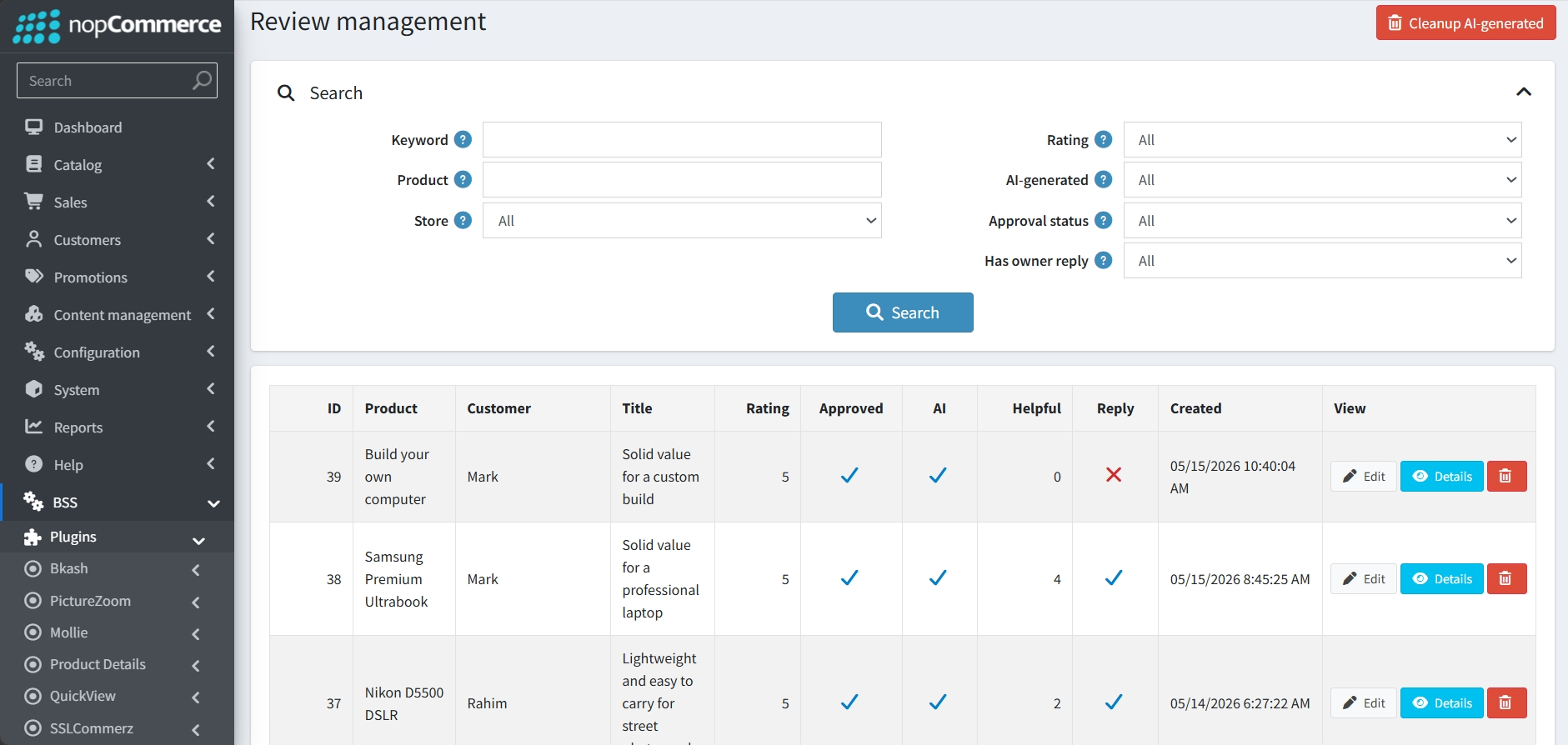
Go to BSS → Plugins → AI Review Manager→ Queue to view a comprehensive list of all product feedback.
-
Identification: A dedicated AI column clearly identifies which reviews were generated by the plugin versus those written by real customers.
-
Status Monitoring: The dashboard displays essential metrics at a glance, including the Rating, Approval status, number of Helpful votes, and whether the review Has an owner reply.
-
Filtering Options: You can narrow down the list using detailed filters, such as searching by Keyword, Product, Rating, or specifically viewing only AI-generated content.
-
Management Actions: Each entry includes buttons to Edit the review text, view full Details, or Delete the record.
-
Bulk Cleanup: A Cleanup AI-generated button at the top of the interface allows for the quick removal of automated content if needed.
AI REVIEW MANAGER DASHBOARD
-
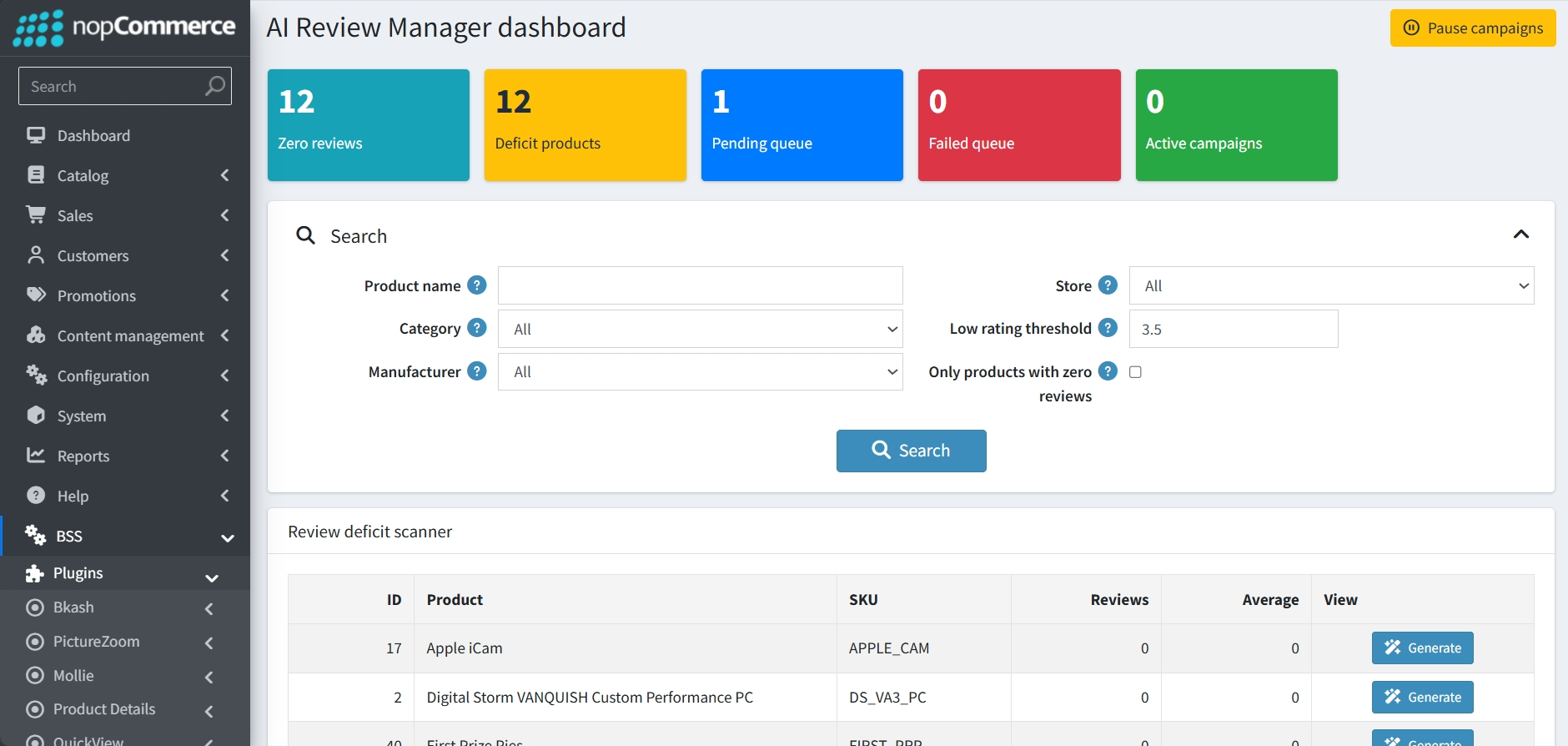
Go to BSS → Plugins → AI Dashboard. The AI Review Manager dashboard serves as the central command center for monitoring your store's review health and automation status.
-
Real-Time Status Tiles: The top of the dashboard displays color-coded metrics for Zero reviews, Deficit products, the Pending and Failed queues, and the number of Active campaigns currently running.
-
Search and Filtering: Administrators can narrow down the product list by Product name, Category, Manufacturer, and Store, or use a Low rating threshold to target specific items.
-
Review Deficit Scanner: A detailed table lists products alongside their SKU, current review count, and average rating, making it easy to identify which items lack engagement.
-
Quick Generation: Each product in the scanner includes a Generate button, allowing you to immediately create a manual AI review for that specific item.
-
Global Campaign Control: A prominent Pause campaigns button is available at the top right to instantly halt all active automation across the store.
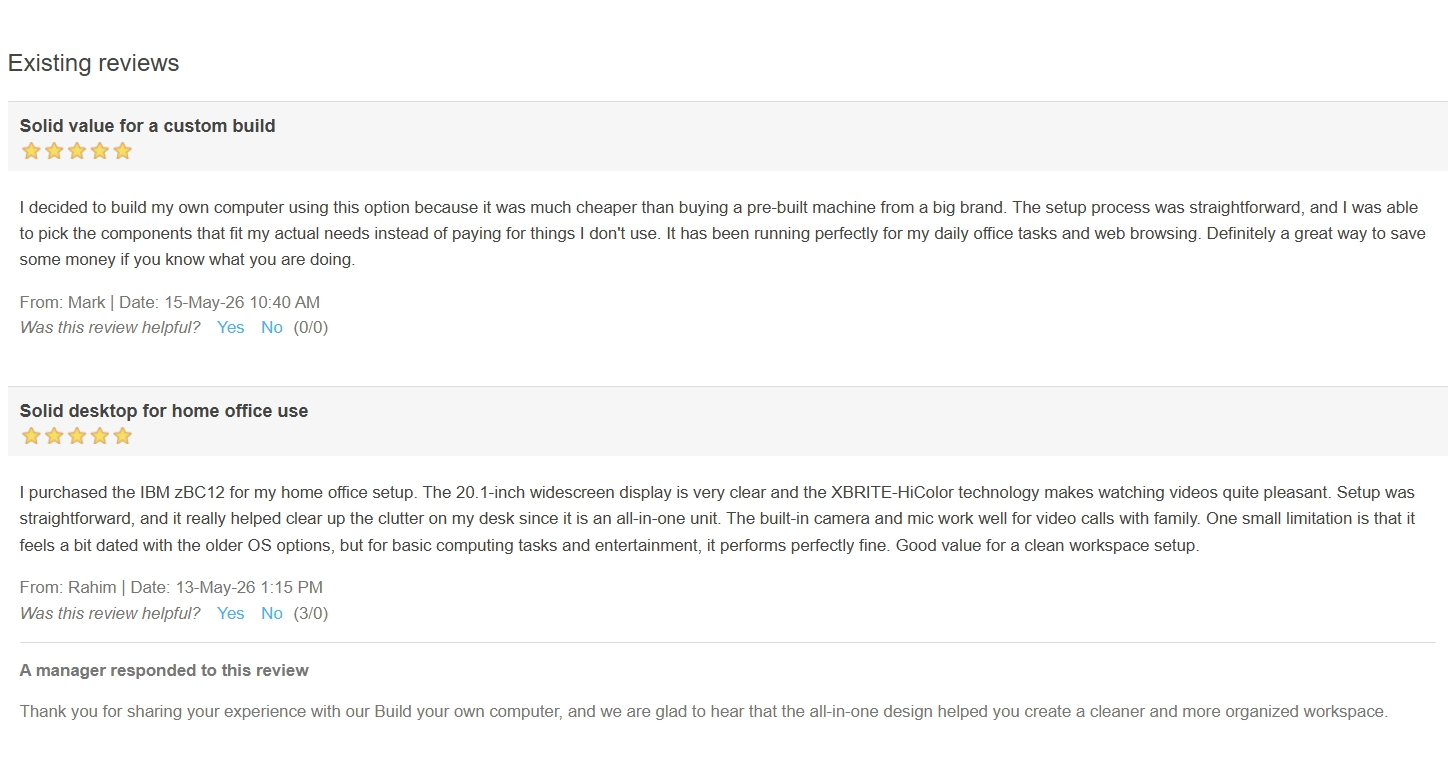
PUBLIC VIEW
FEATURES
-
Review Deficit Scanner: Provides a dashboard overview to quickly identify products with zero or low review counts for targeted engagement.
-
Drip-Feed Campaigns: Automates the generation of multiple reviews over a sustained period to ensure natural store activity.
-
Manual Review Generation: Includes a dedicated interface to manually create one-off AI reviews for specific products with custom instructions.
-
Automated Owner Replies: Features logic to automatically respond to real customer feedback that falls below a specified star-rating threshold.
-
Customizable Reviewer Personalities: Allows you to define distinct personas to ensure diverse and realistic feedback.
-
Instruction Presets: Enables the creation of specific writing templates to guide the AI’s style and SEO focus.
-
Intelligent Workflow Queue: Centralizes the scheduling and tracking of pending reviews, owner replies, and helpfulness votes to maintain a human-like pace.
-
Flexible LLM Integration: Supports multiple Large Language Model providers, including Google Gemini and OpenAI-compatible services.
-
Auto-Approval & Publishing: Offers toggles to automatically approve generated reviews and publish owner replies without manual oversight.
-
Simulated Engagement Metrics: Automatically manages and schedules "helpful" votes for generated content to increase social proof.


