
NopFashion Theme + 15 Plugin Bundle for NopCommerce
NopBeauty Theme + 12 Plugin Bundle for NopCommerce
NopNoor Theme + 16 Plugin Bundle for NopCommerce
NopGadget Theme + 18 Plugin Bundle for NopCommerce
NopEthnic Theme + 17 Plugin Bundle for NopCommerce
NopFurniture Theme + 19 Plugin Bundle for NopCommerce
NopPharma Theme + 16 Plugin Bundle for NopCommerce
NopVogue Theme + 17 Plugin Bundle for NopCommerce
NopGadence Theme + 18 Plugin Bundle for NopCommerce
BSS Ajax Filter
Created on: Mar 06, 2026
The AJAX Filter plugin enhances product browsing on your nopCommerce store by allowing customers to refine search results quickly and smoothly without reloading the page. Shoppers can filter products using attributes, specifications, manufacturers, tags, ratings, and more to find the items they need faster. Store administrators can easily configure filter options and control which filters appear for each category through the admin panel. This flexible setup improves product discovery, creates a smoother shopping experience, and helps customers navigate large product catalogs more efficiently.
Pre-Requisites:
- The plugin requires you to install the BSS Core plugin first.
Installation:
- Go to the Order Details Page and Download plugin package.
- Go to Administration → Configuration → Local plugins
- Within the bundle, you get all the required files, including BSS.Core
- Upload the zip files using the ‘Upload plugin or theme’ button
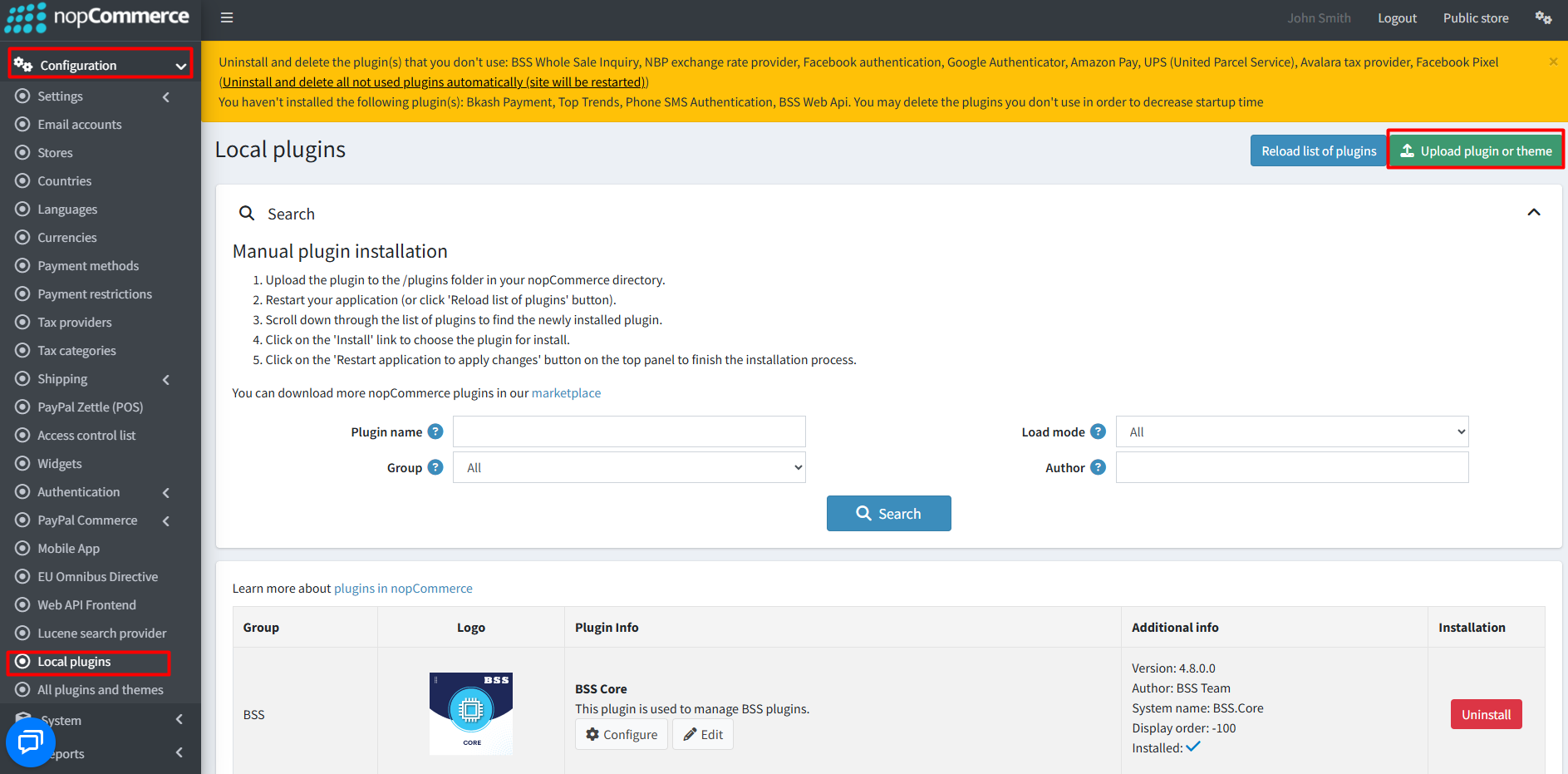
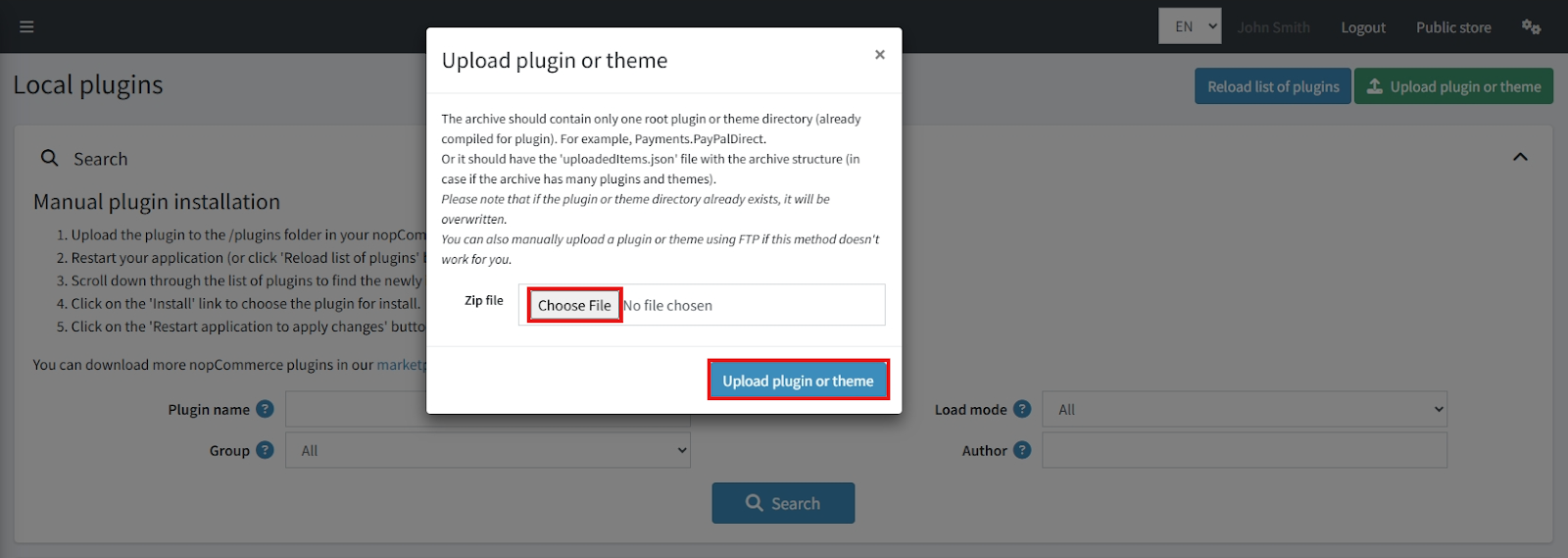
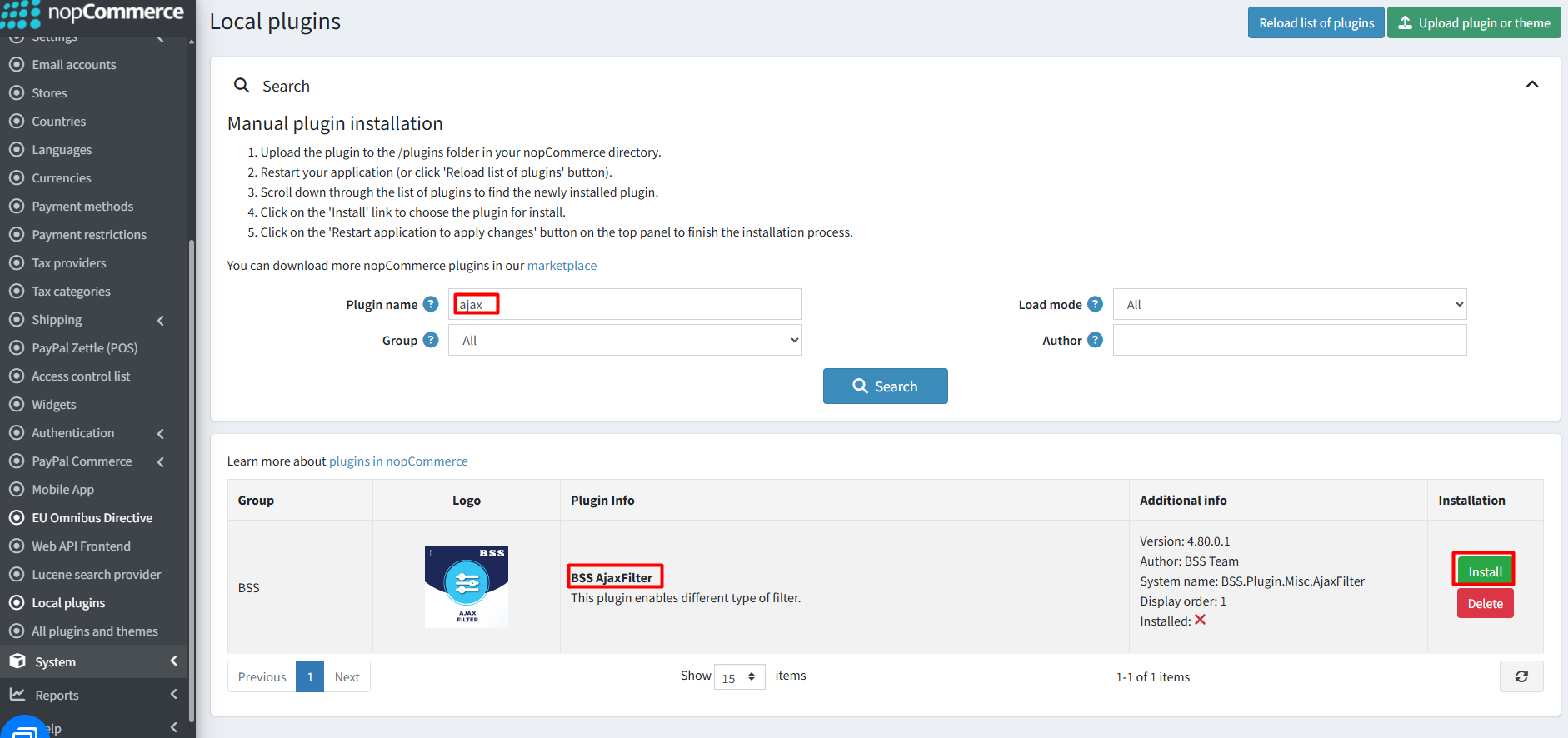
- After uploading, reload the ‘list of plugins’ and install the ‘BSS Core’ plugin first. Scroll down or search for the plugin name, then install ‘AjaxFilter’.
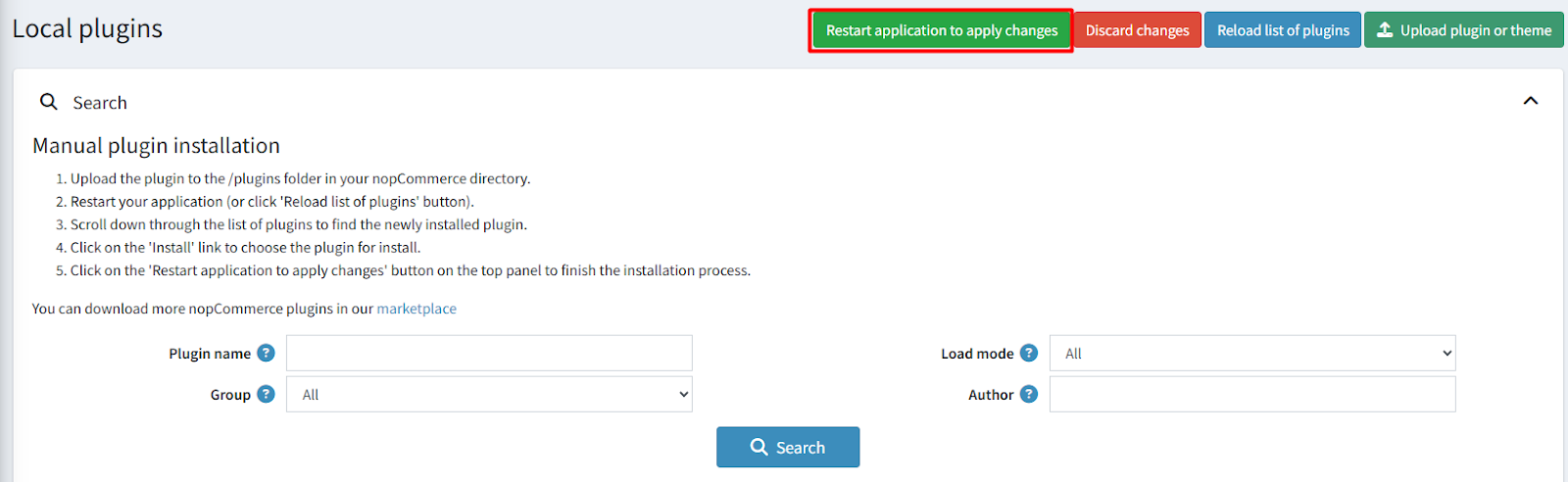
- To make the plugins functional, restart the application.
Recommendation: Go to > App Settings. If you find JavaScript bundling and minification, CSS bundling and minification are checked, then uncheck these two options and disable them.

Configuration:
- Go to Admin → BSS → Plugins → AjaxFilter → Configuration. Enter the License string and save it. Then clear cache.

- Go to BSS → Plugins → AjaxFilter → Configuration to set the Ajax Filter configuration.
Info
- Check the box to enable AJAX filter for your store.
- Enable price range filter: Check the box to enable the price range filter.
- Price filter display type: Select how you want to display the price filter (Slider, Input Field, or Both).
- Enable manufacturer filter: Check to enable filtering by manufacturer.
- Enable attribute filter: Check to allow filtering based on product attributes.
- Enable specification filter: Check to enable specification-based filtering.
- Enable discount filter: Check to allow filtering for discounted products.
- Enable rating filter: Check to enable filtering based on product ratings.
- Enable product tag filter: Check to enable filtering by product tags.
- Enable product availability type filter: Check to filter products based on availability.
- Max filter item to display: Enter the maximum number of filter items to display.
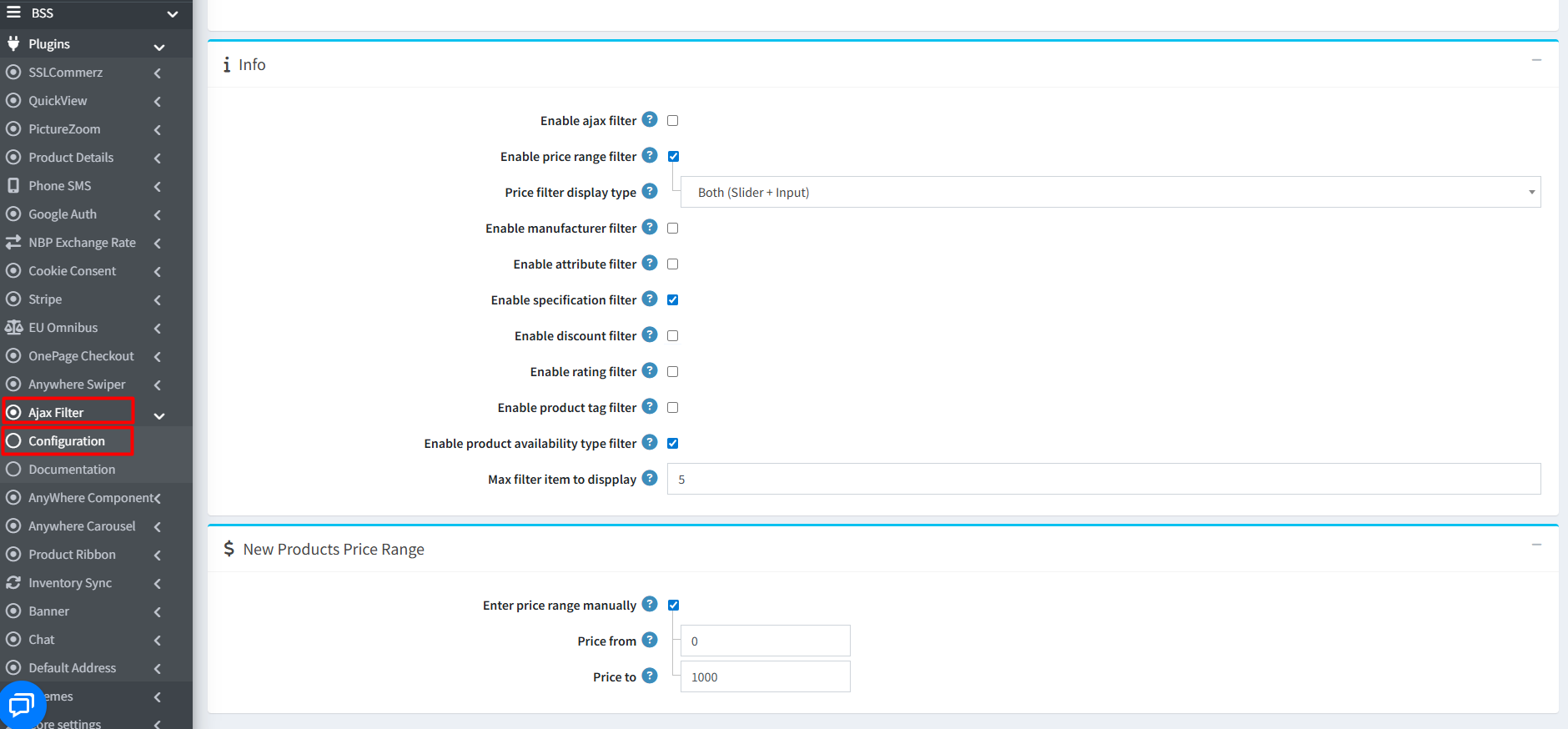
New Products Price Range
- Enter price range manually: Check this option to manually set minimum and maximum price limits for the New Products page. Uncheck it to automatically detect the range from available products.
- Price from: Set the minimum price for the price range filter on the New Products page.
- Price to: Set the maximum price for the price range filter on the New Products page.
Public View
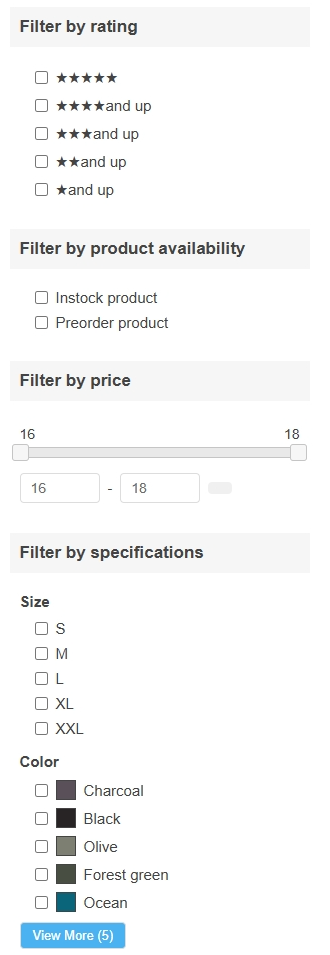
Features :
- Provide fast and responsive filtering with multiple selectable options for a smoother browsing experience for consistent user experience.
- Activate AJAX filtering to allow customers to refine products instantly without page reloads.
- Enable a price filter to help customers quickly narrow down products within their preferred budget.
- Display the price filter as a slider, input field, or both based on your preference.
- Manually set minimum and maximum price limits for the New Products page if needed.
- Allow users to filter products by manufacturer to easily find items from specific brands.
- Enable filtering based on product attributes such as size, color, or other options.
- Let customers refine results using product specifications for more precise searches.
- Allow shoppers to quickly find products that currently have discounts
- Enable filtering based on customer ratings to help users find highly rated products.
- Allow filtering by product tags for better product discovery.
- Help customers find products based on availability status.
- Set the maximum number of filter options displayed to keep the filter panel organized.
- Use AJAX filters on New Products, Vendor, Manufacturer, Product Tag, and Product Search pages for a consistent filtering experience.
- Display advanced filtering options on category pages to help customers refine results more effectively.
- Allow administrators to customize and manage filter fields directly from the admin panel.
Documentation Menu
NopFashion Theme + 15 Plugin Bundle for NopCommerce
NopBeauty Theme + 12 Plugin Bundle for NopCommerce
NopNoor Theme + 16 Plugin Bundle for NopCommerce
NopGadget Theme + 18 Plugin Bundle for NopCommerce
NopEthnic Theme + 17 Plugin Bundle for NopCommerce
NopFurniture Theme + 19 Plugin Bundle for NopCommerce
NopPharma Theme + 16 Plugin Bundle for NopCommerce
NopVogue Theme + 17 Plugin Bundle for NopCommerce
NopGadence Theme + 18 Plugin Bundle for NopCommerce


