
NopFashion Theme + 15 Plugin Bundle for NopCommerce
NopBeauty Theme + 12 Plugin Bundle for NopCommerce
NopNoor Theme + 16 Plugin Bundle for NopCommerce
NopGadget Theme + 18 Plugin Bundle for NopCommerce
NopEthnic Theme + 17 Plugin Bundle for NopCommerce
NopFurniture Theme + 19 Plugin Bundle for NopCommerce
NopPharma Theme + 16 Plugin Bundle for NopCommerce
NopVogue Theme + 17 Plugin Bundle for NopCommerce
NopGadence Theme + 18 Plugin Bundle for NopCommerce
BSS Visual Editor
Created on: Jul 16, 2026
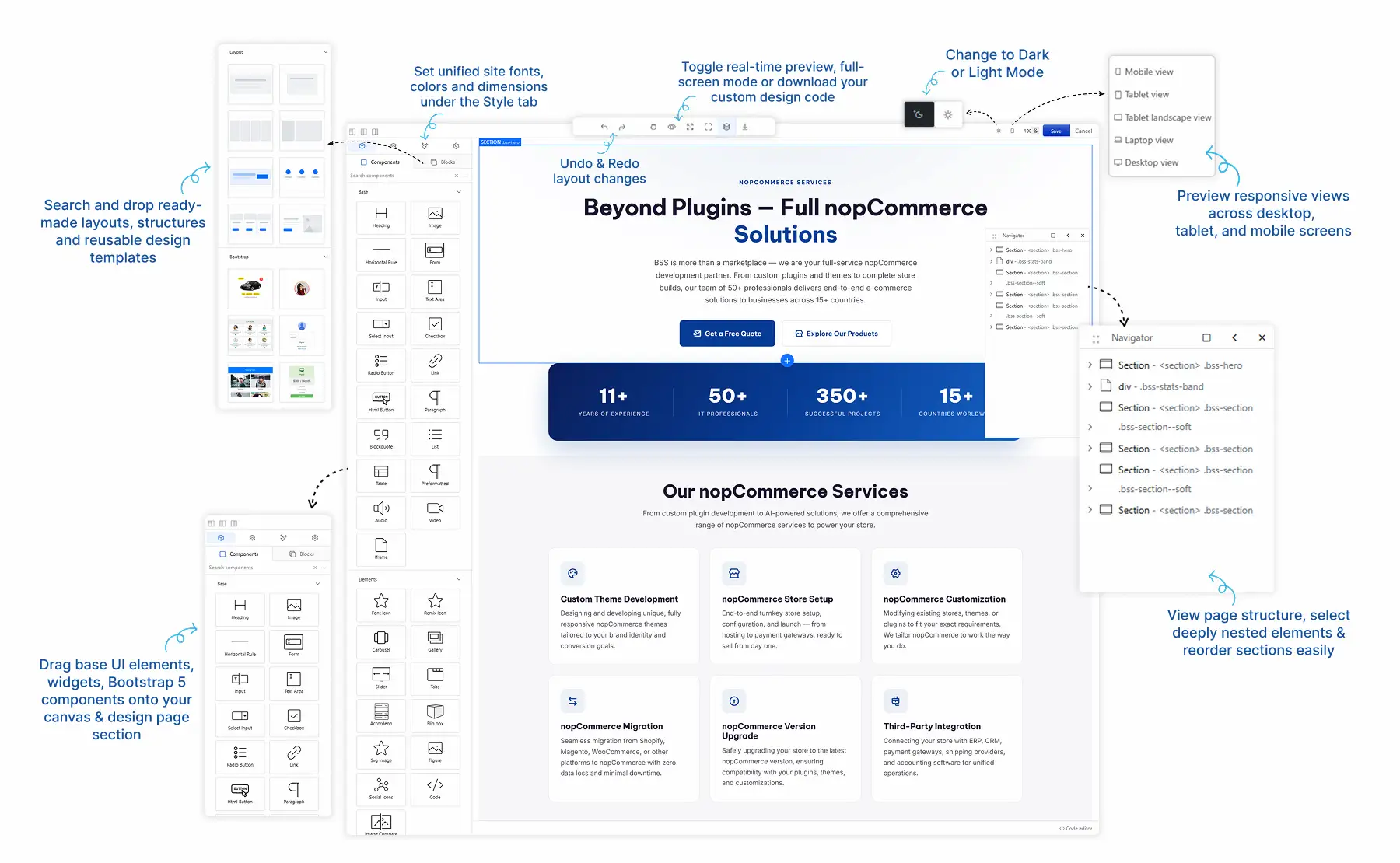
The BSS Visual Editor Plugin enables you to build responsive nopCommerce pages with an intuitive drag-and-drop page builder, no coding required. Design product pages, categories, CMS pages, blogs, and email templates, then enhance them with animations, reusable blocks, AI-assisted content, and custom HTML. This documentation will guide you through every feature to help you create engaging storefront content with ease.
PRE-REQUISITES
- The plugin requires you to install the BSS Core plugin first.
INSTALLATION
- Go to the Order Details Page and Download plugin package
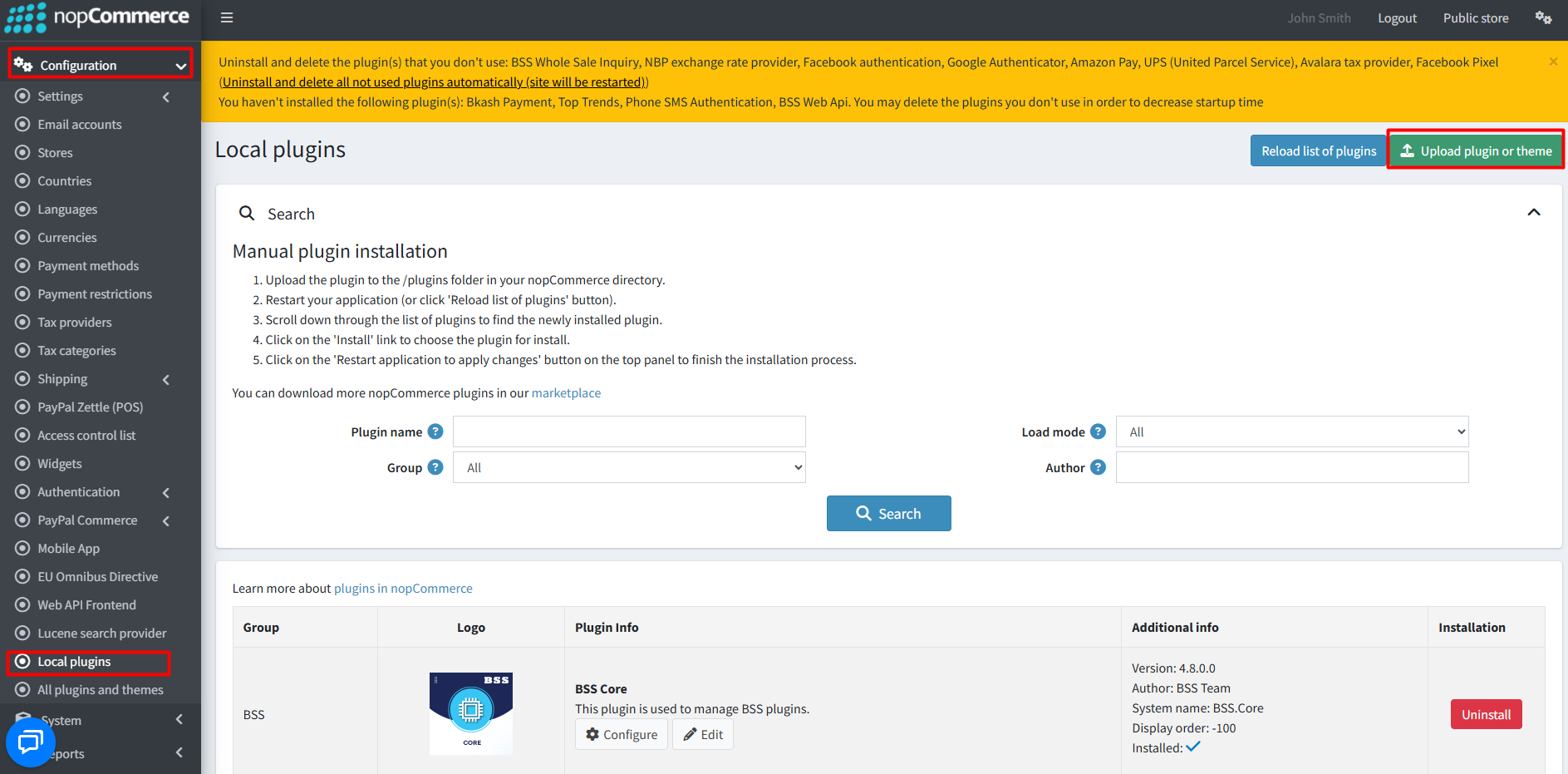
- Go to Administration → Configuration → Local plugins
- Within the bundle, you get all the required files, including BSS.Core
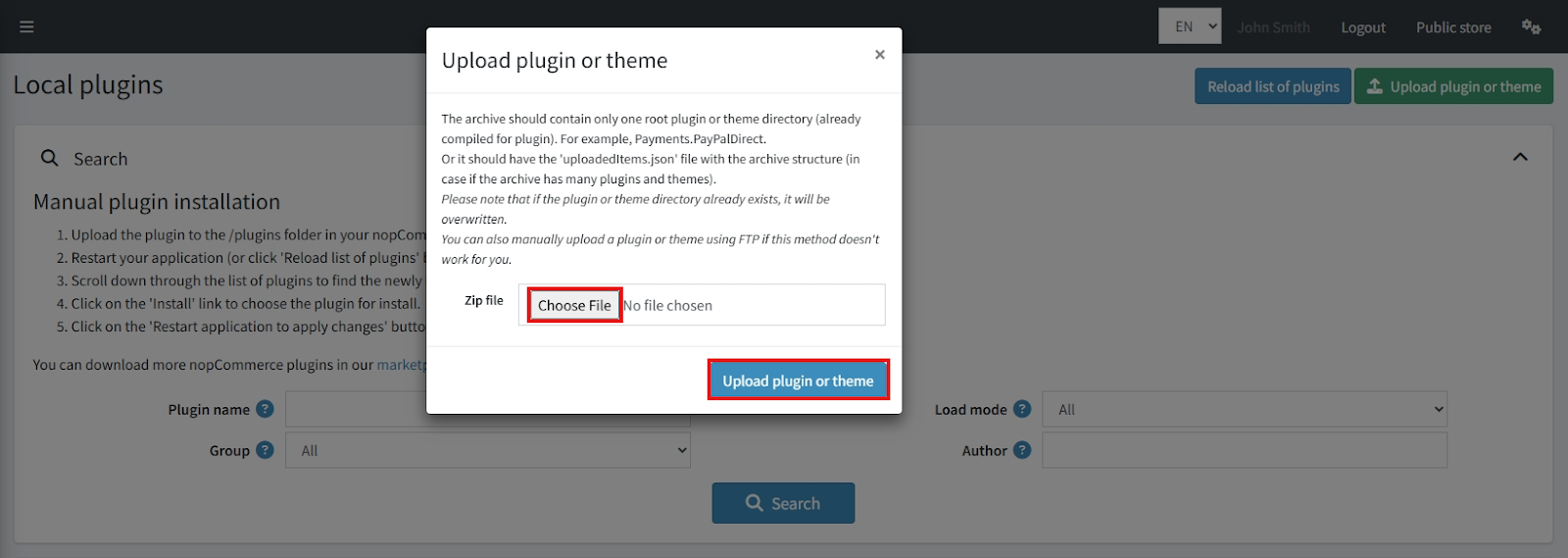
- Upload the zip files using the ‘Upload plugin or theme’ button
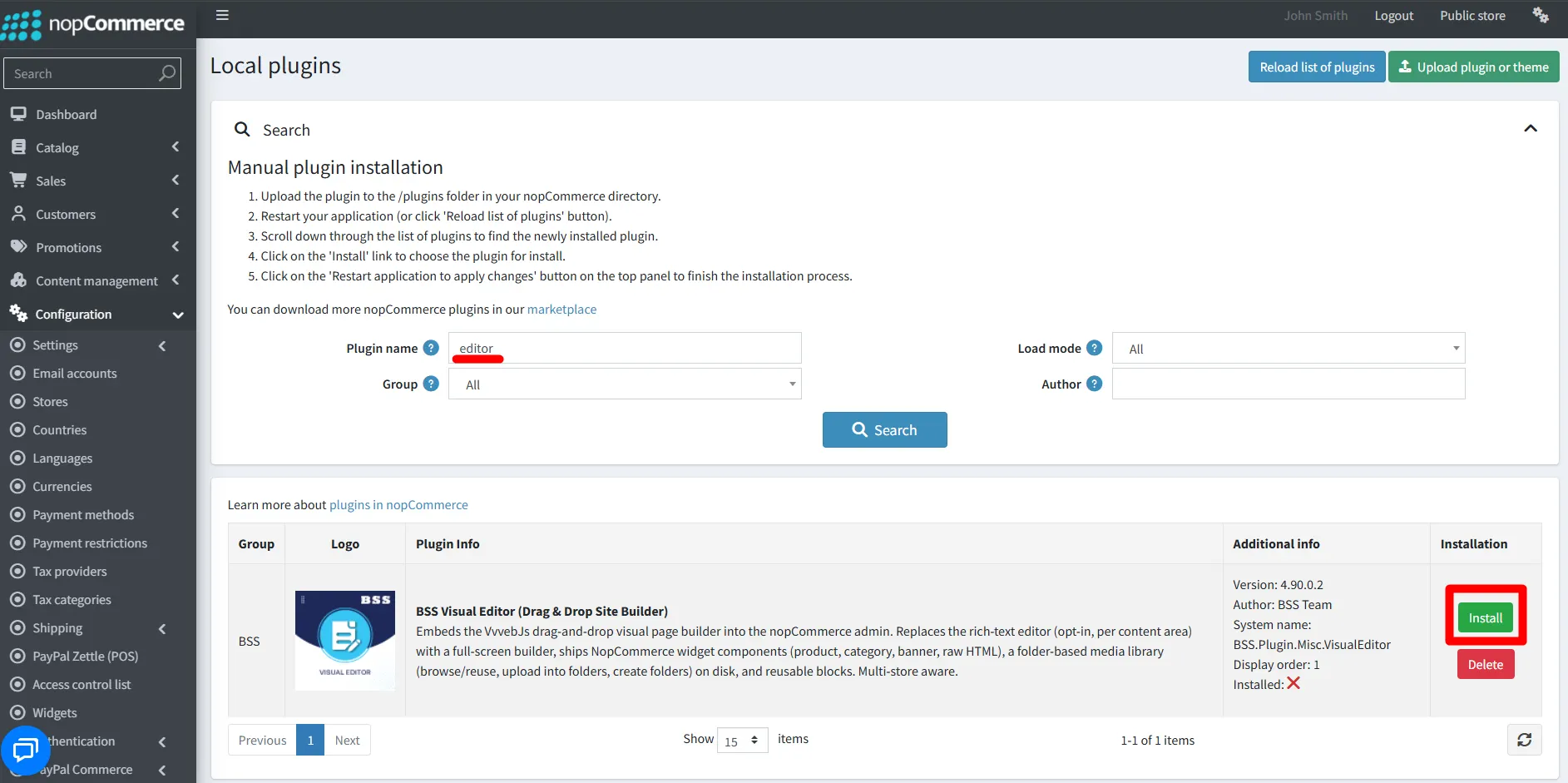
- After uploading, reload the ‘list of plugins’ and install the ‘BSS Core’ Plugin first. Scroll down or use the search bar to find and install ‘Visual Editor’.
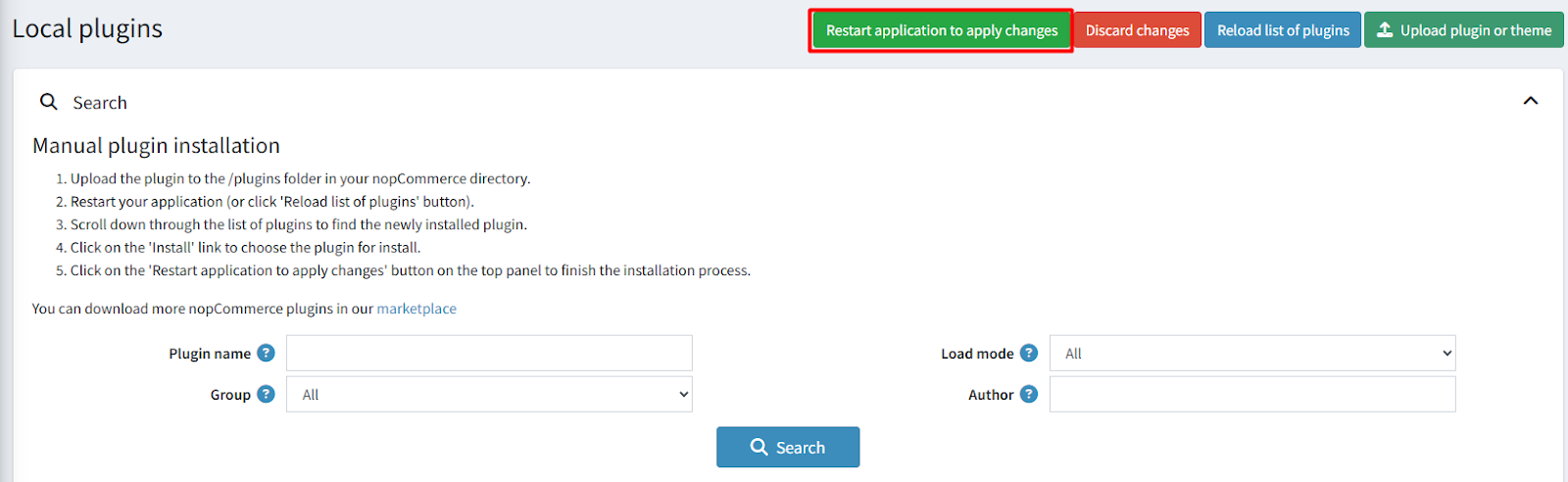
- To activate the plugins, restart the application.
Recommendation: Go to > App Settings. If you find JavaScript bundling and minification, CSS bundling and minification are checked, then uncheck these two options and disable them.
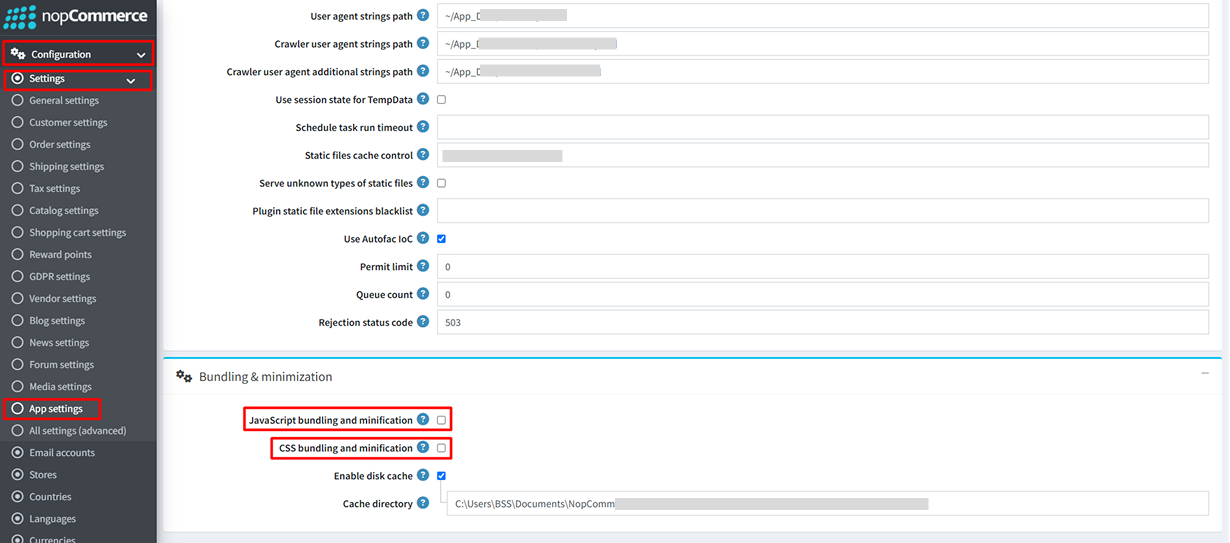
CONFIGURATION
- Go to Admin → BSS → Plugins → Visual Editor→ Configuration. Enter your License string and save. Then clear cache.

- Return to Configuration to set your Visual Editor credentials
General Setting
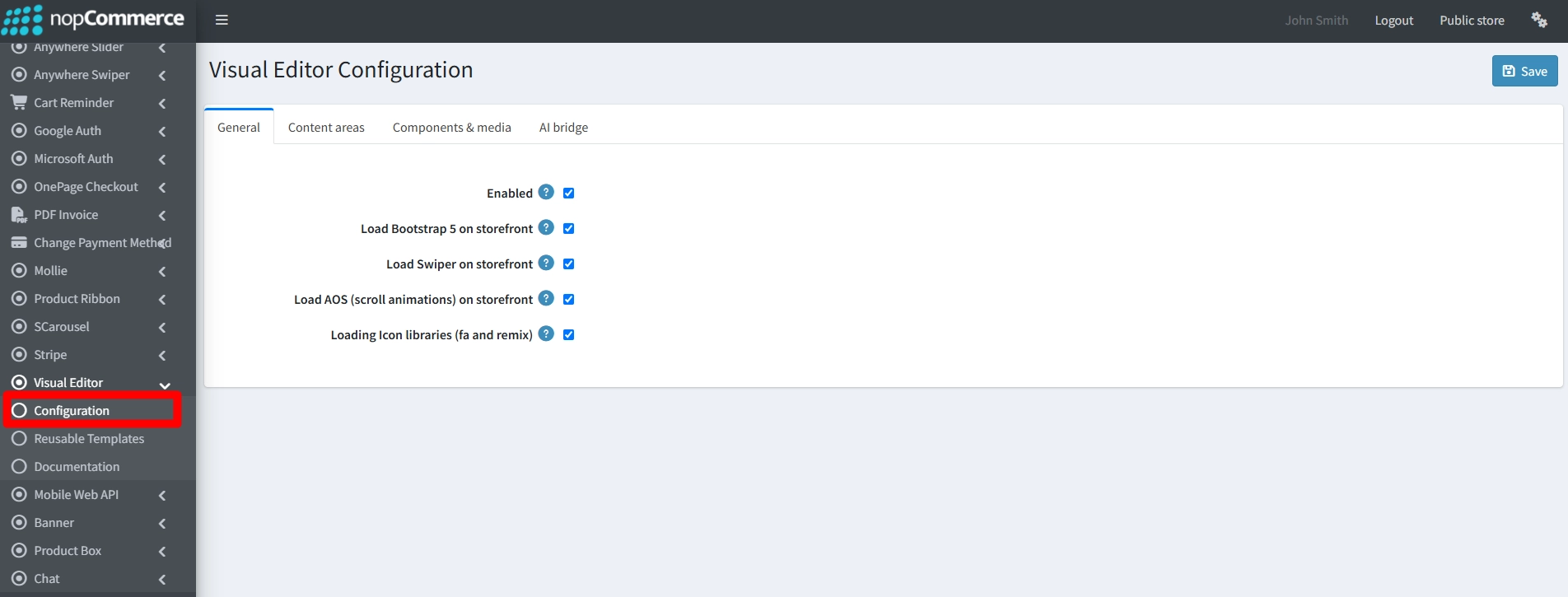
- Enabled: Enable to switch on visual editor and disable to use native rich text editor.
- Load Bootstrap 5 on storefront: Enable this to load the Bootstrap 5 stylesheet and JavaScript if your theme doesn't already include it. Turn it off if your theme already provides Bootstrap to avoid styling conflicts.
- Load Swiper on storefront: Enable this to load the Swiper library so your image sliders and carousels work properly. Turn it off if you do not use sliders or if your theme already loads Swiper.
- Load AOS (scroll animations) on storefront: Enable this to trigger visual effects (like fading or sliding) as visitors scroll down your page. Turn it off if your content doesn't use scroll animations to improve page load speed.
- Loading Icon libraries (fa and remix): Enable this to load webfonts so your design icons, arrows, and symbols display correctly instead of showing up blank. Turn it off if your theme already provides these icon libraries.
Content Areas
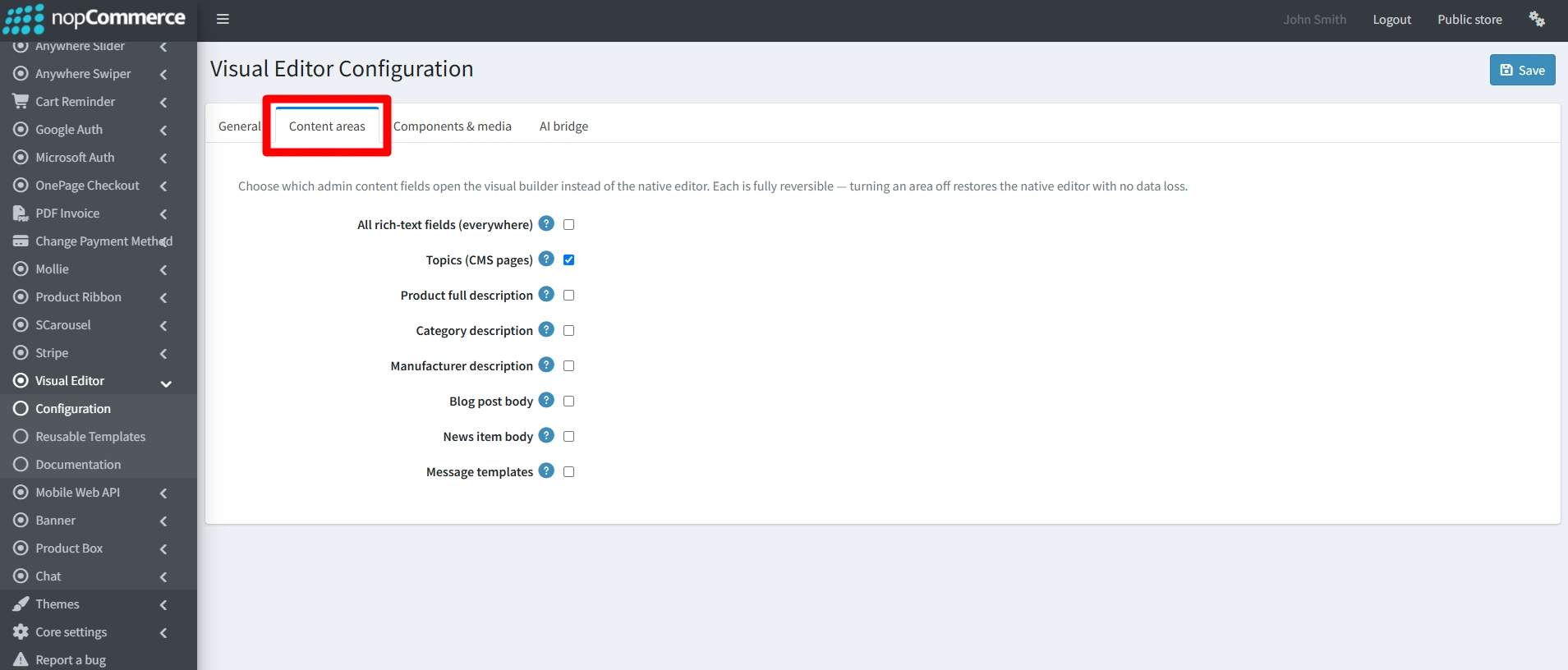
- All rich-text fields (everywhere): When this option is active this will replace the standard text editor with the visual builder across every text area in your admin panel, including other plugins. Turn it off if you want to choose specific content areas individually with no risk of data loss.
- Topics (CMS pages): Enable this to design your system and custom CMS pages using the visual builder. Turn it off to write and edit your topic pages using the default text editor.
- Product full description: Check box to build highly styled layouts for your main product description fields. Turn it off to revert back to the standard text editor without losing any of your existing content.
- Category description: Active this option to use the visual builder when designing descriptions for your store's category pages. Turn it off to manage category descriptions using the default text editor.
- Manufacturer description: Enable this option to design eye-catching layouts and text for your brand or manufacturer detail pages. Turn it off to write manufacturer descriptions using the standard text editor.
- Blog post body: Enable to use builder for blog post bodies and related design.
- News item body: Enable to use visual builder for news item bodies.
- Message templates: Enable this to design your email and notification templates using the visual builder. Turn it off to use the standard editor, noting that dynamic placeholders (tokens) have limited support in this version.
Components & Media
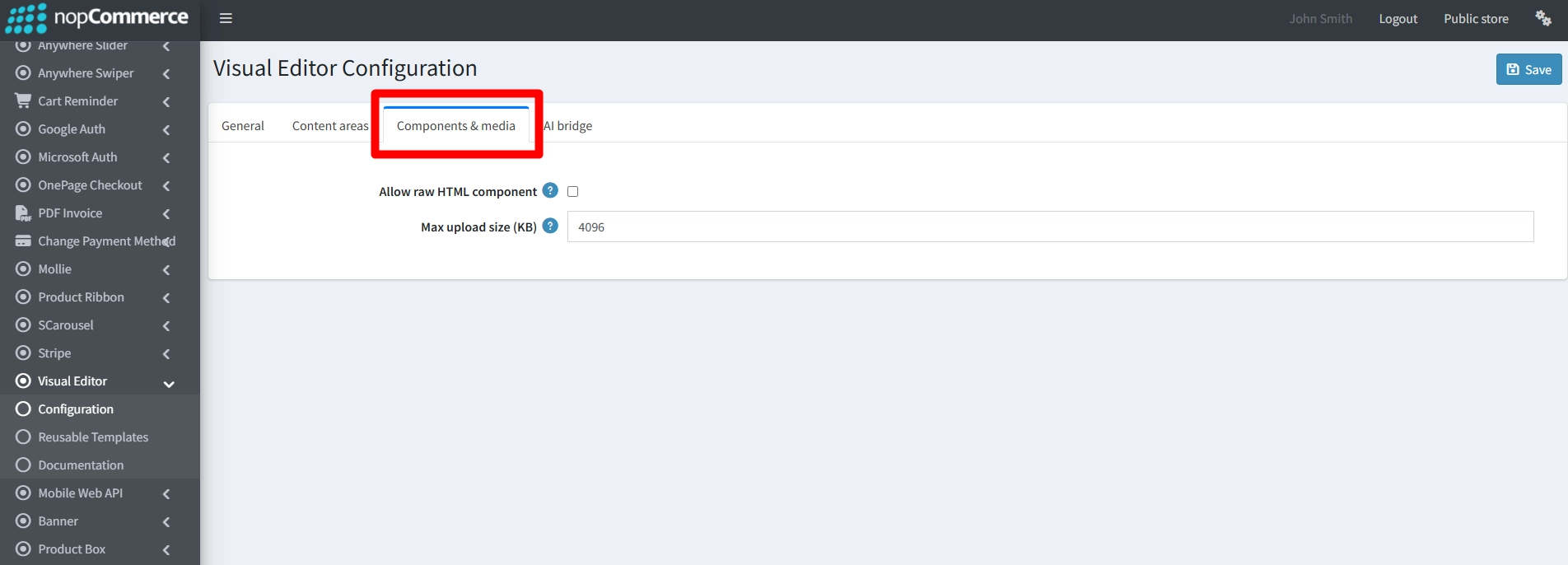
- Allow raw HTML component: When enables users can add custom HTML or code blocks directly inside the visual builder. Turn it off to hide this option, which can also be restricted using specific user permissions.
- Max upload size (KB): Set this to limit the maximum file size (in kilobytes) for any image uploaded directly through the visual builder. This helps prevent large image files from slowing down your website's load times.
AI Bridge
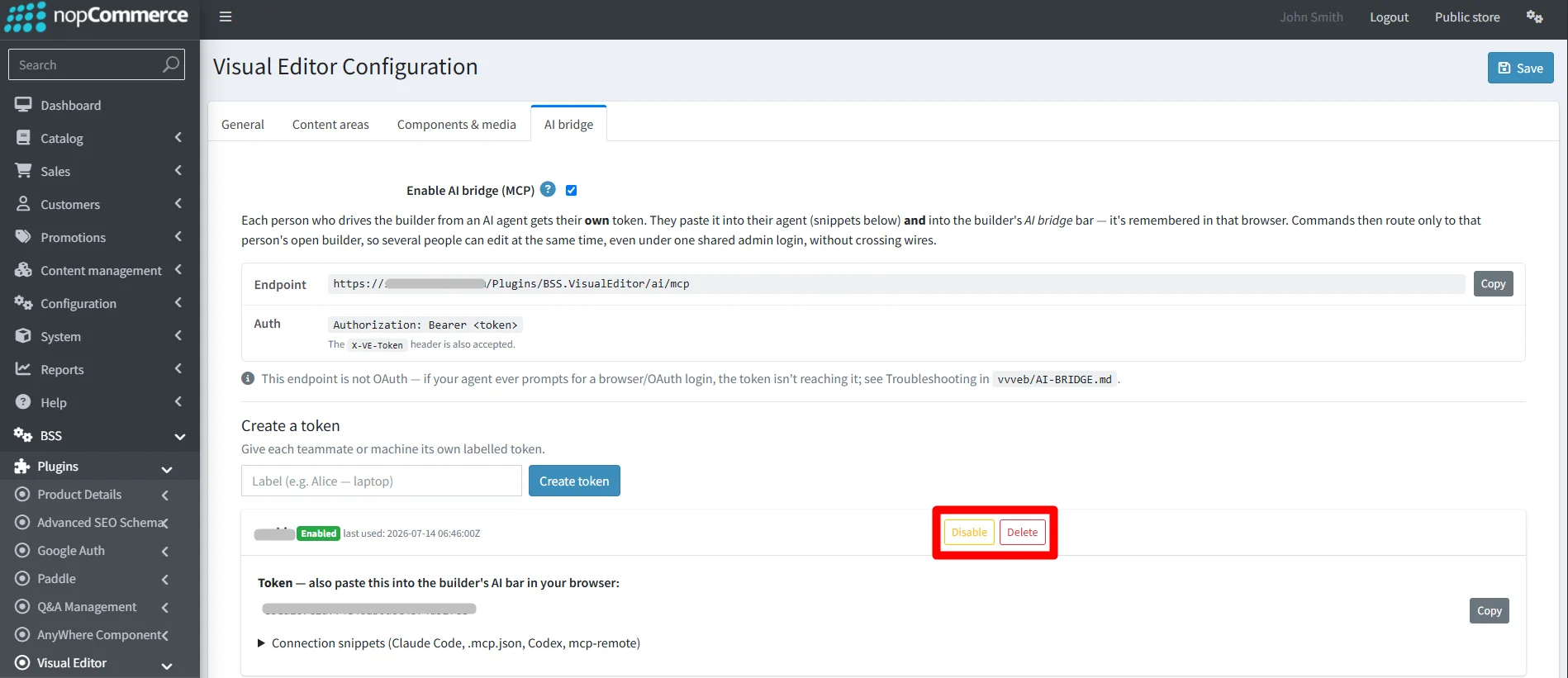
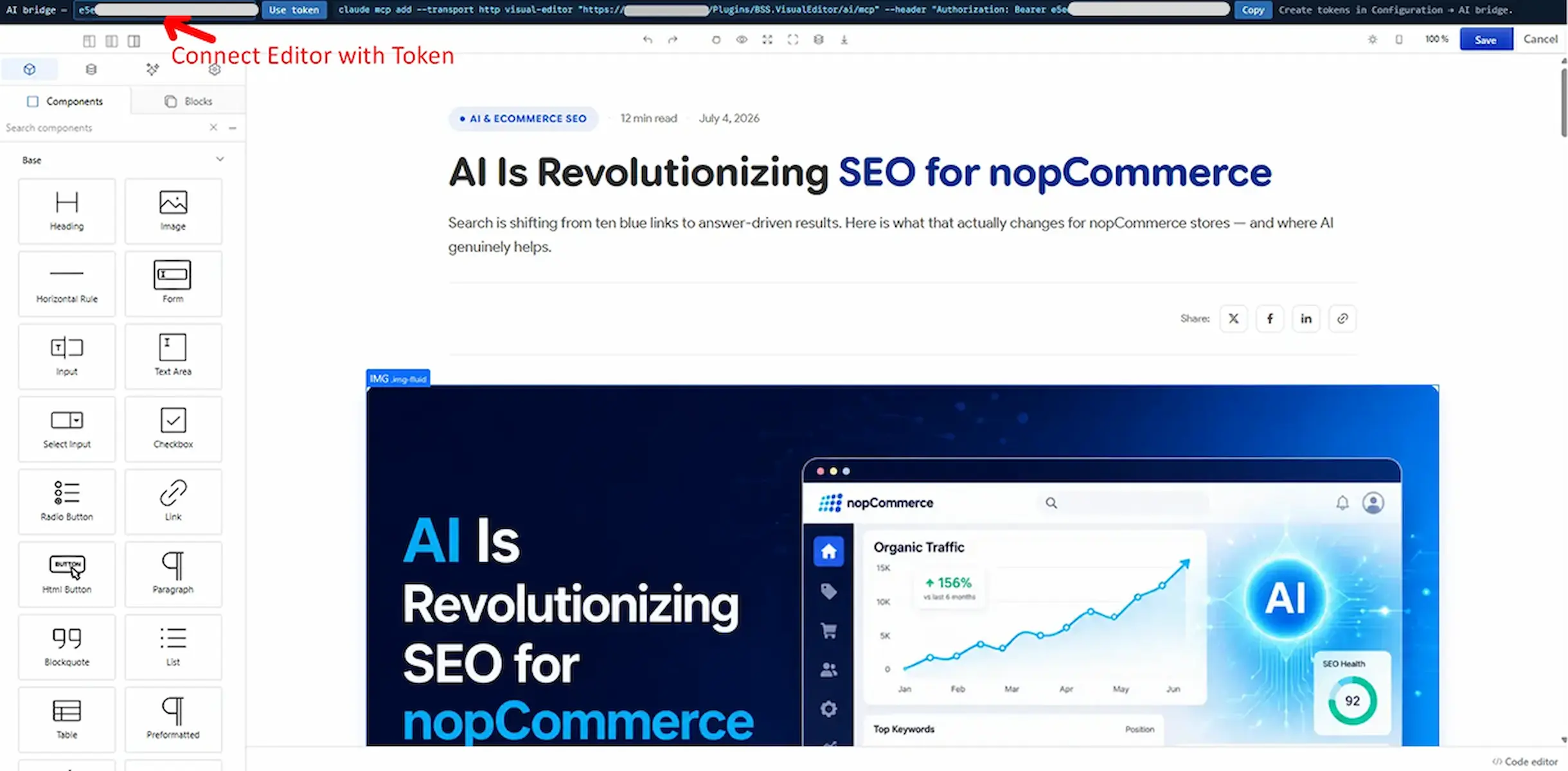
- Enable this to connect the visual builder with external AI agents, allowing you or your teammates to edit and generate page content using AI. Turn it off to disable external AI connections and restrict builder controls solely to manual editing.
How to Connect & Work with AI Agents
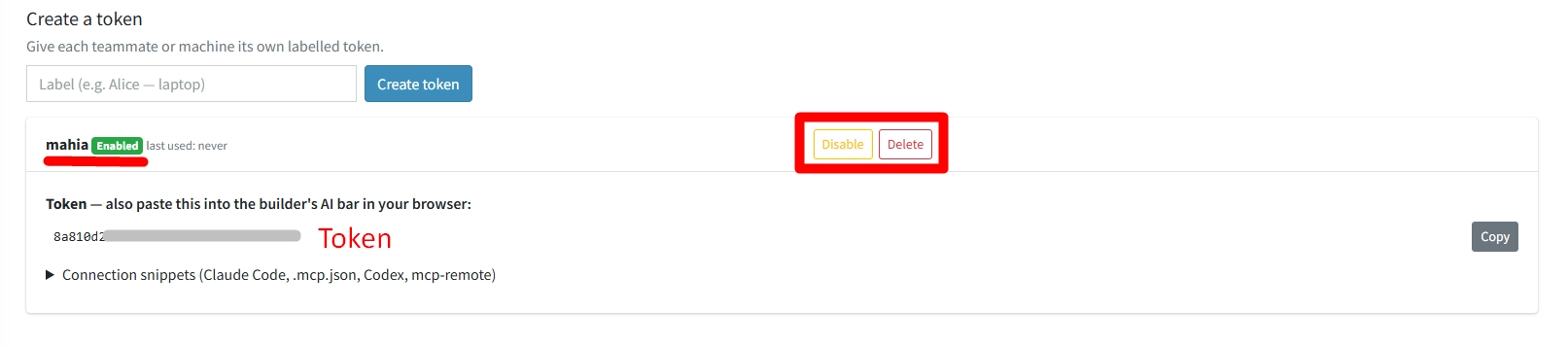
- How to Connect: Copy the Endpoint URL and create a unique Token on this page, then paste them into your AI agent and the builder’s AI bridge bar. Also you can disable or delete the token and generate new one again.
- Collaborate Safely: Multiple teammates can edit at the same time as long as everyone uses their own unique token.
- Avoid Conflicts: Always use one token per browser window. Connecting the same token to multiple open windows will cause commands to cross wires and create conflicts.
Reusable templates
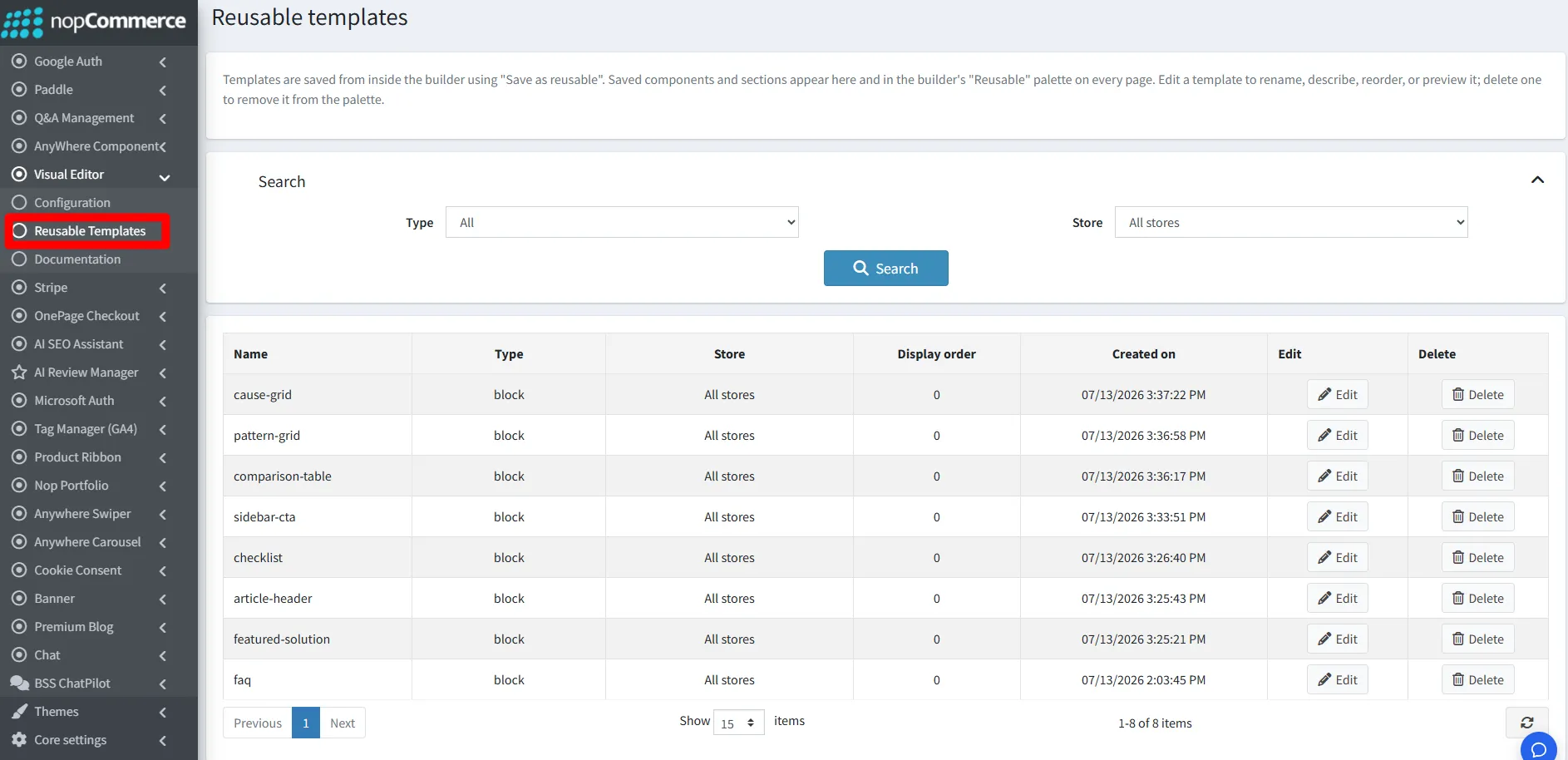
- This area lets you manage custom layout blocks and sections you have saved inside the builder using the "Save as reusable" option. Create and customize any design section or layout using the visual editor, then save it to instantly reuse on any page of your store. From this area, you can easily rename, reorder, preview, or delete your saved templates to keep your design palette organized.
PUBLIC VIEW
FEATURES
- Intuitive Drag-and-Drop Editor: Design pages and frontend responsive components visually without writing a single line of code.
- Global Text Area Overrides: Seamlessly swap the default rich-text engine for the visual builder system-wide or isolate individual admin regions.
- Integrated UI Animation Tools: Natively deploy AOS (Animate On Scroll) motion parameters to activate scrolling fade, slide, and scale visual adjustments.
- Smart Frontend Framework Asset Controls: Dynamically toggle global Bootstrap 5 frameworks, Swiper JS slider modules, and popular asset systems to align perfectly with your active theme.
- Modern Vector Typography Support: Built-in loader triggers for FontAwesome and Remix Icon webfonts to protect your design grids from blank symbols or broken arrows.
- Advanced E-Commerce Canvas Deployment: Construct beautifully styled layout areas specifically mapping to Product Full Descriptions, Category Overrides, and Manufacturer Details.
- Robust CMS & Communication Design: Create beautiful layouts for system Topic Pages, News Item Bodies, Blog Posts, and styled transactional Message Templates.
- Advanced Developer HTML Blocks: Enable specialized raw HTML structural sandbox controls inside the visual layout to securely accept custom scripts or embeds.
- Media Upload Performance Boundaries: Set strict maximum file constraints (in KB) directly inside the media loader panel to safeguard pages from large image friction.
- External AI Bridge Automation: Connect the editor grid straight to external AI automation agents using an Endpoint URL and secure Token to generate text and layouts automatically.
- Collision-Free Collaborative Tokens: Assign unique cryptographic access tokens per workspace to protect multi-user administrative page building from cross-wire command errors.
- Reusable Layout Blocks Library: Instantly save highly styled custom blocks or component sequences as reusable global design tokens, manageable via renaming, ordering, and staging configurations.
Documentation Menu
NopFashion Theme + 15 Plugin Bundle for NopCommerce
NopBeauty Theme + 12 Plugin Bundle for NopCommerce
NopNoor Theme + 16 Plugin Bundle for NopCommerce
NopGadget Theme + 18 Plugin Bundle for NopCommerce
NopEthnic Theme + 17 Plugin Bundle for NopCommerce
NopFurniture Theme + 19 Plugin Bundle for NopCommerce
NopPharma Theme + 16 Plugin Bundle for NopCommerce
NopVogue Theme + 17 Plugin Bundle for NopCommerce
NopGadence Theme + 18 Plugin Bundle for NopCommerce


